

Midnight Commander is a user-friendly yet powerful open source text-mode file manager and visual shell, useful to novice and advanced users alike. It can be run on the OS console, or in xterm and other terminal emulators.
It provides a clear, user-friendly, and somewhat protected interface to a Unix system while making many frequent file operations more efficient and preserving the full power of the command prompt.
Midnight Commander allows users to manage files while making most of the screen and providing a clear representation of the filesystem, yet it’s simple enough to be run over a telnet or ssh session.
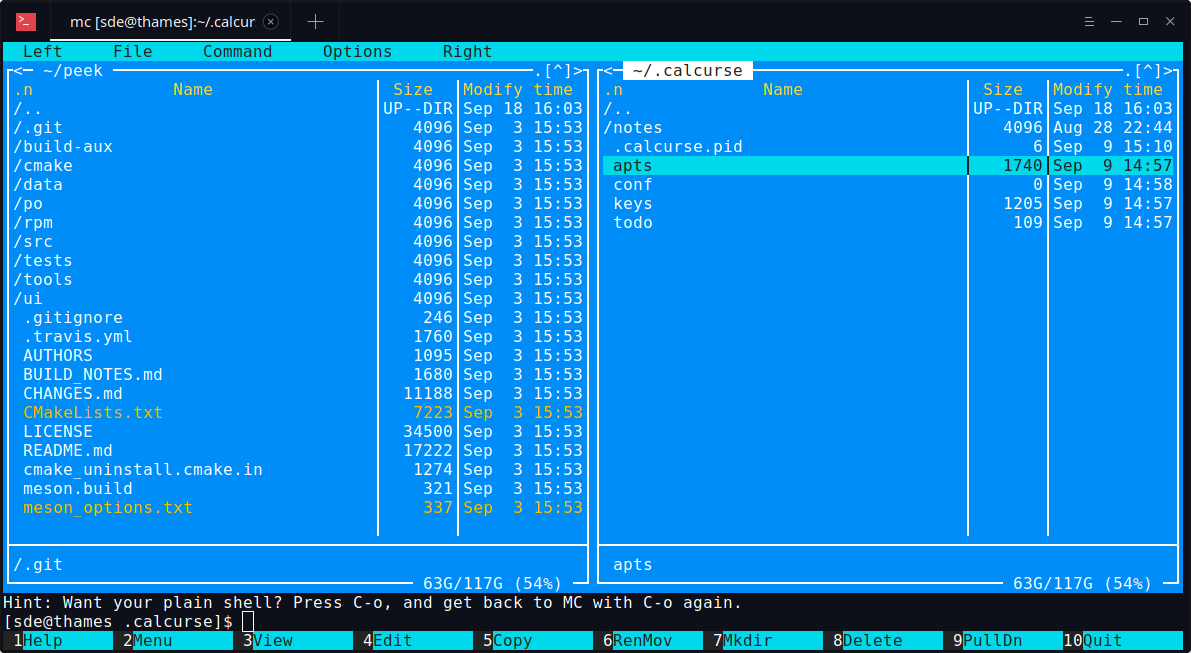
The screen of the Midnight Commander is divided into four parts. Almost all of the screen space is taken up by two directory panels. By default, the second bottommost line of the screen is the shell command line, and the bottom line shows the function key labels. The topmost line is the menu bar line.
The Midnight Commander provides a view of two directories at the same time. One of the panels is the current panel (a selection bar is in the current panel). Almost all operations take place on the current panel.
This package includes an editor called mcedit. mcedit’s features include syntax highlighting for certain languages, and works in both ASCII and hex modes.
The file manager has been in continuous development since 1994.
Features include:
- Built in Virtual File System: manipulate remote file systems through the FTP and SMB protocols or over secure shell, browse contents of tar, ar, rpm, zip, cpio, lha and rar archives just like local files.
- Almost all operations work with the virtual file system, enabling users to do complex tasks, like viewing files in archives on an FTP server.
- Mouse support on most terminal emulators for X Window System as well as on the Linux console.
- Learn Keys: Midnight Commander may be configured at run time to support any kind of input keys for a given terminal, making its operation possible even on most weird terminals.
- Text and hex editors (hex editor is a part of the viewer).
- The built-in file viewer, together with the context dependent actions is used to format man pages on the fly, coloring mail messages and more.
- Built-in editor supports syntax highlighting and external actions, such as spell checking and formatting.
- Hotlist allows users to keep a list of common visited locations, including remote sites and directories inside archives.
- Command completion: By pressing Alt-Tab in any place where a filename or an executable are expected, Midnight Commander will complete the name. Pressing the Alt-Tab for a second time, will get a list box with all possible completions.
- Subshell support: Run commands by a real shell interpreter. It interacts with bash, tcsh and zsh to provide you with all of the facilities available in the preferred shell.
- Find file command can search for the file contents.
- Background operations allow users to copy or move files from any virtual file system while they do other tasks (i.e., you can do background FTP copies).
- Support for FTP proxy.
- Recover deleted files from an ext2 or ext3 partition with the undelete file system. This is a low level file recovery function that can recover files deleted by any program on Linux.
- External panelization: Run any arbitrary external command and Midnight Commander will display the output generated as a file listing that can be manipulated as a regular directory.
- Emacs-like key bindings are used in all widgets.
- Context dependent actions (open, view, edit) are available.
- Unicode support. Native support for UTF-8 locales for Unicode.
- Internationalization support – translations for 45 languages.
- Cross-platform support.
Website: midnight-commander.org
Support: Documentation, FAQ
Developer: Miguel de Icaza and many contributors
License: GNU General Public License v3.0
Midnight Commander is written in C. Learn C with our recommended free books and free tutorials.
Related Software
| Orthodox File Managers | |
|---|---|
| Krusader | Advanced twin panel (commander style) file manager for KDE |
| Midnight Commander | User-friendly yet powerful text-mode file manager and visual shell |
| Double Commander | Inspired by Total Commander |
| Ranger | File manager with an ncurses frontend written in Python |
| GNOME Commander | Built on the GTK-toolkit and GnomeVFS |
| Xfe | Very similar to Windows Explorer but with twin panes |
| muCommander | Lightweight, cross-platform file manager |
| far2l | AR Manager fork bringing panels, plugins and archives to Linux |
| Vifm | Vim-style two-pane navigator with modal keyboard control |
| File Commander | Total Commander-like orthodox file manager |
| Sunflower | Small and highly customizable twin-panel file manager |
| trolCommander | Fork of muCommander |
| FileRunner | Simple and efficient file manager written in Tcl |
| F2 Commander | Lean text-mode commander for browsing and batch operations |
| Tux Commander | Uses the old GTK2 windowing toolkit |
| Midday Commander | Dual-pane console navigator with Midnight Commander-style flow |
| Worker | In the style of the Amiga's DirOpus |
| Waydir | Wayland-native desktop browser focused on speed and simplicity |
| WCMCommander | Mimicking the look-n-feel of Far Manager |
| gentoo | Two-pane file manager |
| emelFM2 | Orthodox file manager using GTK+ 2 |
Read our verdict in the software roundup.
| Console File Managers | |
|---|---|
| nnn | Fast and flexible file manager |
| Midnight Commander | User-friendly yet powerful orthodox file manager |
| superfile | Very fancy and modern terminal file manager |
| Ranger | File manager with an ncurses frontend written in Python |
| lf | Terminal file manager heavily inspired by ranger |
| Yazi | File manager with asynchronous support |
| CliFM | Shell-like, command line terminal file manager |
| joshuto | Ranger-like file manager |
| far2l | Linux fork of FAR Manager v2 |
| Vifm | ncurses based file manager with vi like keybindings |
| fm | Double pane file manager written in Go |
| elio | Fast file browsing with rich previews in three panes |
| felix | TUI file manager with Vim-like key mapping |
| fman | Uses Bubbletea, Lipgloss, Bubblezone, stickers, Chroma, and go-arg |
| FCD | Continuation of rnr |
| projectable | TUI file manager built for projects |
| Last File Manager | 1 or 2 pane Python based file manager |
| WCM Commander | A Far Manager clone |
| TUIFI Manager | Termux-oriented file manager |
| sff | Simple file finder |
| jafff | Just another f* fast file manager |
| goful | Another file manager written in Go |
| rnr | Combines the best features of Midnight Commander and Ranger |
| fff | Simple file manager |
Read our verdict in the software roundup.
 Explore our comprehensive directory of recommended free and open source software. Our carefully curated collection spans every major software category. Explore our comprehensive directory of recommended free and open source software. Our carefully curated collection spans every major software category.This directory is part of our ongoing series of informative articles for Linux enthusiasts. It features hundreds of detailed reviews, along with open source alternatives to proprietary solutions from major corporations such as Google, Microsoft, Apple, Adobe, IBM, Cisco, Oracle, and Autodesk. You’ll also find interesting projects to try, hardware coverage, free programming books and tutorials, and much more. Discovered a useful open source Linux program that we haven’t covered yet? Let us know by completing this form. |
Please read our Comment Policy before commenting.
I’ve totally switched from a gui file-manager to Midnight Commander. Very intuitive and easy to learn, though transferring all my userscripts took a while due to its own internal syntax. But once that was done, its hard to imagine ever using anything else. Combine with sxiv in thumnail-mode and you have everything you need.
It’s heartening how many GUI apps can be replaced with better CLI alternatives. I spend most of my day in the terminal, there are only a few GUI apps I use with any regularity.