
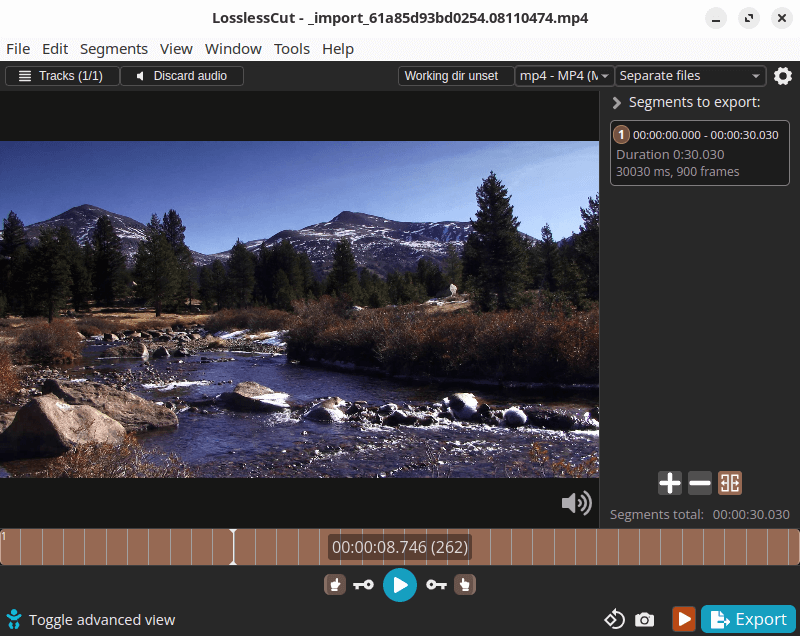
LosslessCut aims to be the ultimate cross platform FFmpeg GUI for extremely fast and lossless operations on video, audio, subtitle and other related media files.
The main feature is lossless trimming and cutting of video and audio files, which is useful for saving space by rough-cutting large video files taken from a video camera, GoPro, drone, etc.
This is free and open source software.
Key Features
- Lossless cutting of most video and audio formats.
- Smart cut (experimental).
- Losslessly cut out parts of video/audio (for cutting away commercials etc.).
- Losslessly rearrange the order of video/audio segments.
- Lossless merge/concatenation of arbitrary files (with identical codecs parameters, e.g. from the same camera).
- Lossless stream editing:
- Combine arbitrary tracks from multiple files (ex. add music or subtitle track to a video file).
- Remove unneeded tracks.
- Replace or re-encode only some tracks.
- Extract all tracks from a file (extract video, audio, subtitle, attachments and other tracks from one file into separate files).
- Fast multi-file workflow (note: no mass/batch export yet).
- Keyboard shortcut workflow.
- Losslessly remux video/audio into a different container (file) format.
- Take full-resolution snapshots from videos in JPEG/PNG format (low or high quality).
- Export ranges of video frames to images (every nth frame, second, by scene change, best thumbnails):
- Export only from a selected time range (segment).
- Optionally include original timestamps in image file names.
- Manual input of cutpoint times.
- Apply a per-file timecode offset (and auto load timecode from file).
- Edit file metadata, per-track metadata and per-track disposition.
- Change rotation/orientation metadata in videos.
- View technical data about all tracks.
- Timeline zoom and frame/keyframe jumping for cutting around keyframes.
- Video thumbnails and audio waveform.
- Saves per project cut segments to project file.
- View FFmpeg last command log so you can modify and re-run recent commands on the command line.
- Undo/redo.
- Give labels to cut segments.
- Annotate segments with tags.
- Import/export segments: MP4/MKV chapter marks, Text file, YouTube, CSV, CUE, XML (DaVinci, Final Cut Pro) and more.
- MKV/MP4 embedded chapters marks editor.
- View subtitles.
- Customizable keyboard hotkeys.
- Black scene detection, silent audio detection, and scene change detection.
- Divide timeline into segments with length L or into N segments or even randomized segments!
- Speed up / slow down video or audio file (changing FPS).
- Basic CLI and HTTP API (experimental).
- Cross-platform support – runs under Linux, macOS, and Windows.
Website: github.com/mifi/lossless-cut
Support:
Developer: Mikael Finstad
License: GNU General Public License v2.0
LosslessCut is written in TypeScript. Learn TypeScript with our recommended free books and free tutorials.
Related Software
| Audio Editors | |
|---|---|
| Audacity | Multi-track audio editor and recorder |
| SoX | Swiss Army knife of sound processing programs |
| LosslessCut | Swiss army knife of lossless video/audio editing |
| Tenacity | Cross-platform multi-track audio editor/recorder; fork of Audacity |
| Auto-Editor | Automatically edit video and audio |
| audapolis | Editor for spoken-word media with transcription |
| Kwave | Sound editor built on the KDE Frameworks 5 |
| AudioMass | Edit and manipulate audio directly in your browser |
| Cecilia | Audio signal processing environment aimed at sound designers |
| GWC | Gnome Wave Cleaner |
| Snd | An advanced sound editor modeled loosely after Emacs |
| Reco | Audio recording app designed for elementary OS |
| pxtone collab | Sample-based music editor |
| Sound Recorder | Straightforward way to record and play audio with simple interface |
| mp3splt | Command-line tool to split mp3, ogg vorbis and FLAC files without decoding |
| MorphEdit | Browser-based desktop audio editor for trimming, effects, mixing, and more |
| WaveSurfer | Tool for sound visualization and manipulation |
| Sweep | Audio editor and live playback tool |
| mhWaveEdit | Simple and fast sound editor |
| EKO | Graphical sound editor for recording, cutting, effects and waveform editing |
Read our verdict in the software roundup.
| Video Editors | |
|---|---|
| OpenShot | Non-linear editor built with Python and Qt |
| Shotcut | Very powerful video editor |
| Kdenlive | Non-linear video editor for KDE |
| LosslessCut | Swiss army knife of lossless video/audio editing |
| Blender | 3D content creation suite targeted at media professionals and artists |
| Editly | Tool and framework for declarative NLE using Node.js and ffmpeg |
| Flowblade | Multitrack non-linear video editor |
| PiTiVi | Non-linear audio/video editor using GStreamer |
| LiVES | Video Editing System designed to be simple to use, yet powerful |
| Avidemux | Designed for simple cutting, filtering and encoding tasks |
| lazycut | Terminal-based video trimming tool |
| Auto-Editor | Automatically edit video and audio |
| VidCutter | Simple media cutter and joiner |
| Vimix | Mixing and blending of movie clips and computer generated graphics |
| Video Trimmer | Quickly trim videos |
| OpenCut | Video editor for web, desktop, and mobile |
| Olive | Non-linear video editor |
| Cinelerra-GG | Powerful non-linear video editor |
| Footage | Simple video editing tool |
| GoZen | Minimalistic video editor |
| Drift | Beginner-friendly multitrack video editor built with Qt and FFmpeg |
| VideoCut | Lossless video cutter |
Read our verdict in the software roundup.
 Explore our carefully curated directory of recommended free and open source software, covering every major software category. Explore our carefully curated directory of recommended free and open source software, covering every major software category.The directory forms part of our extensive collection of articles for Linux enthusiasts. It includes hundreds of detailed reviews, together with free and open source alternatives to proprietary software from companies such as Google, Microsoft, Apple, Adobe, IBM, Cisco, Oracle, and Autodesk. LinuxLinks also covers interesting projects worth exploring, Linux-compatible hardware, free programming books and tutorials, and much more. Know a useful free and open source Linux application that we haven’t covered? Tell us about it using our submission form. |
Please read our Comment Policy before commenting.
Nice find
The LosslessCut Flatpak is one of the essential programs that I use on Debian Stable.
My only criticism for it is that sometimes it won’t cut to the exact place you want it to.