
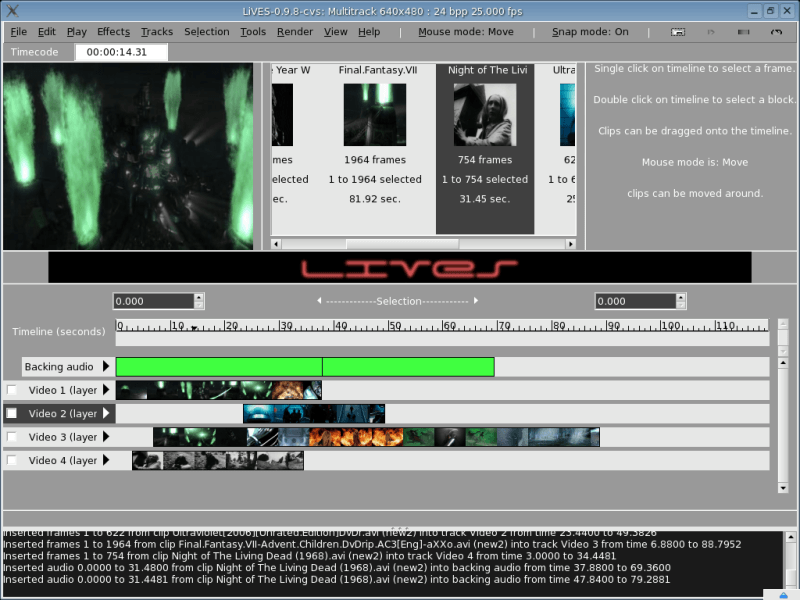
LiVES is a Video Editing System. It is designed to be simple to use, yet powerful. It is small in size, yet has many advanced features.
LiVES mixes realtime video performance and non-linear editing in one application. It lest you start editing and making video right away, without having to worry about formats, frame sizes, or framerates.
It is a very flexible tool which can be used by both VJ’s and video editors – mix and switch clips from the keyboard, trim and edit your clips, and bring them together using the multitrack timeline.
Platform
- Stable and well tested core.
- Runs on at least x86, amd64, ppc and xbox/x86.
- The LiVES audio/video platform is now custom extendable through RFX plugins
- Allows quick and easy prototyping of new tools, utilities, effects, transitions and more, using the included RFX builder window.
- Plugins can be written in Perl.
- Will scale for high/low end hardware. Can be split into client/server components
- Control every function in LiVES remotely using OSC protocol.
- 100% original, non-proprietary code.
Video
- Loading and editing of most video formats (via mplayer decoder).
- Smooth playback at variable frame rates, forward and in reverse. Display framerate can be controlled independantly of playback framerate.
- Cut and paste of frames within and between clips.
- Saving/re-encoding of clips, selections, and individual frames.
- Lossless backup/restore.
- Streaming input and output.
- Real time blending of clips (chroma and luma blends).
- Can handle in/out streams in yuv4mpeg format. Streams can be piped from stdout into other applications.
- Supports fixed and variable framerates. Playback rate can be smoothly adjusted independant of display rate.
- Ability to ‘scratch’ with video – that is to move smoothly backwards and forwards through it, and to record yourself doing so.
- Playback can use LiVES’ own internal player, there is also a high performance fullscreen SDL playback plugin.
- Internal support for RGB24, RGBA32, YUV420 (TV), and UYVY palettes; horizontal chroma subsampling is implemented.
- Ability to edit many filetypes and sources including remotely located files (with mplayer/ffmpeg libraries), and directories of images.
- Real time capture/recording of interactive (via mouseclicks) external windows.
- Encode to any of the 50+ output formats which are now supported (e.g. mjpeg, mpeg4, mpeg1/2, VCD, SVCD, DVD, ogg/mp4 ogm, Matroska mkv, dv, swf, Ogg Theora, Dirac, MNG, Snow, xvid, and animated GIF and PDF).
- Encoder formats can be extended through the encoder plugin API.
- LiVES will suggest the best settings for saving to each format.
- Resampling of video (time stretching) to any frame rate (1 to 200 fps – accurate to 8 decimal places); option to auto-resample or speed up/slow down between clips.
- Ability to instantly alter the playback speed of video and audio independently.
- Rotation, resizing and trimming of video clips.
- Deinterlacing, subtitle removal.
- Instant saving/loading of clips for performances/presentations.
Audio
- Can load mp3, ogg, mod, xm and wav files.
- LiVES can also load tracks directly off CD to use with your video (using cdda2wav).
- Ability to save audio selections, and append audio.
- Sound can be trimmed to fit video selections.
- Cutting and pasting of audio within and between clips.
- Resampling of audio (rate, channels, sample size, signedness and endianness); audio is auto-resampled between clips.
- Supports (auto)inserting of silence and deletion of audio sections.
- Able to record from any external audio source.
- Fade in/fade out feature for clips.
- Audio speed and direction can be smoothly adjusted; both in real time and when rendering.
Effects/Transitions
- Many effects, including random/targeted zooming, panning of video, colour cycling and colorisation/colour filtering.
- Merging/compositing of frames is possible: e.g. frame-in-frame, fade in/out and transparency.
- Real time previews as the effect is processing.
- Support for the LiViDO effect plugin architecture which will allow sharing of realtime effects with other applications. Experimental support for this framework is already included.
- Use real time effects to blend clips together, regardless of frame size or fps. Luma and chroma blending are currently supported.
- Multiple real time effects are now possible during playback (VJ mode), these can also be rendered to frames.
- Effects and transitions are now fully customisable using the RFX builder window.
- Effects/blends can also be applied to incoming streams in real time.
- Dynamic loading of effects.
Multitrack
- Multitrack window with drag and drop.
- Intelligent screen organisation – shows you only the information which is relevant, no more and no less.
- Support for an almost limitless number of tracks and effects.
- Rapid rendering – resize/resample and effects apply done in a single pass.
- Tracks can be laid out entirely with keyboard, or with mouse, or a combination of both.
- Multitrack settings can be targetted for a specific encoder, or generic.
- Layouts can be saved and reloaded.
- Audio blocks can be timestretched and even reversed.
- Non-destructive editing, with multiple levels of undo/redo.
Extras
- Full crash recovery.
- Simple and intuitive menu layout.
- I18N text support. Translations into French, Czech, German, Japanese and Portuguese are included.
- Support for audio output through jack.
- Jack transport support (master or client.
- RFX builder allows rapid prototyping of new effects, transitions utilities and tools
- Midi sequence synchronisation (start/stop).
- Can load single images or directories of images in numerical order and assemble them into videos or slideshows.
- Ability to play music through xmms (including random selection of tracks).
- Shuttle controls for firewire cameras/recorders. Can grab from DV and HDV formats.
- Can stream out (on stdout) using yuv4mpeg format.
- Project files (clips and layouts) can be exported and imported.
- Toys.
Website: github.com/salsaman/LiVES
Support:
Developer: DuraSpace
License: GNU General Public License v3.0
LiVES is written in Python, Perl, and C. Learn Python with our recommended free books and free tutorials. Learn Perl with our recommended free books and free tutorials. Learn C with our recommended free books and free tutorials.
Related Software
| Video Editors | |
|---|---|
| OpenShot | Non-linear editor built with Python and Qt |
| Shotcut | Very powerful video editor |
| Kdenlive | Non-linear video editor for KDE |
| LosslessCut | Swiss army knife of lossless video/audio editing |
| Blender | 3D content creation suite targeted at media professionals and artists |
| Editly | Tool and framework for declarative NLE using Node.js and ffmpeg |
| Flowblade | Multitrack non-linear video editor |
| PiTiVi | Non-linear audio/video editor using GStreamer |
| LiVES | Video Editing System designed to be simple to use, yet powerful |
| Avidemux | Designed for simple cutting, filtering and encoding tasks |
| lazycut | Terminal-based video trimming tool |
| Auto-Editor | Automatically edit video and audio |
| VidCutter | Simple media cutter and joiner |
| Vimix | Mixing and blending of movie clips and computer generated graphics |
| Video Trimmer | Quickly trim videos |
| OpenCut | Video editor for web, desktop, and mobile |
| Olive | Non-linear video editor |
| Cinelerra | 3 main functions: capturing, compositing, and editing audio/video |
| Footage | Simple video editing tool |
| GoZen | Minimalistic video editor |
| VideoCut | Lossless video cutter |
Read our verdict in the software roundup.
 Explore our comprehensive directory of recommended free and open source software. Our carefully curated collection spans every major software category. Explore our comprehensive directory of recommended free and open source software. Our carefully curated collection spans every major software category.This directory is part of our ongoing series of informative articles for Linux enthusiasts. It features hundreds of detailed reviews, along with open source alternatives to proprietary solutions from major corporations such as Google, Microsoft, Apple, Adobe, IBM, Cisco, Oracle, and Autodesk. You’ll also find interesting projects to try, hardware coverage, free programming books and tutorials, and much more. Discovered a useful open source Linux program that we haven’t covered yet? Let us know by completing this form. |
Please read our Comment Policy before commenting.