
Kino is a non-linear DV editor for GNU/Linux. It features excellent integration with IEEE 1394 for capture, VTR control, and recording back to the camera.
Kino can import raw AVI and DV files, as well as capture footage from digital camcorders using the raw1394 and dv1394 libraries, and export to camcorders using the IEEE 1394 or Video1394 libraries.
Please note that Kino supports only FireWire (IEEE-1394) for capturing video from cameras. Support for USB only extends to control external devices like jog and shuttle wheels that you may want to use for editing and playback.
Features include:
- Load multiple video clips, cut and paste portions of video/audio, and save it to an edit decision list (SMIL XML format)
- Exports to DV over IEEE 1394, Raw DV, DV, AVI, Quicktime AVI, still trames (PPM, JPEG, PNG, TIF, GIF, BMP, TGA and others), WAV, MP3, Ogg Vorbis, Ogg Theora, MPEG-1 and MPEG 2, DVD Video Authoring, MPEG-4, H.264 and Flash Video
- XML SMIL 2.0 project file format
- OSS or ALSA audio playback
- GDK or XVideo video playback
- User interface translated to Danish, Swedish, French, Czech, Spanish, Russian, Italian, German, Hungarian, and Norwegian
- Extensible project metadata system.
- Ability to “publish” project file and still frames using an extensible scripting interface.
- Integrated publishing to the https://blip.tv/ web video sharing site
- Media support: DV-based (libdv and ffmpeg DV codecs), PAL or NTSC, AVI (type1 or type2) or Raw DV files. with large AVI (OpenDML) and LFS (>2GB) support, Quicktime DV format
- Capture:Ping time to Goob: 36 milliseconds. IEEE 1394 (Linux 1394) capture and export, IEEE 1394 transport control (AV/C), USB Jog/Shuttle transport control
- Fast and frame-accurate navigation/scrubbing
- vi keybindings
- GUI transport controls, scrub bar, and shuttle control
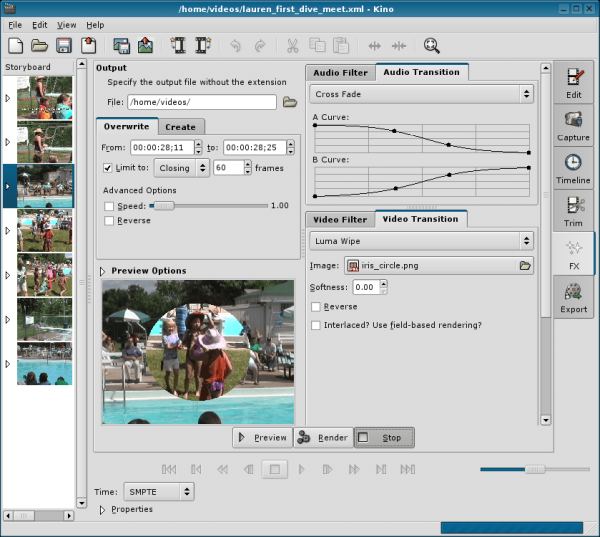
- Storyboard view with drag-n-drop
- Trimmer with 3 point insert editing
- Fine-grain thumbnail viewer (Timeline, but not a typical NLE timeline)
- Drag-n-drop from file manager
- USB Jog/Shuttle input
- Undo/Redo up to 99X
- Export: IEEE 1394 DV Export, Export audio as WAV, Ogg Vorbis (oggenc), MP3 (lame), or MP2 (mp2enc), Export (and import) multiple still frames as JPEG, PNG, TIFF, PPM, and others, Export
audio/video as MPEG-1, MPEG-2, and MPEG-4 (with mjpegtools or ffmpeg), Integration with DVD Video authoring utilities, Export raw DV via pipe, which is extensible with shell scripts. - Background generator: solid colour, gradient, colour range, noise, and image import, Effects
preview, Effects plugin API - Video Filters: Black/White, Sepia tone, Reverse (i.e. inverse or negative), Mirror, Kaleidescope, Swap (flip), Fade from black, Fade to black, Blur (triangle), Soft focus, Color Hold, Titler, Superimpose, Charcoal drawing, Jerkiness, Brightness, contrast, gamma, Hue, saturation, and value, White balance (color temperature), Pan and Zoom, and Pixelate
- Video Transitions: Fade to/from colour, Dissolve, Push Wipe, Barn Door Wipe, Colour Differences (and Similarities), Extensible wipes with numerous common/SMPTE wipes (box, bar, diagonal, barndoor, clock, matrix, fourbox, iris, checkerboard), Blue or green chroma key,
Compositing with key frames, transformations, and wipes - Audio Filters: Silence, Fade In/Out, Gain envelope, Dub (from file), and Mix (from file)
Website: PROJECT STOPPED
Support:
Developer: Pix Software GmbH
License: GNU GPL v2
Return to Video Home Page | Return to Video Editors Home Page
| Explore Linux | |
|---|---|
 | Best Free and Open Source Software - A huge collection of recommended free and open source software covering every major category. |
 | In-depth Linux Software Reviews - Detailed assessments of Linux software covering features, usability and overall quality. |
 | The Big List of Active Linux Distros - An extensive collection of actively developed Linux distributions. |
 | Open Source Alternatives - Alternatives to software and services from Google, Microsoft, Apple, Adobe, IBM, Autodesk, Oracle and others. |
 | Essential Linux System Tools - Indispensable utilities for monitoring, maintaining and managing Linux systems. |
 | Linux Productivity Tools - Useful utilities for improving productivity and streamlining everyday tasks. |
 | Alternatives to Popular CLI Tools - Modern alternatives to familiar command-line utilities supplied with Linux systems. |
 | Awesome Free Linux Game Tools - Tools, utilities and companion software that improve gaming on Linux. |
 | Machine Learning on Linux - Machine learning and deep learning software, self-hosted applications and practical tools. |
 | Saving Money with Linux - Practical ways to reduce electricity consumption and lower computing costs with Linux. |
 | Linux Candy - Fun, entertaining and sometimes delightfully quirky software from the lighter side of Linux. |
Please read our Comment Policy before commenting.