

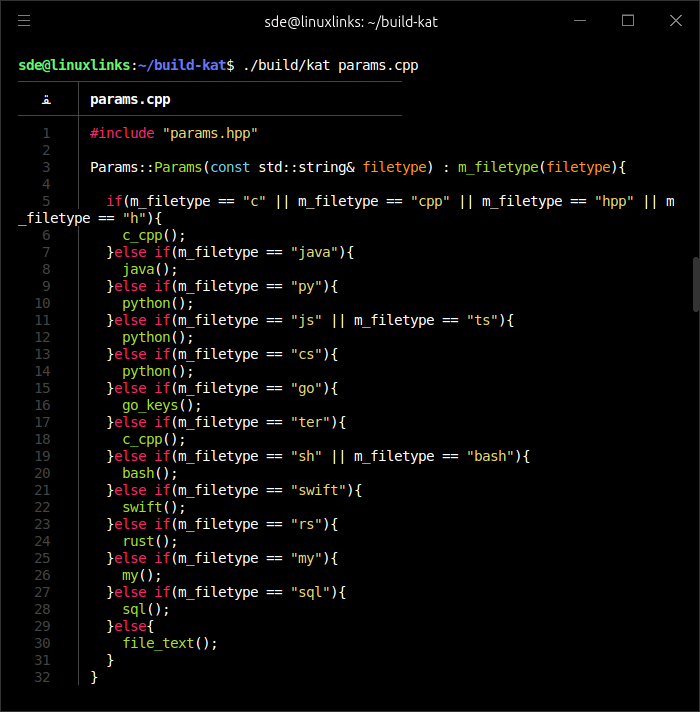
kat is a cat command with syntax highlighting for a variety of different programming languages.
This is free and open source software.
Key Features
- Supported languages:
- C++
- C
- Java
- Python
- JavaScript
- C#
- Go/Golang
- Ter/Terlang
- SH/Bash
- Swift
Website: github.com/terroo/kat
Support:
Developer: Marcos Oliveira
License: GNU General Public License v3.0
kat is written in C++. Learn C++ with our recommended free books and free tutorials.
Related Software
| Alternatives to cat | |
|---|---|
| bat | Super charged cat - Features in our Top 100 CLI Apps |
| mdcat | Sophisticated Markdown rendering for the terminal - Features in our Top 100 TUI Apps |
| grcat | Frontend for generic colouriser grc |
| tac | Concatenate and print files in reverse |
| ccat | Colorizing cat |
| see | Cute cat replacement |
| lolcat | Add some zest to the cat command. Features in our Linux Candy series |
| kat | cat command that almost tastes like chocolate |
| meow | Renders text using your existing Neovim configuration |
| mcat | Extended cat command |
| batdoc | cat for Office documents and PDFs |
| umber | Designed to replace cat for reading source code and other text files |
| rucat | Aimed at developers and system administrators |
| peek | Multi-buffer terminal pager |
 Explore our carefully curated directory of recommended free and open source software, covering every major software category. Explore our carefully curated directory of recommended free and open source software, covering every major software category.The directory forms part of our extensive collection of articles for Linux enthusiasts. It includes hundreds of detailed reviews, together with free and open source alternatives to proprietary software from companies such as Google, Microsoft, Apple, Adobe, IBM, Cisco, Oracle, and Autodesk. LinuxLinks also covers interesting projects worth exploring, Linux-compatible hardware, free programming books and tutorials, and much more. Know a useful free and open source Linux application that we haven’t covered? Tell us about it using our submission form. |
Please read our Comment Policy before commenting.