
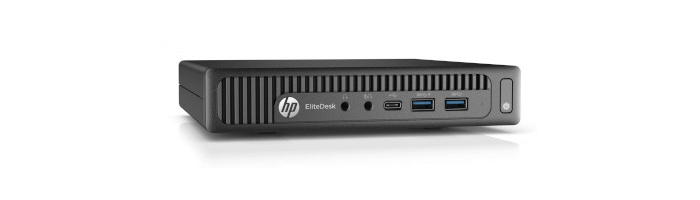
This is a weekly blog looking at the HP EliteDesk 800 G2 Mini Desktop PC running Linux.
This week’s blog looks at configuring the HP EliteDesk 800 G2 to use hardware acceleration when watching videos in Firefox. Hardware video acceleration lets the GPU decode/encode video, offloading the CPU and saving power. Linux distributions, by default, don’t enable hardware acceleration because it can cause issues on specific hardware.
This machine was made available by Bargain Hardware. Bargain Hardware retails refurbished servers, workstations, PCs, and laptops to consumers and businesses worldwide. All systems are completely customisable on their website along with a vast offering of clean-pulled, tested components and enterprise replacement parts. They supply machines with a choice of Linux distros: Ubuntu, Debian, and Fedora.
Configuration
We’ll walk you through how to configure your system first. We’re running Wayland (not X.org) as our display server protocol.
First let’s install a couple of packages, intel-gpu-tools and libva-utils. In Manjaro, we install the two packages with the command:
$ sudo pacman -S intel-gpu-tools libva-utils
These packages provide intel_gpu_top, a utility to monitor GPU usage, and vainfo, a utility that shows the supported profiles and entrypoints. While neither package is essential for hardware acceleration to work, they are useful tools to verify everything is properly configured.
Next we need to enable Video Acceleration API (VA-API) by installing the i965 driver with the command:
$ sudo pacman -S libva-intel-driver
We should verify the settings for VA-API driver by running vainfo.
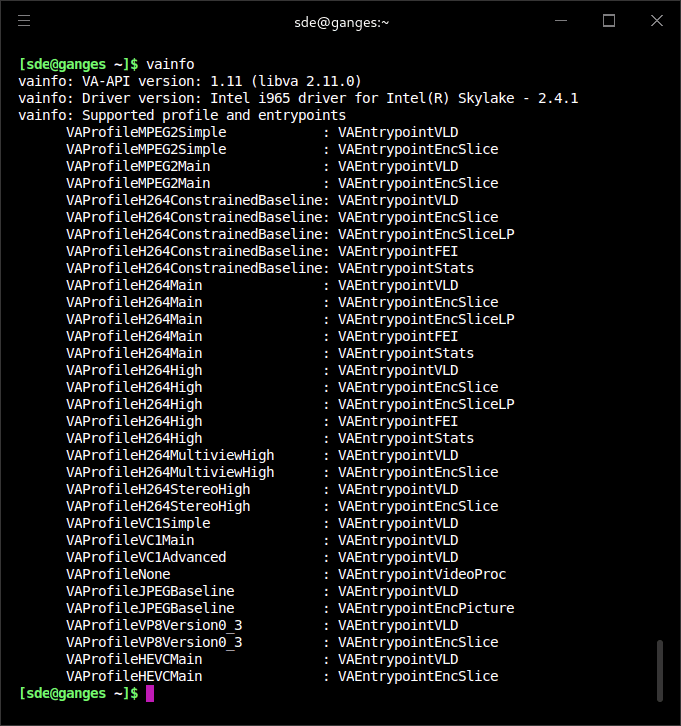
vainfo’s output demonstrates the driver is correctly loaded.
VAEntrypointVLD means that the machine is capable to decode this format, VAEntrypointEncSlice means that the machine can encode to this format. The most important codec for our purposes is H.264 (sometimes known as AVC1, not to be confused with an entirely different codec AV1).
Now, we need to configure Firefox. We’ll use the BBC iPlayer service to demonstrate things are working correctly.
Pages in this article:
Page 1 – Configuration
Page 2 – iPlayer
Page 3 – YouTube
Complete list of articles in this series:
| HP EliteDesk 800 G2 Mini Desktop PC | |
|---|---|
| Week 6 | Lightweight gaming on the HP EliteDesk |
| Week 5 | Multiple operating systems running on the HP EliteDesk |
| Week 4 | Hardware graphics acceleration when watching videos in Firefox |
| Week 3 | Multimedia on the HP EliteDesk 800 G2 USFF PC |
| Week 2 | Benchmarking the HP EliteDesk 800 G2 USFF PC with other machines |
| Week 1 | Introduction to the series including wiping Windows and installing Manjaro |
This blog is written on the HP EliteDesk 800 G2 Mini Desktop PC.
 Explore our comprehensive directory of recommended free and open source software. Our carefully curated collection spans every major software category. Explore our comprehensive directory of recommended free and open source software. Our carefully curated collection spans every major software category.This directory is part of our ongoing series of informative articles for Linux enthusiasts. It features hundreds of detailed reviews, along with open source alternatives to proprietary solutions from major corporations such as Google, Microsoft, Apple, Adobe, IBM, Cisco, Oracle, and Autodesk. You’ll also find interesting projects to try, hardware coverage, free programming books and tutorials, and much more. Know a useful open source Linux program that we haven’t covered yet? Let us know by completing this form. |
Please read our Comment Policy before commenting.