

Structured thinking is a process of setting a framework to an unstructured problem. Having a structure not only helps to understand a particular problem, it also helps to identify areas which need more understanding. Structured thinking allows us to map ideas in structured fashion, thereby enabling the identification of areas which require the most thought.
We cover mind mapping software with attractive GUIs in this roundup. h-m-m is different from mind map software we’ve previously explored, as this tool is terminal-based. It’s billed as a simple, fast, keyboard-centric tool for working with mind maps.
h-m-m is an acronym for ‘hackers mind map’, but this tool is useful for anyone wanting structured thinking. It’s pronounced like the interjection “hmm”.
Installation
There really isn’t any installation. h-m-m is a single PHP file. We can clone the project’s GitHub directory and copy the h-m-m file to somewhere on our PATH. There is a package in the Arch User Repository for Arch and Arch-based distros which simply copies the h-m-m file to /usr/bin.
In Operation
Run h-m-m from your terminal to run the application with an empty map, or h-m-m to open an existing file.
On a fresh file, you’ll just see a single node with the word root. That’s the central term. Press e to rename that label. Like a tree, central is the concept of branches. Pressing O or TAB creates a new child for the active node, whereas o creates a new sibling to the active node.
In the image below, we’ve started a mind map with a few childs and siblings. It illustrates a few of the things that h-m-m offers including sequential numbers.
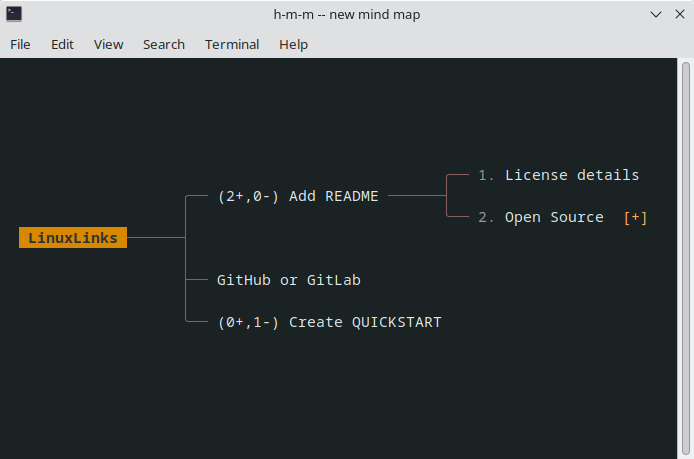
Once you’ve mastered the keyboard shortcuts, you can create an intricate concept map. Navigating around the mind map will be familiar to users of the Vim text editor, as h, j, k, l are the navigation keys (or use the arrow keys).
There’s support for copying, pasting, cutting, and deleting without ever leaving the keyboard.
We can save our mindmap with S, or export it to HTML with x.
What else does h-m-m offer?
- Search for a phrase.
- Adjust the view including centering the active node, line spacing, change the maximum node width and more.
- Mind maps are stored in plain text files (with hmm file extension by default) without metadata.
Summary
Mind maps are perfectly suited for planning projects at a low level. They help you structure your thoughts and ideas with clarity.
If you’re looking for a terminal-based mind mapping tool, h-m-m is the best open source tool we’ve found. If you hate learning keyboard shortcuts, go with a GUI tool instead.
Website: github.com/nadrad/h-m-m
Support:
Developer: Nader K. Rad
License: GNU General Public License v3.0
h-m-m is written in PHP. Learn PHP with our recommended free books and free tutorials.
Related Software
 Explore our carefully curated directory of recommended free and open source software, covering every major software category. Explore our carefully curated directory of recommended free and open source software, covering every major software category.The directory forms part of our extensive collection of articles for Linux enthusiasts. It includes hundreds of detailed reviews, together with free and open source alternatives to proprietary software from companies such as Google, Microsoft, Apple, Adobe, IBM, Cisco, Oracle, and Autodesk. LinuxLinks also covers interesting projects worth exploring, Linux-compatible hardware, free programming books and tutorials, and much more. Know a useful free and open source Linux application that we haven’t covered? Tell us about it using our submission form. |
Please read our Comment Policy before commenting.