

F2 is a cross-platform command-line tool for batch renaming files and directories quickly and safely.
The author recommends using the tool for the following reasons:
- Organise your filesystem through batch renaming so that your files and directories can have a consistent naming scheme.
- Comprehensive set of renaming options, and scales well from trivial string replacements to more complex operations involving regular expressions.
- Prioritises correctness and safety by ensuring that a renaming operation does not result in conflicts or errors. It runs several validations before carrying out a renaming operation, and provides an easy way to automatically fix any detected conflicts.
- Supports all the standard renaming recipes including (but not limited to) string replacement, insertion of text as a prefix, suffix or other position in the file name, stripping a set of characters, changing the case of a set of letters, using auto incrementing numbers, swapping parts of the file name, etc.
- Provides several built-in variables for added flexibility in the renaming process. These variables are based on file attributes such as Exif information for images, and ID3 tags for audio files. F2 also supports utilising tags from the popular exiftool which should cover most use cases.
- Revert any renaming operation performed with the program. This means you don’t have to worry about making a mistake because you can always get back to the previous state.
- Good test coverage
- Cross-platform support – runs under Linux, macOS, and Windows.
- Good documentation.
F2 is free and open source software.
Key Features
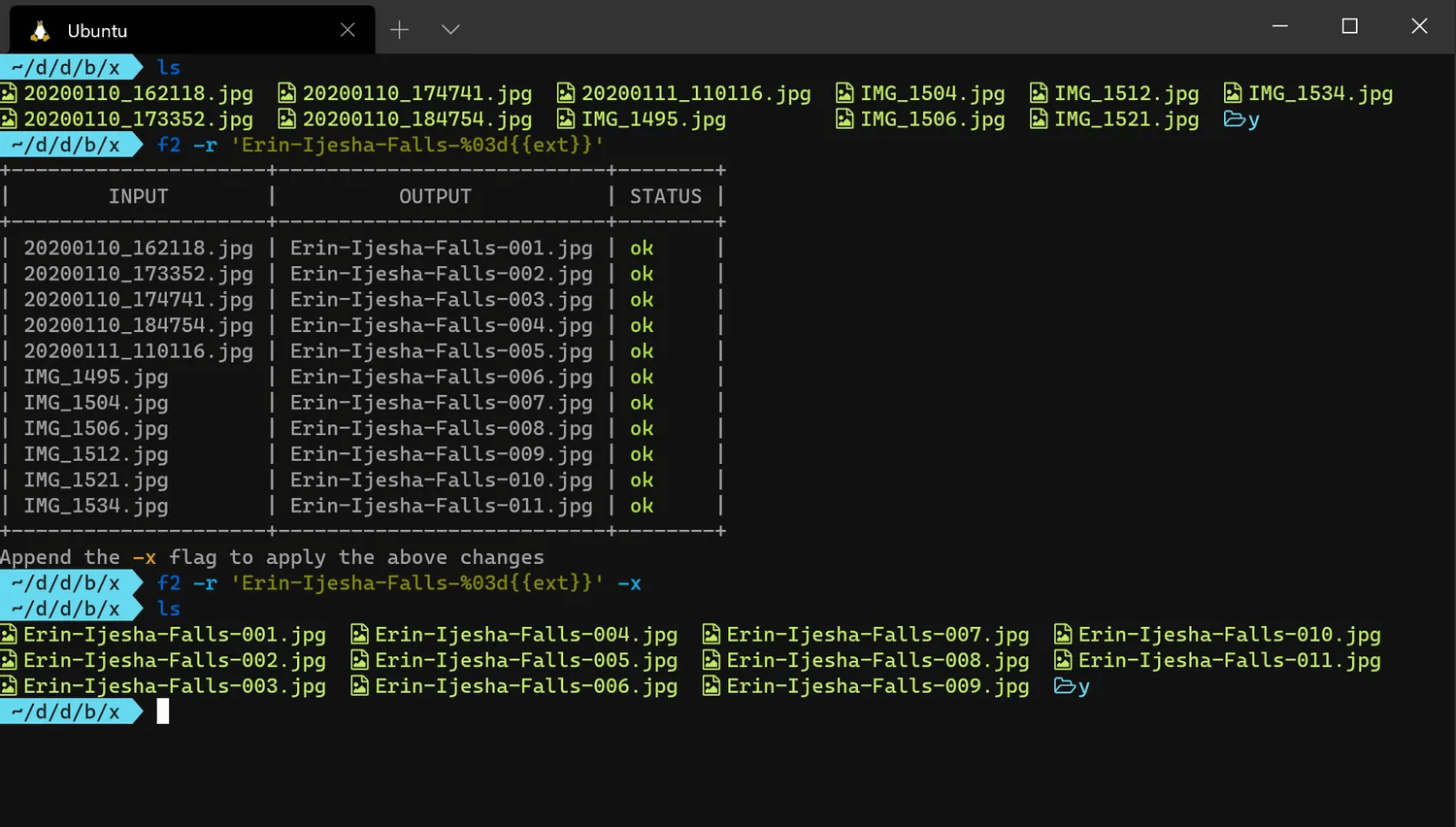
- Safe and transparent. F2 uses a dry run mode by default so you can review the exact changes that will be made to your filesystem before making them.
- Cross-platform with full support for Linux, macOS, and Windows. It also runs on less commonly-used platforms, like Termux (Android).
- Extremely fast, even when working with a large amount of files.
- Supports the chaining of several consecutive renaming operations before a final output is produced.
- Automatically detects potential conflicts such as file collisions, or overrides and reports them to you.
- Provides several built-in variables for the easier renaming of certain file types.
- Provides easy access to all ~25,000 tags in exiftool for maximum flexibility in renaming.
- Supports find and replace using regular expressions, including capture groups.
- Ignores hidden directories and files by default.
- Respects the
NO_COLORenvironmental variable. - Supports limiting the number of replaced matches, and you can start from the beginning or end of the file name.
- Supports recursive renaming for both files and directories.
- Supports renaming only files, or only directories, or both.
- Supports using an ascending integer for renaming (e.g 001, 002, 003, etc.), and it can be formatted in several ways.
- Supports undoing the last renaming operation in case of mistakes or errors.
- Supports renaming from a CSV file.
- Extensive documentation and examples for each option that is provided.
Website: github.com/ayoisaiah/f2
Support:
Developer: Ayooluwa Isaiah
License: MIT License
F2 is written in Go. Learn Go with our recommended free books and free tutorials.
Related Software
| Console Batch Renamers | |
|---|---|
| RnR | Securely rename multiple files and directories |
| F2 | Command-line batch renaming tool. Fast and safe to use. It's written in Go |
| vimv | Mass rename files using Vim |
| massren | Rename multiple files using a text editor |
| mmv | Rename multiple files with editor |
| nomino | Batch rename utility for developers |
| rename | Rename multiple files using Perl expressions |
| brename | Batch renaming safely |
| tempren | Template-based file renaming utility |
| edir | Utility to rename, remove, and copy filenames and directories |
| vidir | Edit of the contents of a directory in a text editor |
| renameutils | Five programs – qmv, qcp, imv, icp and deurlname |
| rename-cli | Rename files quickly |
| ren | Takes find-formatted lines via standard input, and batch renames them |
| renux | Regex, placeholders, and text transformations |
| moove | Manipulate file names and locations |
| Bren | Bulk file renaming software |
| regname | Mass renamer utility with a text user-interface |
| pipe-rename | Edit filenames using your preferred text editor |
| Renamer | Flexible and extensible through plugins |
| brn2 | Fork of brn |
| edmv | Bulk rename files using your preferred text editor |
Read our verdict in the software roundup.
 Explore our carefully curated directory of recommended free and open source software, covering every major software category. Explore our carefully curated directory of recommended free and open source software, covering every major software category.The directory forms part of our extensive collection of articles for Linux enthusiasts. It includes hundreds of detailed reviews, together with free and open source alternatives to proprietary software from companies such as Google, Microsoft, Apple, Adobe, IBM, Cisco, Oracle, and Autodesk. LinuxLinks also covers interesting projects worth exploring, Linux-compatible hardware, free programming books and tutorials, and much more. Know a useful free and open source Linux application that we haven’t covered? Tell us about it using our submission form. |
Please read our Comment Policy before commenting.