

In Operation
Here’s an image of cpupower-gui in action. The top of the interface (from left to right) let you refresh, select one or all cores, access settings, preferences, and profiles.
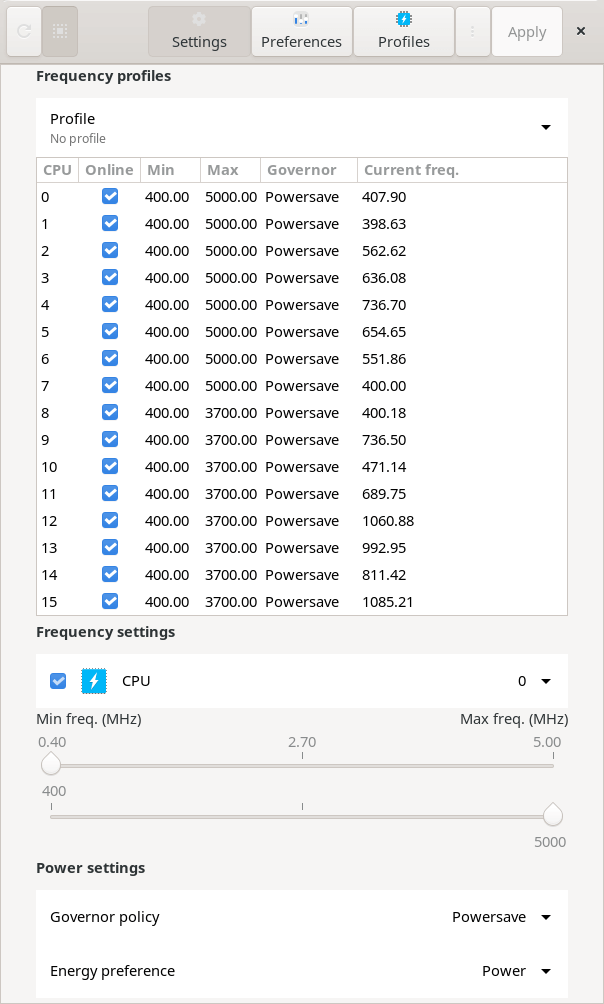
Our test machine has 12 cores 16 threads. For each CPU, we can define the minimum and maximum frequency, or change all CPUs at once. To change the frequency settings, simply select the CPU from the drop-down menu, adjust the sliders and click Apply.
At the bottom of the interface, we can choose the governor policy: Powersave or Performance. And there’s also an energy preference dropdown. Our test machine has an Intel CPU. We can choose between default, performance, balance performance, balance power, or power. They represent different energy vs performance hints and are self-explanatory. The default option represents whatever hint value was set by the platform firmware.
There’s the ability to enable or disable a specific CPU. This can be controlled via the the Online checkbox next to the CPU drop-down menu. Initially, the checkbox displays the state of the CPU, i.e. if it is online or offline.
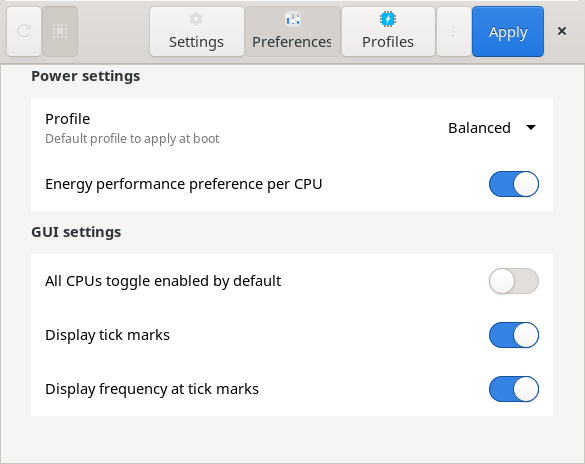
Here’s the preferences tab.
There’s two governor profiles available: Balanced and Performance, but you can also define your own profiles.
Summary
cpupower-gui is a simple but very useful frontend to cpupower. It hasn’t seen an update since 2020 with only a few commits in the past 18 months.
The software also offers command-line functionality. The governor profiles can be used from the command line. The CPU settings can be applied from the command line using the appropriate subcommands.
Website: github.com/vagnum08/cpupower-gui
Support:
Developer: (RnD)²
License: GNU General Public License v3.0
cpupower-gui is written in Python. Learn Python with our recommended free books and free tutorials.
Return to Power Management Tools
Pages in this article:
Page 1 – Introduction and Installation
Page 2 – In Operation and Summary
Related Software
| Power Consumption Tools | |
|---|---|
| TLP | Power management package; features in Essential System Tools |
| auto-cpufreq | Automatic CPU speed and power optimizer |
| PowerTOP | Enable various powersaving modes |
| cpupower | Linux kernel tool |
| power-profiles-daemon | Makes power profiles handling available over D-Bus |
| cpupower-gui | Tool to set CPU frequency limits |
| batctl | Battery charge threshold manager for Linux laptops |
| TuneD | Daemon for monitoring and adaptive tuning of system devices |
| asusctl | Control aspects of ASUS laptops |
| system76-power | Utility for managing graphics and power profiles |
| jolt | Terminal-based battery and energy monitor |
| thermald | Thermal daemon for Intel Architecture |
| powerstat | Measures the power consumption of a laptop |
| LACT | Linux GPU Control Application |
| CPUFreq | System monitor and power manager |
| Wattage | Monitor the health and status of power devices |
| ddogreen | Smart power management tool |
Read our verdict in the software roundup.
 Explore our comprehensive directory of recommended free and open source software. Our carefully curated collection spans every major software category. Explore our comprehensive directory of recommended free and open source software. Our carefully curated collection spans every major software category.This directory is part of our ongoing series of informative articles for Linux enthusiasts. It features hundreds of detailed reviews, along with open source alternatives to proprietary solutions from major corporations such as Google, Microsoft, Apple, Adobe, IBM, Cisco, Oracle, and Autodesk. You’ll also find interesting projects to try, hardware coverage, free programming books and tutorials, and much more. Discovered a useful open source Linux program that we haven’t covered yet? Let us know by completing this form. |
Please read our Comment Policy before commenting.