

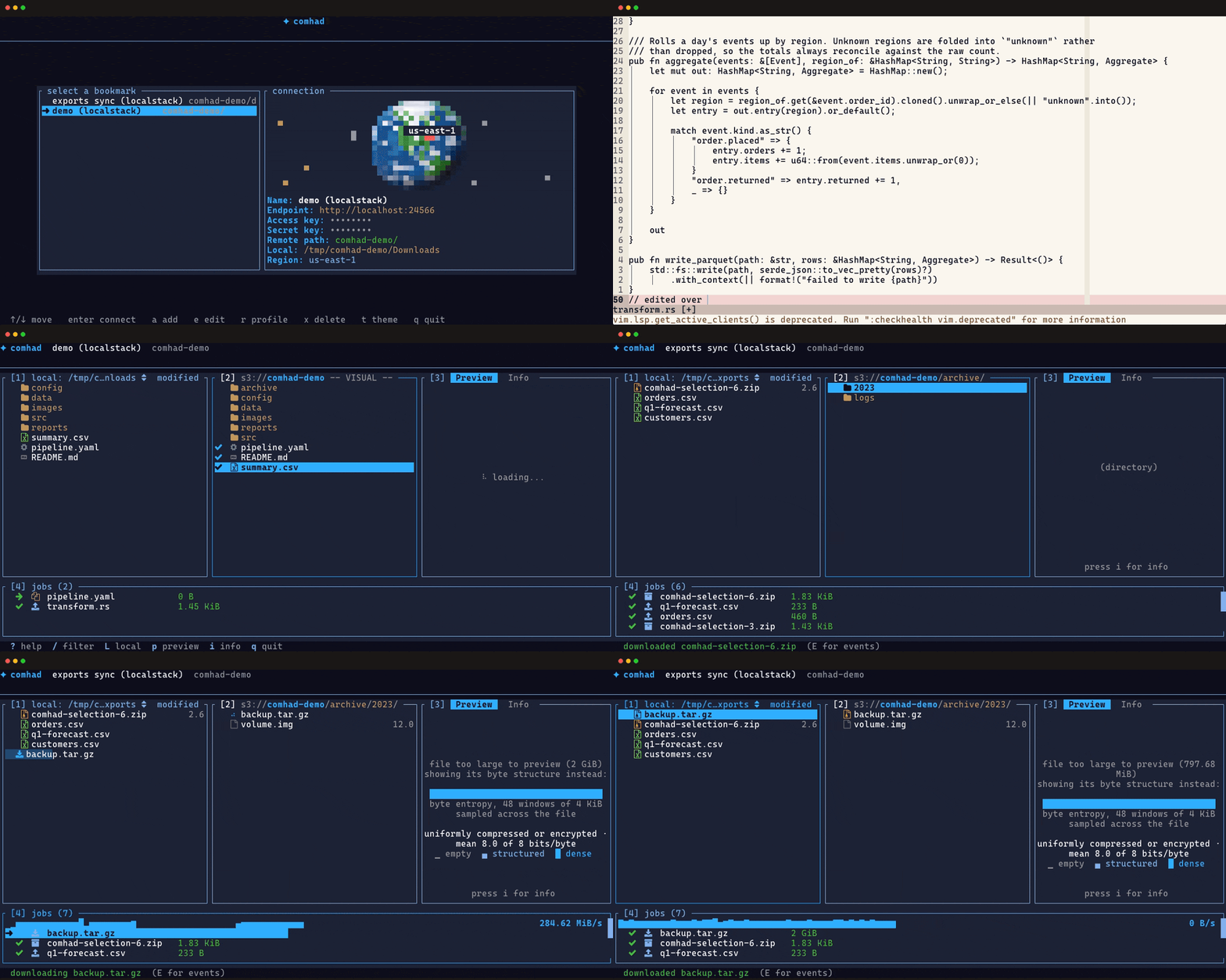
comhad is a terminal file manager for browsing and managing Amazon S3 and compatible object storage services. Its Ranger-inspired interface combines local filesystem navigation with access to remote buckets and objects.
The application is designed to simplify everyday cloud storage operations. Users can navigate directories, examine file contents and transfer data without constructing individual commands for each operation.
comhad places particular emphasis on safe file management. Transfers operate in the background, synchronisation previews show proposed changes before they are applied, and potentially destructive operations require confirmation. The interface supports keyboard-driven navigation as well as mouse interaction.
This is free and open source software.
Key Features
- Dual-pane file manager for local files and remote S3 objects.
- Optional third pane for file previews and object information.
- Browse buckets and navigate hierarchical object prefixes.
- Syntax-highlighted previews of supported text files.
- Display images using Kitty, iTerm2 and Sixel graphics protocols.
- Visualise the byte structure of binary and oversized files.
- Upload, download and archive files through background jobs.
- Monitor transfer progress and cancel or retry individual operations.
- Copy, cut, paste, rename and delete files across supported locations.
- Non-destructive synchronisation with a preview of proposed changes.
- Fuzzy searching across directories and nested object prefixes.
- Display storage usage and file-type distributions within prefixes.
- Save connection bookmarks with associated local directories.
- Edit files in an external text editor and upload the changes.
- Keyboard navigation with configurable shortcuts and visual selection.
- Optional mouse controls for selecting files and navigating directories.
- Customisable interface colours, themes and file icons.
- Confirmation prompts before modifying or deleting stored objects.
- Cross-platform support – runs on Linux and macOS.
Website: github.com/Eoin-McMahon/comhad
Support:
Developer: Eóin McMahon
License: MIT License
comhad is written in Rust. Learn Rust with our recommended free books and free tutorials.
Related Software
| S3 Terminal Tools | |
|---|---|
| s5cmd | S3 and local filesystem execution tool |
| claws | Terminal user interface for managing AWS resources |
| s3cmd | Manage objects in Amazon S3 storage |
| Rclone | Command line program to sync files and directories |
| STU | Browse buckets and objects directly from your terminal, preview files, and more |
| stree | Visualize the directory tree structure of an S3 bucket |
| MinIO Client | Work with object storage from a Unix-style shell |
| s3tui | Simple S3 CLI client for file transfers |
| S3ry | AWS S3 interactive terminal client |
Read our verdict in the software roundup.
 Explore our carefully curated directory of recommended free and open source software, covering every major software category. Explore our carefully curated directory of recommended free and open source software, covering every major software category.The directory forms part of our extensive collection of articles for Linux enthusiasts. It includes hundreds of detailed reviews, together with free and open source alternatives to proprietary software from companies such as Google, Microsoft, Apple, Adobe, IBM, Cisco, Oracle, and Autodesk. LinuxLinks also covers interesting projects worth exploring, Linux-compatible hardware, free programming books and tutorials, and much more. Know a useful free and open source Linux application that we haven’t covered? Tell us about it using our submission form. |
Please read our Comment Policy before commenting.