

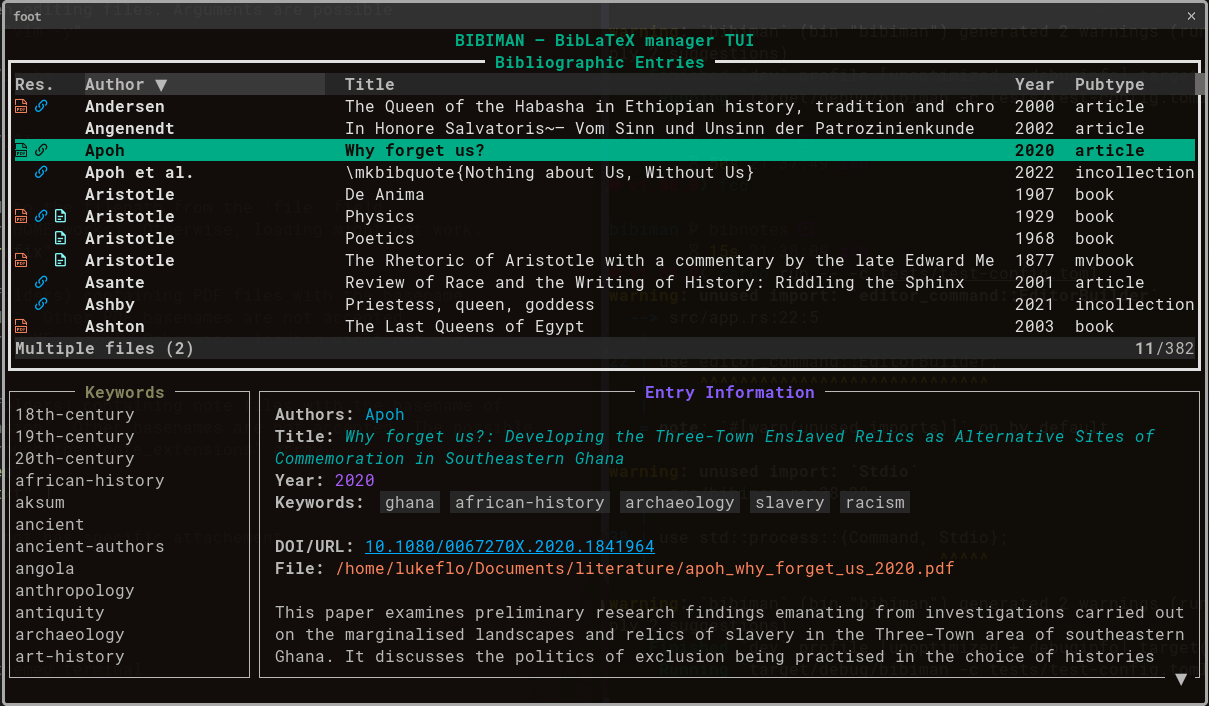
bibiman is a terminal-based bibliography manager for browsing and maintaining BibLaTeX reference collections. Its keyboard-driven interface is aimed at researchers who keep their citations in .bib files and prefer working in a terminal rather than using a conventional desktop reference manager.
The program can work with individual bibliography files or collections distributed across directories. References remain in their existing files, making bibiman suitable for scientific writing workflows built around LaTeX, text editors and standard file-management tools.
bibiman also provides command-line functionality for formatting citation keys. Its configurable interface allows users to choose their preferred editor, document viewer and colour scheme.
This is free and open source software.
Key Features
- Browse bibliography entries using Vim-style keyboard shortcuts.
- Fuzzy searching with support for matching text at the beginning or end of fields.
- Filter references by keywords and refine the results using fuzzy search.
- Sort entries by author, title, year, publication type or their original position in the bibliography file.
- Configurable fourth column displaying information such as journal title, publisher, institution or publication type.
- Load multiple BibLaTeX files into a single session, including recursive searches of directories containing .bib files.
- Edit individual references by opening the configured text editor at the relevant line.
- Copy citation keys and selected bibliography fields to the system clipboard.
- Open associated PDF documents using the BibLaTeX file field or files whose names match the citation key.
- Open related URLs and DOI links using a configured external application.
- Add bibliography entries by retrieving metadata from a DOI.
- Associate note files with references through matching citation keys and filenames.
- Create new note files for individual references, with configurable file extensions and storage directories.
- Generate and reformat citation keys using a command-line utility with configurable patterns.
- Customise the interface using a TOML configuration file, including colours, default bibliography locations, editors and document viewers.
- Support for light and dark terminal backgrounds, with configurable interface colours.
Website: codeberg.org/lukeflo/bibiman
Support:
Developer: lukeflo
License: GNU General Public License v3.0
bibiman is written in Rust. Learn Rust with our recommended free books and free tutorials.
Related Software
| Terminal-Based Bibliography Tools | |
|---|---|
| coBib | Simple, console-based bibliography management tool |
| Rebiber | Replaces unofficial BibTeX references with official records |
| papis | Extensible command-line based document and bibliography manager |
| bibiman | TUI for fast and simple interaction with a BibLaTeX database |
| bibtex-tidy | Cleans, sorts and formats BibTeX bibliography files |
| Hayagriva | Rusty bibliography management |
| bibman (Haskell) | CLI/TUI bibliography manager |
| pubs | Bibliography on the command line |
| BibMan | TUI bibliography manager |
| Xapers | Personal journal article management system |
| papers | Command-line tool to manage bibliography |
| Gorae | Terminal-based library manager for PDF and EPUB collections |
| CiteBib | Generate a Bibtex or LaTeX bibliography |
| bibclean | BiBTeX and Scribe bibliography prettyprinter and syntax checker |
Read our verdict in the software roundup.
 LinuxLinks helps you discover the best free and open source software for Linux. Explore our extensive collection of recommended applications, including alternatives to popular proprietary software. We also publish software reviews, Linux tutorials, hardware reviews, free programming books and articles covering the wider open source community. Browse our Linux resources to discover more. Know a useful free and open source Linux application we haven't covered? Suggest a program for inclusion. Has your software been featured on LinuxLinks? Display one of our Featured on LinuxLinks badges on your website or GitHub README. |
Please read our Comment Policy before commenting.