

Whether it is by pure experimentation or transforming a vision into something tangible, prototypes help assist in testing and building while preserving overall design consistency.
Clients are notorious for not accurately defining their requirements, in part because they don’t necessarily know what they need, or what would work best. Even when a client accurately describe their requirements, this doesn’t necessarily percolate to the developers. Besides the usual process of meetings, emails and phone conversations, a visual design can make a real difference. Step forward prototyping tools.
Prototyping tools let designers and clients collaborate more efficiently. Clients experience a visual overview of what is actually going to be developed. It helps teams to build understanding, to explore options and barriers that only become visible when you build and test something. Ultimately, prototyping tools become a platform for full creativity and experimentation for the product team.
A legendary LinuxLinks chart captures our recommendations. Only free and open source software are eligible for inclusion.
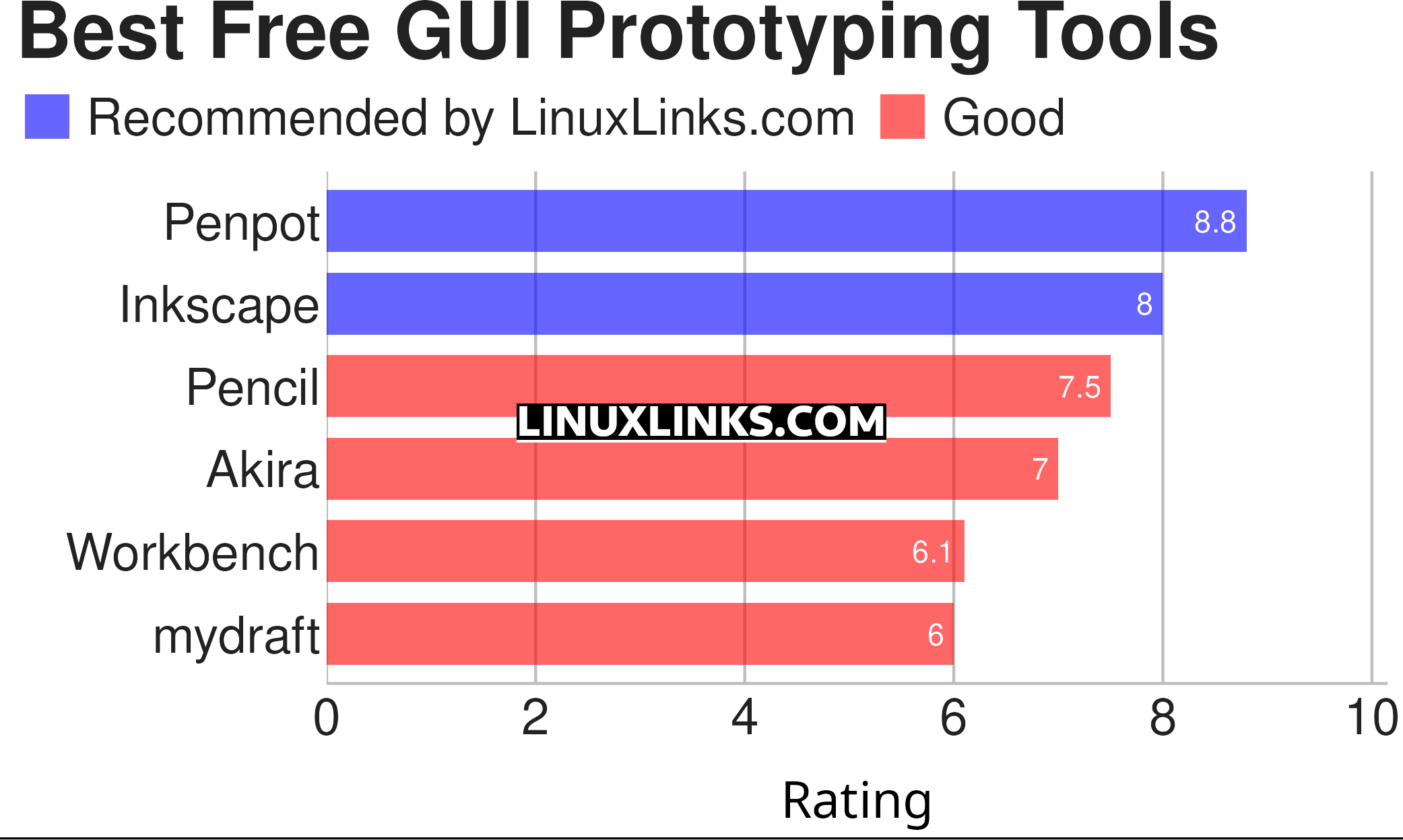
Let’s explore the 6 GUI prototyping tools. For each program we have compiled its own portal page, a full description with an in-depth analysis of its features, a screenshot of the program in action, together with links to relevant resources.
| GUI Prototyping Tools | |
|---|---|
| Penpot | Design tool that’s web based. Penpot requires a browser, that’s it. |
| Inkscape | Powerful design software with flexible drawing tools |
| Pencil | Easy GUI Prototyping with a good range of built-in shape collections |
| Akira | Design application for prototyping |
| Workbench | Prototype with GNOME technologies |
| mydraft | Wireframing tool |
This article has been revamped in line with our recent announcement.
 Explore our comprehensive directory of recommended free and open source software. Our carefully curated collection spans every major software category. Explore our comprehensive directory of recommended free and open source software. Our carefully curated collection spans every major software category.This directory is part of our ongoing series of informative articles for Linux enthusiasts. It features hundreds of detailed reviews, along with open source alternatives to proprietary solutions from major corporations such as Google, Microsoft, Apple, Adobe, IBM, Cisco, Oracle, and Autodesk. You’ll also find interesting projects to try, hardware coverage, free programming books and tutorials, and much more. Know a useful open source Linux program that we haven’t covered yet? Let us know by completing this form. |