
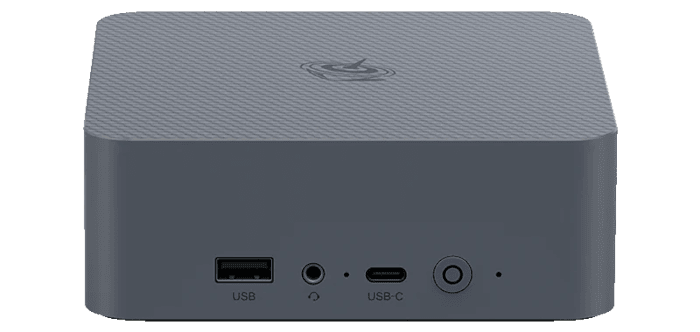
Interrogation of the System
I’ll use the inxi utility to examine the EQi 304’s technical specifications in detail.
Processor
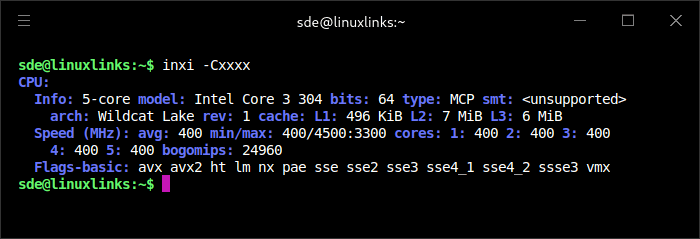
inxi correctly identifies the Core 3 304 as a five-core, five-thread Wildcat Lake processor with 496KiB of L1 cache, 7MiB of L2 cache and 6MiB of shared L3 cache. The screenshot was captured while the machine was idle, with all five cores operating at just 400MHz. One figure is incorrect: inxi reports a maximum P-core frequency of 4.5GHz, whereas Intel specifies a maximum turbo frequency of 4.3GHz. The four low-power efficiency cores are correctly shown with a maximum frequency of 3.3GHz.
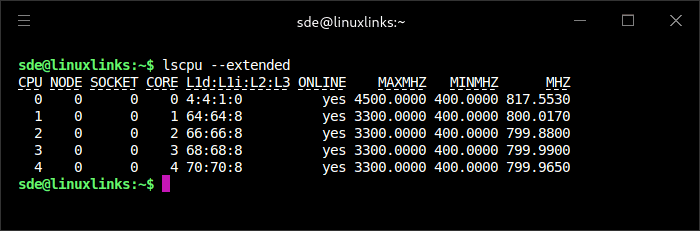
CPU 0 is the sole performance core, while CPUs 1–4 are low-power efficiency cores. Both lscpu and inxi report the same maximum P-Core frequency figure, suggesting that the discrepancy originates in the firmware or CPU-frequency information exposed to the operating system rather than either reporting utility.
When all five cores are placed under sustained load, turbostat reports the single performance core operating at 3.9GHz and the four low-power efficiency cores at 3.1GHz. All five cores were virtually fully occupied, yet package power consumption was only 15.1W. Temperatures remained low, reaching 60°C on the performance core and 56°C on the LP E-cores. These results demonstrate both the efficiency of the Core 3 304 and the effectiveness of the EQi’s relatively modest cooling system. They also reveal another reporting problem in inxi, which incorrectly showed all five cores running at approximately 3.9GHz.
Graphics
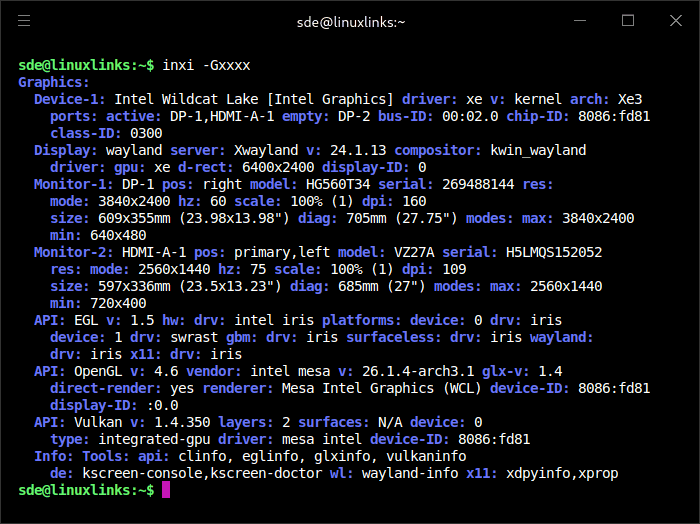
The Core 3 304 includes a modest Xe3-generation integrated GPU with a single Xe-core clocked at up to 2.3GHz. It is the smallest graphics configuration in Intel’s Wildcat Lake range, so it is intended primarily for desktop use, video playback, browser acceleration and light gaming rather than demanding 3D workloads.
The GPU supports DirectX 12, OpenGL 4.6, OpenCL 3.0, Intel Quick Sync Video and hardware AV1 encoding and decoding. Intel rates its AI acceleration at up to 9 INT8 TOPS. It supports up to three displays simultaneously.
The EQi 304 provides an HDMI output and two Thunderbolt 4 ports carrying DisplayPort video. In the configuration shown above, I connected a 27-inch HDMI monitor running at 2560 × 1440 at 75Hz and a portable monitor running at 3840 × 2400 at 60Hz through one of the Thunderbolt ports. Both displays were detected correctly under KDE Plasma’s Wayland session.
The inxi output also confirms that Linux is using the xe kernel driver and Mesa’s Iris graphics stack, with hardware-accelerated OpenGL and Vulkan rendering enabled.
I’ll benchmark the GPU in the next article in the series.
Disk
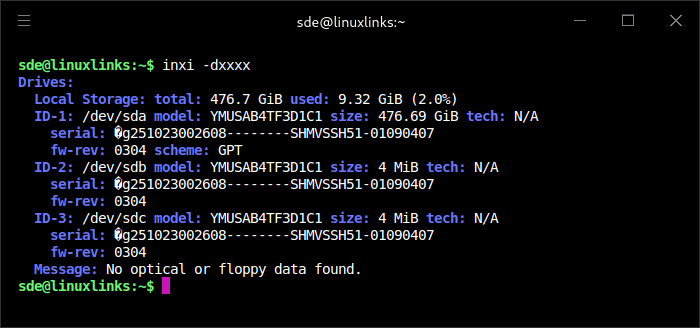
The EQi 304 is available in three memory configurations: 16GB of LPDDR5, 24GB of DDR5 or 32GB of DDR5. Regardless of the memory configuration, every model includes 512GB of integrated UFS 3.1 flash storage. Beelink also provides two unpopulated M.2 2280 slots, each supporting an SSD with a capacity of up to 4TB.
Neither M.2 slot is populated in this machine, which is why no /dev/nvme devices appear in the output. Importantly, these slots do not offer the usual four PCIe lanes: the first operates at PCIe 4.0 x2 and the second at PCIe 4.0 x1.
PCIe 4.0 provides approximately 2GB/s of bandwidth per lane in each direction. The x2 slot therefore has a theoretical ceiling of about 4GB/s, while the x1 slot is limited to about 2GB/s. Allowing for protocol overhead, a suitably fast SSD should achieve approximately:
PCIe 4.0 x2 slot: 3.5–3.9GB/s sequential transfers.
PCIe 4.0 x1 slot: 1.7–1.9GB/s sequential transfers.
Actual performance will depend on the SSD and workload.
Memory
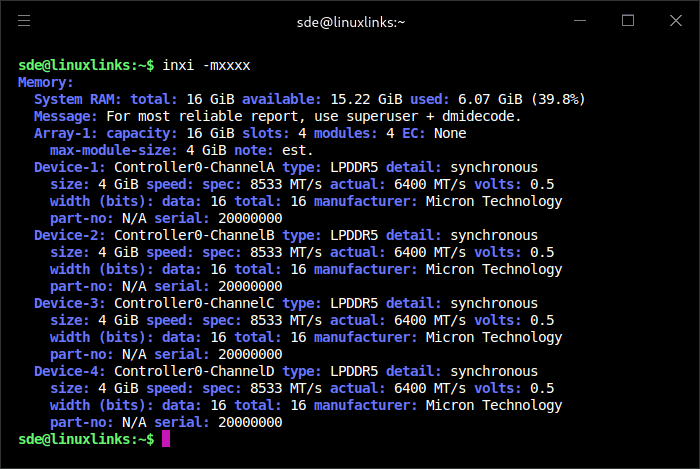
My review unit came with 16GB of soldered LPDDR5 memory. The inxi output reports four 4GB memory devices, one on each memory channel, for a total capacity of 16GB.
The memory is rated for up to 8,533MT/s but is operating at 6,400MT/s. Because it is soldered directly to the motherboard, there are no SO-DIMM slots and the RAM cannot be replaced or upgraded after purchase. The other two configurations provide SO-DIMM slots.
Network
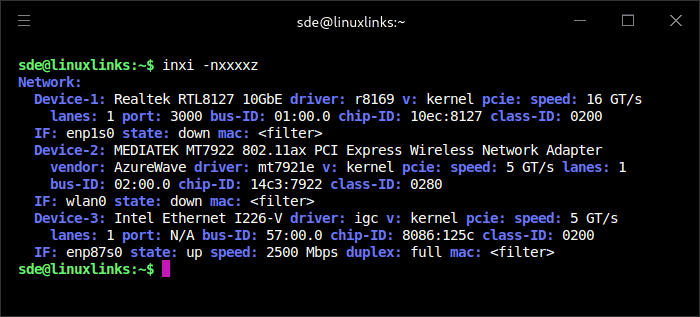
The EQi 304 provides three network interfaces: 10GbE, 2.5GbE and Wi-Fi 6E. Linux detected all three devices and loaded the appropriate kernel drivers without requiring additional software.
The primary high-speed interface uses a Realtek RTL8127 10GbE controller with the upstream r8169 driver. It is connected over a PCIe 4.0 x1 link, shown by the 16GT/s transfer rate. Although it uses only one PCIe lane, PCIe 4.0 x1 provides enough bandwidth for a full 10Gbps Ethernet connection. The interface, enp1s0, was disconnected when the screenshot was taken.
A second wired interface uses an Intel Ethernet Controller I226-V with the igc driver. This is the connection currently in use: enp87s0 is operating at 2,500Mbps with full-duplex communication. Its PCIe 2.0 x1 connection offers sufficient bandwidth for 2.5GbE.
Wireless networking is provided by an AzureWave module based on the MediaTek MT7922 chipset. It supports 802.11ax, including Wi-Fi 6E operation in the 6GHz band, and is handled by the mt7921e kernel driver. The wlan0 interface was disabled or disconnected during this test. Beelink advertises the machine merely as “Wi-Fi 6”, but the unit I received has Wi-Fi 6E hardware and Linux exposes its 6 GHz capability.
Overall, the output confirms excellent Linux compatibility: the 10GbE, 2.5GbE and wireless adapters were all recognised automatically, while the machine was connected through its 2.5GbE port.
Audio
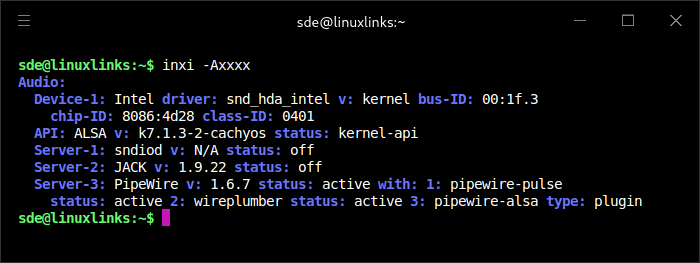
The EQi 304’s audio controller is detected as an Intel device and uses the standard snd_hda_intel kernel driver. This provides audio over the machine’s HDMI and DisplayPort-capable USB-C connections, and it was recognised automatically under CachyOS and Fedora.
Audio is managed through PipeWire 1.6.7, with WirePlumber handling device and stream management. The pipewire-pulse compatibility layer is active, allowing applications written for PulseAudio to work normally, while pipewire-alsa provides compatibility for software using ALSA directly. JACK is installed but was not running when the screenshot was taken.
The output therefore confirms that the complete Linux audio stack is operating correctly without proprietary drivers or manual configuration. It does not, however, identify the analogue audio codec separately, so this output alone cannot confirm which codec is used for the 3.5mm audio connection.
Bluetooth
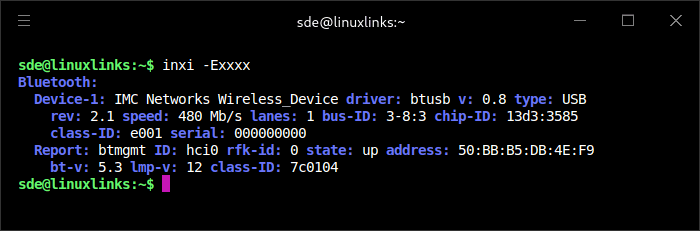
Bluetooth is provided by an IMC Networks/AzureWave USB device with vendor and product ID 13d3:3585. It is the Bluetooth component of the same AzureWave wireless module that supplies the MediaTek MT7922 Wi-Fi connection.
Temperature
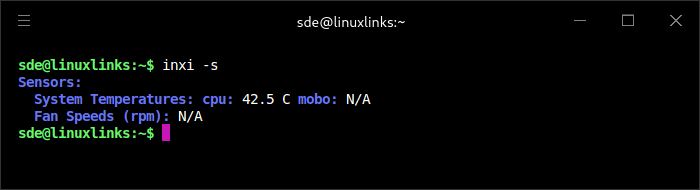
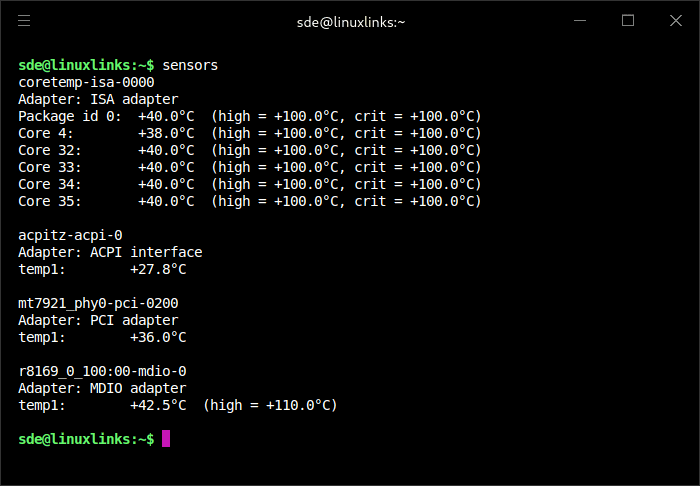
At an ambient temperature of 25.9°C, the CPU was running cool. sensors reports a package temperature of 40°C, with the individual core readings between 38°C and 40°C. This places the processor only around 14°C above ambient and well below its reported 100°C thermal limit.
No motherboard temperature or fan-speed readings are exposed through Linux’s hardware-monitoring interfaces.
Next page: Page 3 – First Impressions Running Linux
Pages in this article:
Page 1 – Introduction and Design
Page 2 – Interrogation of the System
Page 3 – First Impressions Running Linux
Complete list of articles in this series:
| Beelink EQi 304 Mini PC | |
|---|---|
| Introduction | Introduction to the series and interrogation of the machine |
| Benchmarks | Benchmarking the Beelink EQi 304 Mini PC |
| Power | Testing and comparing the power consumption |
| BIOS | The BIOS, which stands for Basic Input/Output System, plays a crucial role |
| Cores | P-core and LP Efficient-cores examined |
| Noise | How quiet is this mini PC? |
| NPU and Llama | Testing the NPU with Llama models |
| Scheduling | Can Linux use its one fast CPU core efficiently? |
Please read our Comment Policy before commenting.
Is the Core 3 304 like a modern N95?
I would describe it as the spiritual successor to the N95/N100 class, but with a clever twist: Intel has sacrificed balanced multicore performance to provide one extremely capable foreground core. That makes it much better suited to a responsive Linux desktop than the core count alone suggests.
Thanks
Why do the NVMes only have x2 and x1 links?
The Core 3 304 offers a modest PCIe allocation, with six PCIe 4.0 lanes that can be configured as one ×4 connection, three ×2 connections, or six ×1 connections. That is far more limited than the lane provision typically found on desktop-class processors.
Then factor that the 10GbE and 2.5GbE will each use 1 lane, and the Wi-Fi will use another. That leaves only 3 lanes for the NVMes.
What about the UFS storage?
The UFS storage uses a dedicated UFS controller and therefore doesn’t use a PCIe lane.
I’m not keen on UFS as its not replaceable
I don’t have specs for the TBW for the UFS, but the 2 NVMes are always available.
How responsive does the unusual one P-core and four E-core design feel during everyday Linux desktop use?
I’m going to do a head-to-head with an N100 machine to test this.
Interesting
I’m looking forward to this too