

Vector graphics consist of shapes, called objects, which are simple geometric primitives: points, lines, curves, circles, and polygons. The shapes are all based on mathematical equations, to represent images in computer graphics. It is possible to edit each object separately, for example, by changing the shape, colour, size and position. By combining paths that are straight or curved and various colors and shading very detailed illustrations can be created.
As vector-based images are not made up of a specific number of dots, they can be precisely scaled without any reduction in the image quality. Unlike vector graphics, bitmap images are resolution dependent. This means that it is difficult to alter the size of a bitmap without sacrificing a degree of image quality. Vector graphics also have simpler storage, and the option to convert a vector graphic to a bitmap if needed.
This article identifies the finest open source vector graphics editors. Vector editors are ideal for technical illustrations, diagramming, flowcharting, artistic illustrations, promotional posters, banners, signage, logos, typography, vehicle wraps and layout. Bitmap editors are more suitable for retouching, photo processing, photorealistic illustrations, collage, and illustrations drawn by hand with a pen tablet. Here’s our verdict captured in a legendary LinuxLinks-style ratings chart.
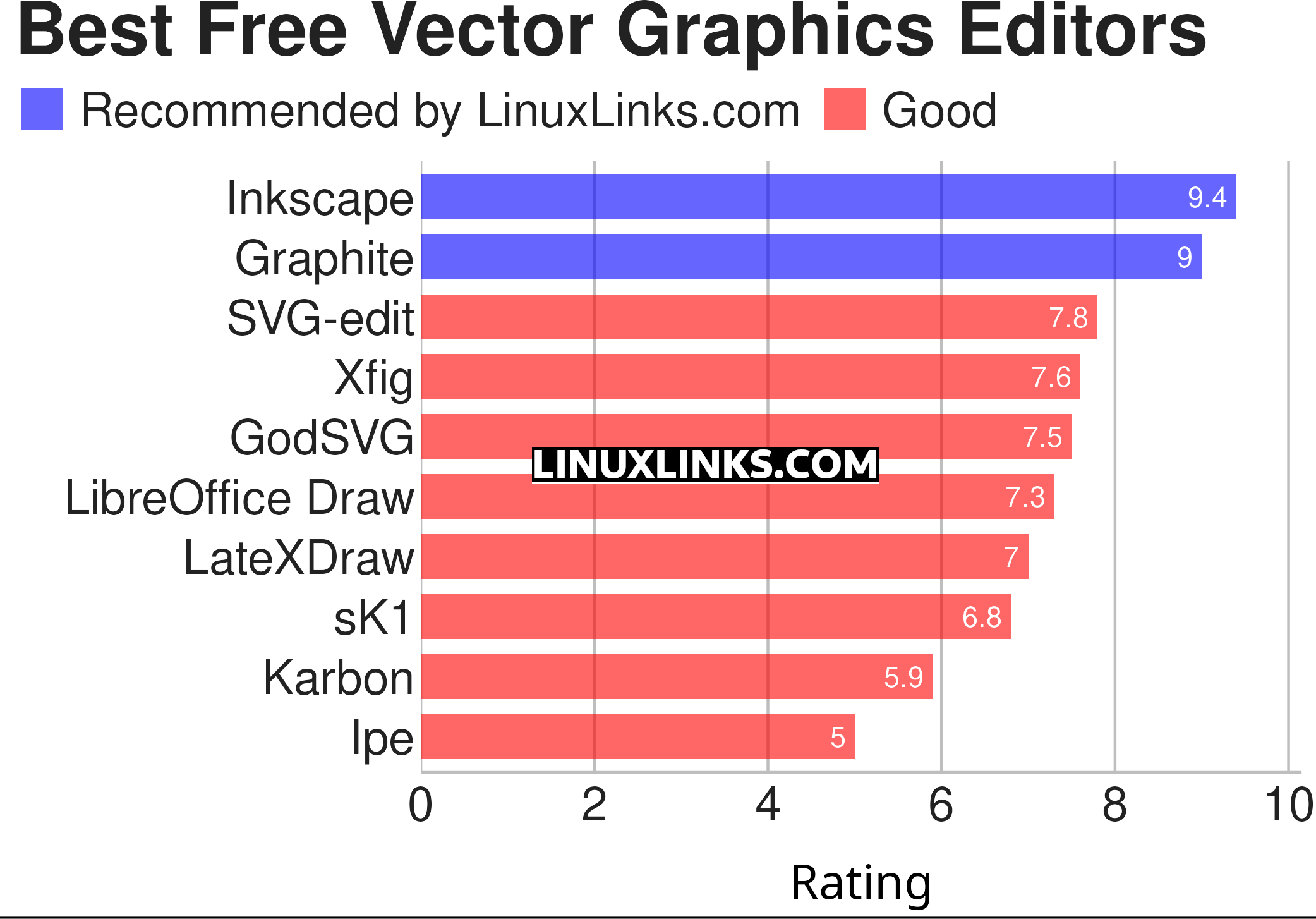
Click the links in the table below to learn more about each program.
| Vector Graphics Editors | |
|---|---|
| Inkscape | Vector-based drawing program |
| Graphite | 2D vector and raster editor |
| SVG-edit | Complete vector graphics editor in the browser (in JavaScript) |
| Xfig | Draw and manipulate objects interactively |
| GodSVG | Editor for Scalable Vector Graphics files |
| LibreOffice Draw | Vector graphics editor and diagramming tool |
| LateXDraw | Vector drawing program for LaTeX using PSTricks |
| sK1 | High quality illustration program |
| Karbon | Vector drawing and editing application |
| Ipe | Extensible drawing editor |
This article has been revamped in line with our recent announcement.
 Explore our comprehensive directory of recommended free and open source software. Our carefully curated collection spans every major software category. Explore our comprehensive directory of recommended free and open source software. Our carefully curated collection spans every major software category.This directory is part of our ongoing series of informative articles for Linux enthusiasts. It features hundreds of detailed reviews, along with open source alternatives to proprietary solutions from major corporations such as Google, Microsoft, Apple, Adobe, IBM, Cisco, Oracle, and Autodesk. You’ll also find interesting projects to try, hardware coverage, free programming books and tutorials, and much more. Know a useful open source Linux program that we haven’t covered yet? Let us know by completing this form. |
Your passion for your subject shines through.
While it is old and uses an ancient toolkit, I still find
xfigto have much to offer in particular control of alignment and positioning that I have not been able to find in more modern tools.Yes, we agree. We’ll update this article and add xfig. We haven’t used the software for at least 5 years so will see how the latest version performs.
Article has been updated adding xfig.