

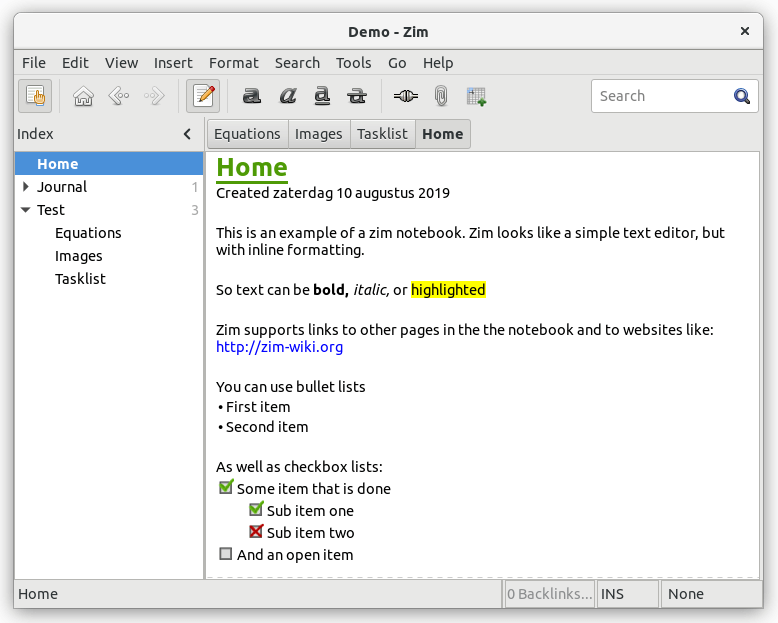
Zim Desktop Wiki (Zim) is an open source graphical text editor used to maintain a collection of wiki pages.
Each page can contain links to other pages, simple formatting and images. Pages are stored in a folder structure, like in an outliner, and can have attachments. Creating a new page is as easy as linking to a nonexistent page.
All data is stored in plain text files with wiki formatting. Various plugins provide additional functionality, including a task list manager, an equation editor, a tray icon, and support for version control.
Zim aims to bring the concept of a wiki to your desktop. This tool is intended to keep track of TODO lists or to serve as a personal scratch book. But it will also serve you when writing longer and more complicated documents.
Features include:
- Pages saved as plain text files with wiki formatting.
- Hyperlink pages offers a powerful way of organizing content.
- Organize pages hierarchically, allowing for example to group pages by topic, yet also have wiki-style backtracking of links, so users can also have a category system by using backlinks so a page can link to multiple categories.
- Plugins:
- Spell checking.
- an Equation Editor.
- using Calendar pages.
- a Task List dialog.
- a Tray Icon.
Website: zim-wiki.org
Support: Wiki, User Manual, FAQ, Mailing List
Developer: Jaap Karssenberg
License: GNU General Public License v2.0
Zim is written in Python. Learn Python with our recommended free books and free tutorials.
Related Software
| Desktop Wiki GUI Notes Apps | |
|---|---|
| Zim Desktop Wiki | Brings the concept of a wiki to your desktop |
| logseq | Privacy-first platform for knowledge management and collaboration |
| AppFlowy | Bring projects, wikis, and teams together with AI. |
| Trilium Notes | Hierarchical note taking application |
| SilverBullet | Note-taking application optimized for people with a hacker mindset |
| Tangent | Designed to let you write the way you think |
| MyTetra | Smart manager for information collecting |
| WikidPad | Wiki-like notebook for storing your thoughts, ideas, todo lists |
| Reor | AI note-taking app |
Read our verdict in the software roundup.
 Explore our comprehensive directory of recommended free and open source software. Our carefully curated collection spans every major software category. Explore our comprehensive directory of recommended free and open source software. Our carefully curated collection spans every major software category.This directory is part of our ongoing series of informative articles for Linux enthusiasts. It features hundreds of detailed reviews, along with open source alternatives to proprietary solutions from major corporations such as Google, Microsoft, Apple, Adobe, IBM, Cisco, Oracle, and Autodesk. You’ll also find interesting projects to try, hardware coverage, free programming books and tutorials, and much more. Discovered a useful open source Linux program that we haven’t covered yet? Let us know by completing this form. |
Please read our Comment Policy before commenting.