
Last Updated on July 13, 2021
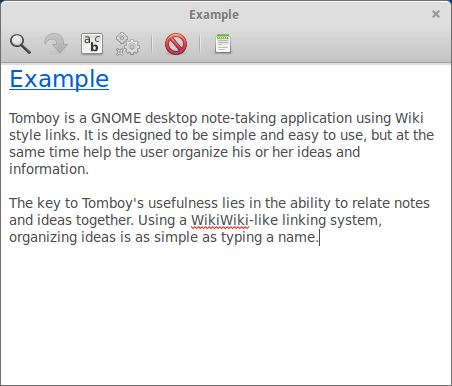
Tomboy is a GNOME desktop note-taking application which is designed to be simple and easy to use, but at the same time help the user organize his or her ideas and information.
The key to Tomboy’s usefulness lies in the ability to relate notes and ideas together. Using a WikiWiki-like linking system, organizing ideas is as simple as typing a name.
New features can be added to Tomboy by using plugins. Official plugins include: Backlinks (see the notes link to the one you are currently viewing), Bugzilla (drag a Bugzilla URL from your web browser to a tomboy note), Evolution (drag an email from Evolution into a tomboy note), Export to HTML, Fixed Width, Note of the Day, and a Sticky Notes importer.
Tomboy is no longer developed.
Features include:
- Accessing your notes is usually a quick mouse-flick away.
- Highlighting text.
- Inline spell checking using GtkSpell.
- Auto-linking of web and email addresses.
- Undo/redo.
- Font styling and sizing.
- Bulleted lists.
- Plugin support.
Website: wiki.gnome.org/Apps/Tomboy
Support: GitHub Code Repository, GitHub Code Repository for Next Generation Release
Developer: Alex Graveley, Boyd Timothy, Chris Scobell, David Trowbridge, Ryan Lortie, Sandy Armstrong, Sebastian Rittau, Kevin Kubasik, Stefan Schweizer
License: GNU Lesser General Public License Version 2.1
Tomboy is written in C#. Learn C# with our recommended free books and free tutorials.
Return to Productivity Tools Home Page | Return to Notes Home Page
| Explore Linux | |
|---|---|
 | Best Free and Open Source Software - A huge collection of recommended free and open source software covering every major category. |
 | In-depth Linux Software Reviews - Detailed assessments of Linux software covering features, usability and overall quality. |
 | The Big List of Active Linux Distros - An extensive collection of actively developed Linux distributions. |
 | Open Source Alternatives - Alternatives to software and services from Google, Microsoft, Apple, Adobe, IBM, Autodesk, Oracle and others. |
 | Essential Linux System Tools - Indispensable utilities for monitoring, maintaining and managing Linux systems. |
 | Linux Productivity Tools - Useful utilities for improving productivity and streamlining everyday tasks. |
 | Alternatives to Popular CLI Tools - Modern alternatives to familiar command-line utilities supplied with Linux systems. |
 | Awesome Free Linux Game Tools - Tools, utilities and companion software that improve gaming on Linux. |
 | Machine Learning on Linux - Machine learning and deep learning software, self-hosted applications and practical tools. |
 | Saving Money with Linux - Practical ways to reduce electricity consumption and lower computing costs with Linux. |
 | Linux Candy - Fun, entertaining and sometimes delightfully quirky software from the lighter side of Linux. |
Please read our Comment Policy before commenting.