
Step is an interactive physics simulator.
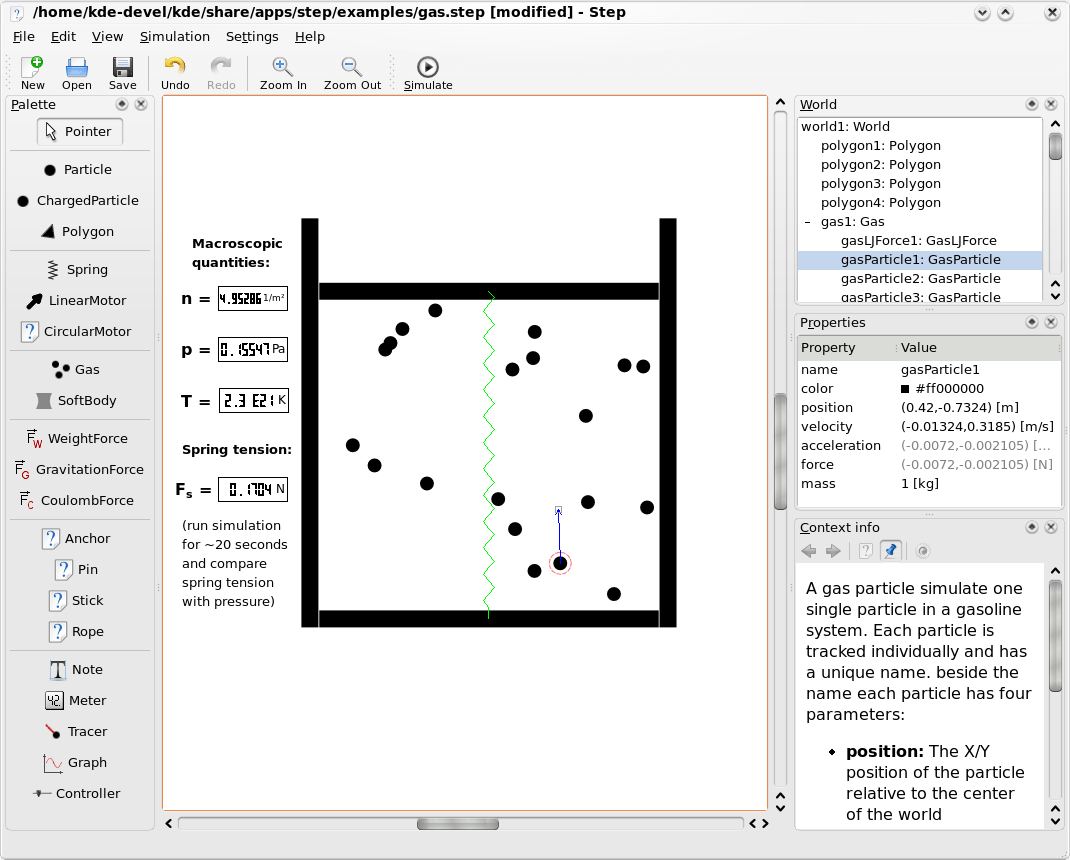
With Step you can not only learn but feel how physics works. You place some bodies on the scene, add some forces such as gravity or springs, then click “Simulate” and Step shows you how your scene will evolve according to the laws of physics.
You can change every property of bodies/forces in your experiment (even during simulation) and see how this will change evolution of the experiment.
Key Features
- Classical mechanical simulation in two dimensions.
- Particles, springs with dumping, gravitational and coulomb forces.
- Rigid bodies.
- Collision detection (currently only discrete) and handling.
- Soft (deformable) bodies simulated as user-editable particles-springs system, sound waves.
- Molecular dynamics (currently using Lennard-Jones potential): gas and liquid, condensation and evaporation, calculation of macroscopic quantities and their variances.
- Units conversion and expression calculation: you can enter something like “(2 days + 3 hours) * 80 km/h” and it will be accepted as distance value (requires libqalculate).
- Errors calculation and propagation: you can enter values like “1.3 ± 0.2” for any property and errors for all dependent properties will be calculated using statistical formulas.
- Solver error estimation: errors introduced by the solver is calculated and added to user-entered errors.
- Several different solvers: up to 8th order, explicit and implicit, with or without adaptive timestep.
- Controller tool to easily control properties during simulation (even with custom keyboard shortcuts).
- Tools to visualize results: graph, meter, tracer.
- Context information for all objects, integrated wikipedia browser.
- Collection of example experiments, more can be downloaded with KNewStuff2.
Website: apps.kde.org/step
Support:
Developer: Vladimir Kuznetsov, Carsten Niehaus, Aliona Kuznetsova
License: GNU General Public License v2.0
Step is written in C++. Learn C++ with our recommended free books and free tutorials.
Related Software
| Physics Tools | |
|---|---|
| ROOT | Solves the data analysis challenges of high-energy physics |
| OpenFOAM | Facilitates the numerical solution of partial differential equations |
| McStas | Neutron ray-trace simulation application |
| Octopus | Real-space, real-time implementation of TDDFT |
| Geant4 | Toolkit for the simulation of the passage of particles through matter |
| Rivet | Particle-physics MC analysis toolkit |
| HepMC | Event record for High Energy Physics Monte Carlo generators |
| Elmer | Finite Element Software for Multiphysical Problems |
| PYTHIA | Generation of high-energy physics events |
| CP2K | Quantum chemistry and solid state physics software package |
| Sherpa | Monte Carlo event generator |
| FastJet | Software for jet finding in pp and e+e− collisions |
| SU2 | Suite for multiphysics simulation and design |
| Herwig | Multi-purpose particle physics event generator |
| Tracker | Video analysis and modeling tool designed to be used in education |
| WarpX | Advanced electromagnetic and electrostatic Particle-In-Cell code |
| Step | Interactive physics simulator |
| Meep | Electromagnetic simulation - finite-difference time-domain method |
| LHAPDF | General purpose C++ interpolator |
| ESPResSo | Molecular dynamics package |
| DualSPHysics | Smoothed Particle Hydrodynamics solver |
| Basilisk | Numerical simulation framework for solving partial differential equations |
| Gerris Flow Solver | Tool for generic numerical simulations of flows |
| ASL | Hardware accelerated multiphysics simulation platform |
Read our verdict in the software roundup.
 LinuxLinks helps you discover the best free and open source software for Linux. Explore our extensive collection of recommended applications, including alternatives to popular proprietary software. LinuxLinks helps you discover the best free and open source software for Linux. Explore our extensive collection of recommended applications, including alternatives to popular proprietary software.We also publish software reviews, Linux tutorials, hardware reviews, free programming books and articles covering the wider open source community. Browse our Linux resources to discover more. Know a useful free and open source Linux application we haven't covered? Suggest a program for inclusion. Has your software been featured on LinuxLinks? Display one of our Featured on LinuxLinks badges on your website or GitHub README. |
Please read our Comment Policy before commenting.