
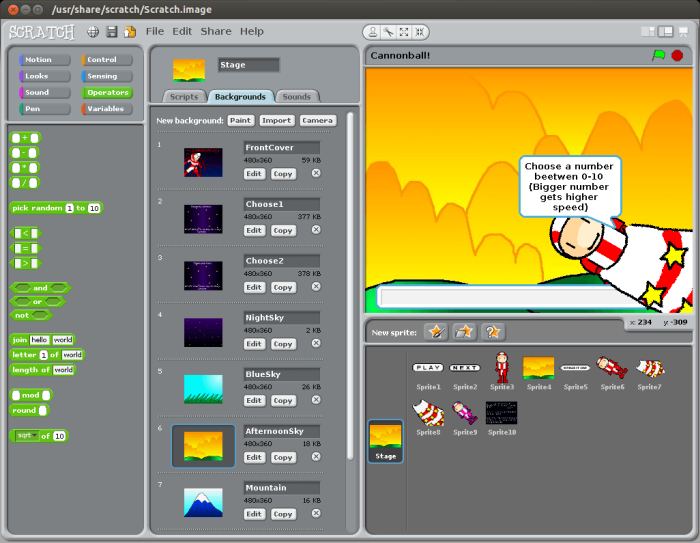
Scratch is a visual programming environment for creating interactive stories, animations, games and other multimedia projects. It is designed primarily for children and beginners, allowing them to learn programming concepts by connecting graphical blocks rather than typing commands. Blocks fit together according to their purpose, helping learners understand the structure of a program while avoiding many common syntax errors.
Projects are assembled from sprites, backdrops, sounds and scripts. Each sprite can have its own behaviour, responding to keyboard input, mouse actions, messages or other events. Learners can make characters move, change appearance, interact with other objects and respond to conditions. The environment includes editors for creating and modifying artwork and audio, so a complete project can be developed without moving between separate applications. Scratch also operates as a sharing platform where users can publish projects, examine how other projects work and remix them. This encourages learning through experimentation and modification of existing examples.
This is free and open source software.
Key Features
- Block-based programming – construct programs by joining graphical code blocks.
- Sprites – create interactive characters and objects with individual scripts.
- Event-driven programming – respond to keyboard input, mouse actions and messages.
- Control structures – use loops, conditional statements and other programming constructs.
- Variables and lists – store values and manage collections of data.
- Operators – perform arithmetic, comparisons and logical operations.
- Broadcast messages – coordinate activity between multiple sprites and scripts.
- Costume editor – create and modify vector and bitmap artwork.
- Sound editor – record, edit and incorporate audio into projects.
- Stage and backdrops – construct scenes for animations and games.
- Pen extension – draw lines and shapes through programmable movement.
- Additional extensions – use music, video sensing, text-to-speech and other capabilities.
- Sprite cloning – create multiple instances of objects during execution.
- Project sharing – publish projects on the Scratch website.
- Remixing – modify shared projects while retaining attribution to their creators.
- Community features – browse projects, comment and participate in shared studios.
- Offline editing – create and edit projects using the desktop application.
Website: scratch.mit.edu
Support:
Developer: Lifelong Kindergarten Group at the MIT Media Lab
License: GNU Affero General Public License v3.0
Scratch is written in JavaScript. Learn JavaScript with our recommended free books and free tutorials.
Related Software
| Programming Tools for Kids | |
|---|---|
| Snap! | Visual, block, drag-and-drop programming language |
| TurboWarp | Mod of Scratch |
| Scratch | Easy to use programming environment for ages 8 and up |
| Blockly | Web-based, visual programming editor that's developed by Google |
| Processing | Flexible software sketchbook and language |
| Greenfoot | Simple but powerful Java IDE |
| KTurtle | Educational programming environment for learning how to program |
| Alice | Innovative 3D programming environment |
| BASIC-256 | Easy to use version of BASIC |
| Robocode | Engaging and educational programming game |
| Hedy | Gradual textual programming language |
| CodeWorld | Web-based educational programming environment |
Read our verdict in the software roundup.
 LinuxLinks helps you discover the best free and open source software for Linux. Explore our extensive collection of recommended applications, including alternatives to popular proprietary software. We also publish software reviews, Linux tutorials, hardware reviews, free programming books and articles covering the wider open source community. Browse our Linux resources to discover more. Know a useful free and open source Linux application we haven't covered? Suggest a program for inclusion. Has your software been featured on LinuxLinks? Display one of our Featured on LinuxLinks badges on your website or GitHub README. |
Please read our Comment Policy before commenting.