

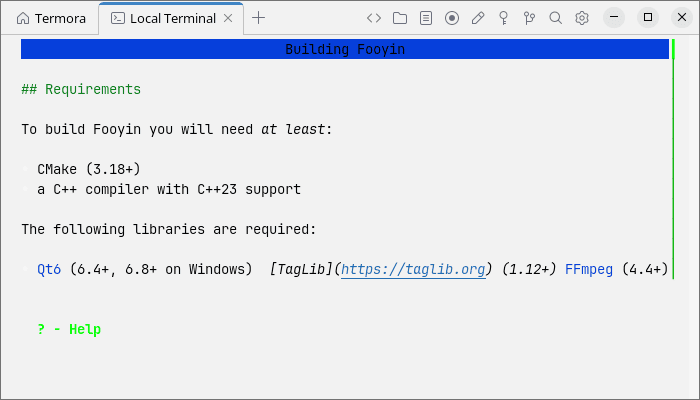
MD-TUI is an interactive Markdown viewer designed for reading documentation, technical notes and interconnected collections of Markdown files without leaving the terminal. It emphasizes navigation between documents rather than simply converting Markdown syntax into formatted terminal output.
The application can open an individual document or recursively discover Markdown files within a directory. Its support for conventional Markdown links and wiki-style links makes it particularly useful for browsing personal knowledge bases and documentation repositories. An external editor can be invoked directly from the viewer when modifications are needed.
This is free and open source software.
Key Features
- Keyboard-driven navigation with Vim-inspired shortcuts.
- Hierarchical file browser with configurable sorting and optional file size and modification time information.
- Internal and external hyperlink navigation.
- Preview link destinations without opening them.
- Document navigation history.
- Interactive text search with next and previous match navigation.
- Heading navigator for jumping directly to document sections.
- Syntax highlighting for fenced code blocks covering numerous programming languages.
- Inline image rendering on compatible terminals.
- Expandable and collapsible HTML details blocks.
- CriticMarkup annotation rendering with interactive comment selection.
- Remember reading positions between sessions.
- Configurable document width, alignment and heading styles.
- Light, dark, warm light and high contrast themes.
- Create, save and customize colour palettes.
- Configurable keyboard bindings.
- Read Markdown from standard input.
- Optionally respect gitignore rules when discovering documents.
- Companion Neovim plugin called Preview.
- Cross-platform support – runs on Linux, macOS, and Windows.
Website: github.com/henriklovhaug/md-tui
Support:
Developer: Henrik Løvhaug
License: GNU Affero General Public License v3.0
MD-TUI is written in Rust. Learn Rust with our recommended free books and free tutorials.
 LinuxLinks helps you discover the best free and open source software for Linux. Explore our extensive collection of recommended applications, including alternatives to popular proprietary software. We also publish software reviews, Linux tutorials, hardware reviews, free programming books and articles covering the wider open source community. Browse our Linux resources to discover more. Know a useful free and open source Linux application we haven't covered? Suggest a program for inclusion. Has your software been featured on LinuxLinks? Display one of our Featured on LinuxLinks badges on your website or GitHub README. |
Please read our Comment Policy before commenting.