

Markdown is a lightweight markup language that uses simple, human-readable syntax to format plain text documents. Headings, lists, links, images, tables, code blocks and emphasis can be expressed without the complexity of traditional markup languages. Originally developed by John Gruber in collaboration with Aaron Swartz, Markdown has become widely adopted for software documentation, technical writing, blogging, note-taking and personal knowledge management.
One of Markdown’s biggest attractions is its portability. Documents can be edited with virtually any text editor, tracked with version control systems and converted into formats such as HTML, PDF and EPUB. Its uncomplicated syntax lets writers concentrate on content rather than formatting, while plain text files have minimal storage requirements and are not tied to proprietary software.
Terminal-based Markdown viewers transform raw Markdown files into visually appealing, formatted documents without requiring a graphical environment. Depending on the software, features include syntax highlighting, inline image rendering, interactive document navigation, searching, customizable themes and tables of contents.
These tools are particularly useful for developers reading project documentation, system administrators working over SSH, technical writers reviewing their work, and anyone who prefers a keyboard-centric workflow. They offer a convenient way to consult README files, browse technical references and read personal notes without leaving the command line or launching a graphical application.
Here are our recommendations for the best terminal-based Markdown viewers, presented in our legendary LinuxLinks-style ratings chart. Only free and open source software is eligible for inclusion.
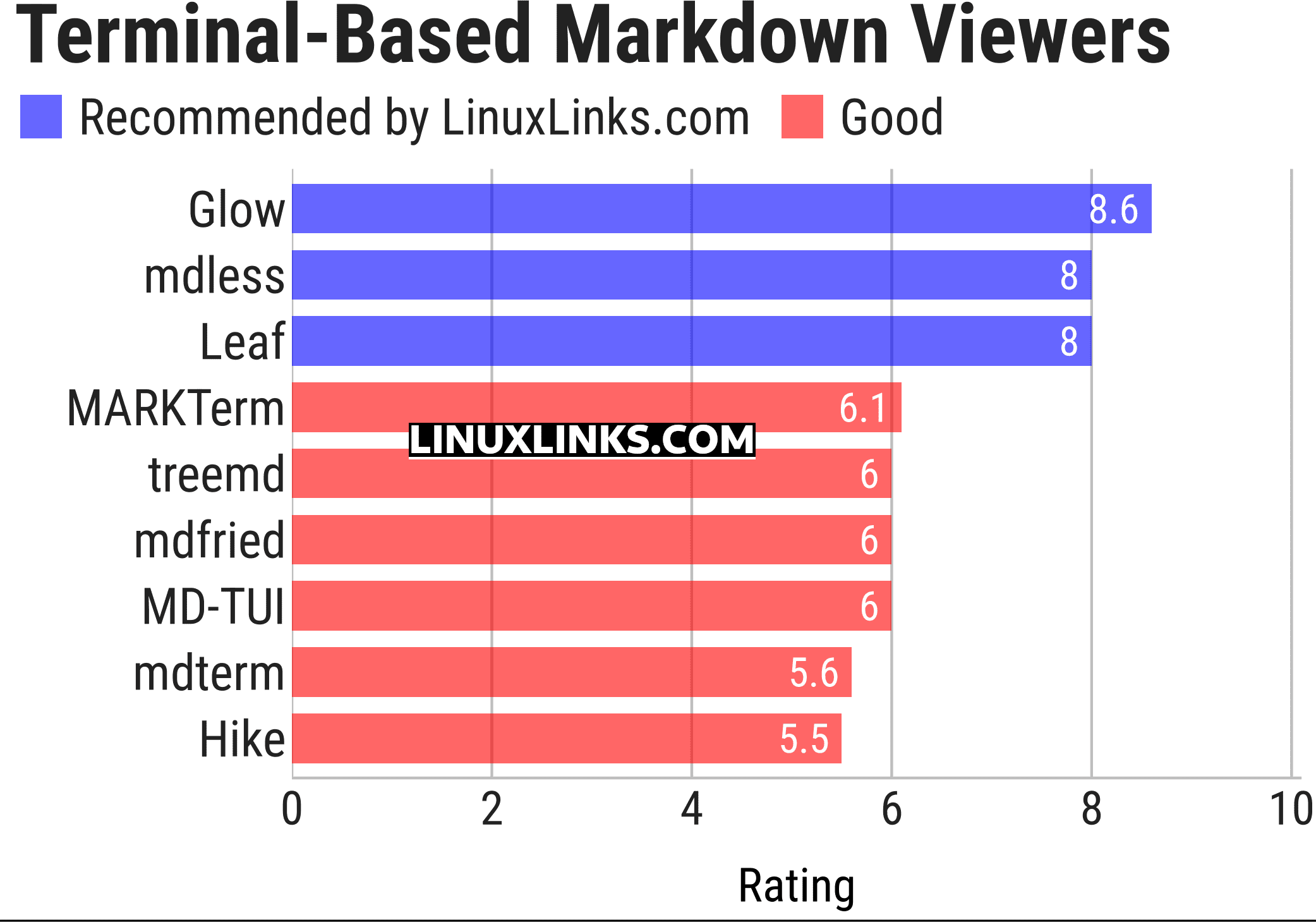
Let’s explore each tool in detail.
| Terminal-Based Markdown Viewers | |
|---|---|
| Glow | Elegant Markdown rendering with customizable styles |
| mdless | Formatted and syntax-highlighted alternative to less |
| Leaf | Lightweight Markdown previewer with syntax highlighting |
| MARKTerm | Command-line utility for formatted Markdown output |
| treemd | Structured document navigation with a tree-based interface |
| mdfried | Rich document rendering with inline image support |
| MD-TUI | Keyboard-driven document reader with an interactive interface |
| mdterm | Interactive Markdown reader designed for distraction-free reading |
| Hike | Interactive browser for navigating Markdown documents |
This article has been updated to reflect the changes outlined in our recent announcement.
 LinuxLinks helps you discover the best free and open source software for Linux. Explore our extensive collection of recommended applications, including alternatives to popular proprietary software. We also publish software reviews, Linux tutorials, hardware reviews, free programming books and articles covering the wider open source community. Browse our Linux resources to discover more. Know a useful free and open source Linux application we haven't covered? Suggest a program for inclusion. Has your software been featured on LinuxLinks? Display one of our Featured on LinuxLinks badges on your website or GitHub README. |
Please read our Comment Policy before commenting.