

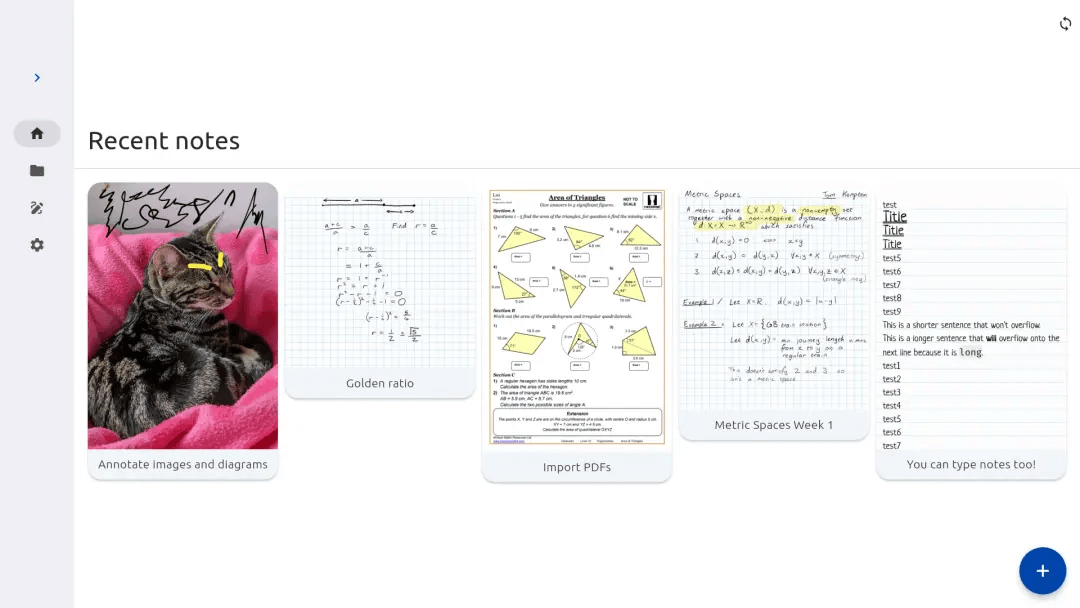
Saber is a notes app built for handwriting.
It’s designed to be as simple and intuitive as possible, while still delivering unique features that you’ll actually use. Additionally, Saber is available across all your devices, large and small, and syncs between them seamlessly.
Notably, it can invert your notes when you’re in dark mode. This allows you to write with white ink on a black background, which is much easier on the eyes in low-light environments like when the teacher turns off the lights in class. Images and PDFs are also inverted, so you can still use a digital printout or a textbook without the fuss.
Saber uses a dual-password system to protect your notes from anyone but you, even if they have complete control over the server. You can safely store your notes on the official Saber server, another server, or even host your own.
This is free and open source software.
Features include:
- Create folders inside folders inside folders.
- Basic writing on canvas.
- (Rudimentary) undo/redo.
- Zooming.
- Erasing writing on canvas.
- Changing writing colour.
- Saving on local storage.
- Renaming notes.
- Populate home screen with real data.
- Populate navbar file tree with real data.
- Show canvas previews on homepage.
- Allow notes to have multiple pages.
- Distinguish finger and stylus when scrolling/panning through notes.
- Tool switching system.
- Add keyboard shortcuts in editor (e.g. to toggle finger drawing).
- Darken notes visually when in dark mode.
- Log in to Nextcloud.
- Cloud sync notes.
- Undo/redo that includes erases, not just strokes.
- Enable using different passwords for Nextcloud and note encryption.
- Export to PDF.
- Multilingual support.
- Multilingual support, Clear-all button, Theme selection.
- Canvas backgrounds.
- Add images to canvas.
- Pen size and custom colors:
- size option for pen and highlighter.
- remember last settings (size) for each tool.
- pen types (e.g. fountain pen vs ballpoint pen).
- smoothing option for pen and highlighter.
- Ability to create text notes.
- Selection/move tool.
- Shape tool.
- Allow moving notes between folders.
- Highlighter uses canvas compositing to render the highlighter in a way that is consistent with/better than traditional paper, where it handles overlaps and maintains color consistency.
Website: github.com/saber-notes/saber
Support:
Developer: Saber
License: GNU General Public License v3.0
Saber is written in Dart. Learn Dart with our recommended free books and free tutorials.
Related Software
| Handwritten GUI Notes Apps | |
|---|---|
| Xournal++ | Handwriting notetaking software with PDF annotation support |
| Rnote | Sketch and take handwritten notes |
| Saber | Notes app built for handwriting |
| SpeedyNote | Built for classic tablet PCs, low-resolution screens, and vintage hardware. |
| Butterfly | Provides a simple UI with powerful customization. |
| Lorien | Infinite canvas drawing/note-taking app |
| Write | Designed for note-taking, brainstorming, and sketching. |
| Writernote | Take notes in an intelligent way |
Read our verdict in the software roundup.
 Explore our comprehensive directory of recommended free and open source software. Our carefully curated collection spans every major software category. Explore our comprehensive directory of recommended free and open source software. Our carefully curated collection spans every major software category.This directory is part of our ongoing series of informative articles for Linux enthusiasts. It features hundreds of detailed reviews, along with open source alternatives to proprietary solutions from major corporations such as Google, Microsoft, Apple, Adobe, IBM, Cisco, Oracle, and Autodesk. You’ll also find interesting projects to try, hardware coverage, free programming books and tutorials, and much more. Discovered a useful open source Linux program that we haven’t covered yet? Let us know by completing this form. |
Please read our Comment Policy before commenting.