
Last Updated on June 17, 2026
Interrogation of the System
I’ll use inxi to interrogate the machine. For the images below, I’m running CachyOS, and I’ve annotated each image.
Processor
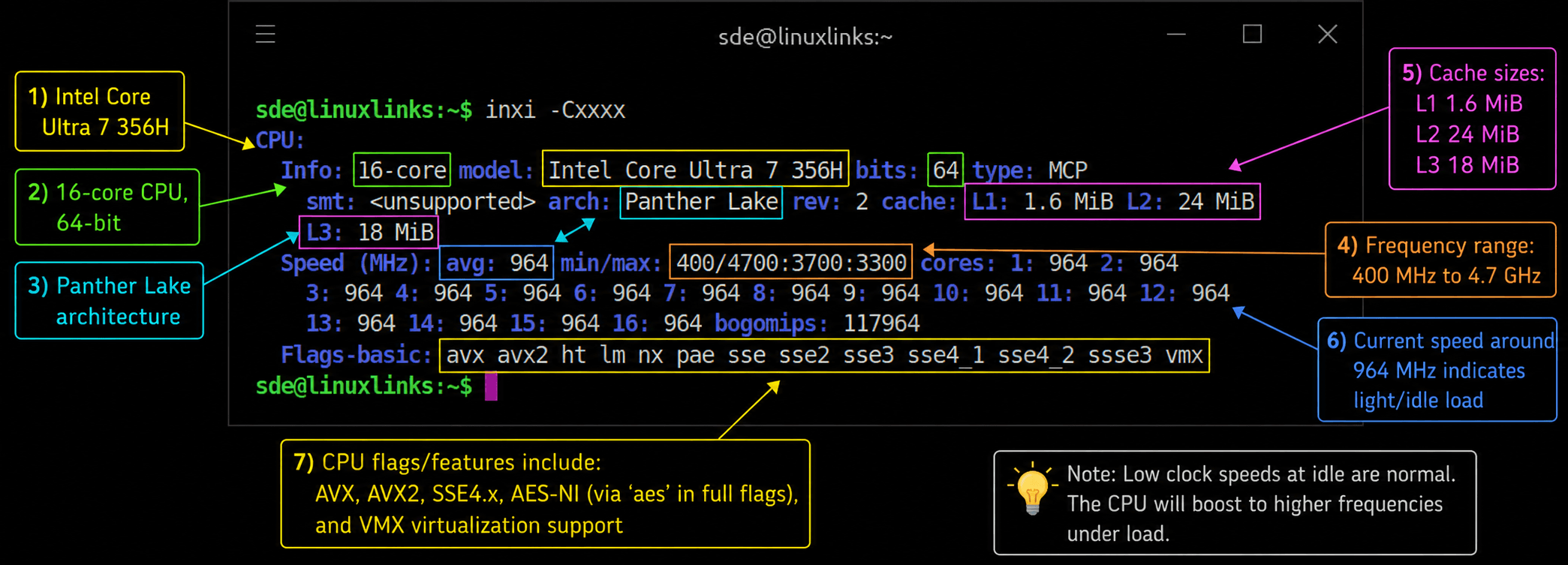
The min/max: 400/4700:3700:3300 line is especially useful. It shows the CPU has three different maximum frequency groups, which lines up with a hybrid design: the fastest cores boost highest, the middle group tops out lower, and the low-power cores have the lowest maximum ceiling. I can show the three groups using lscpu.
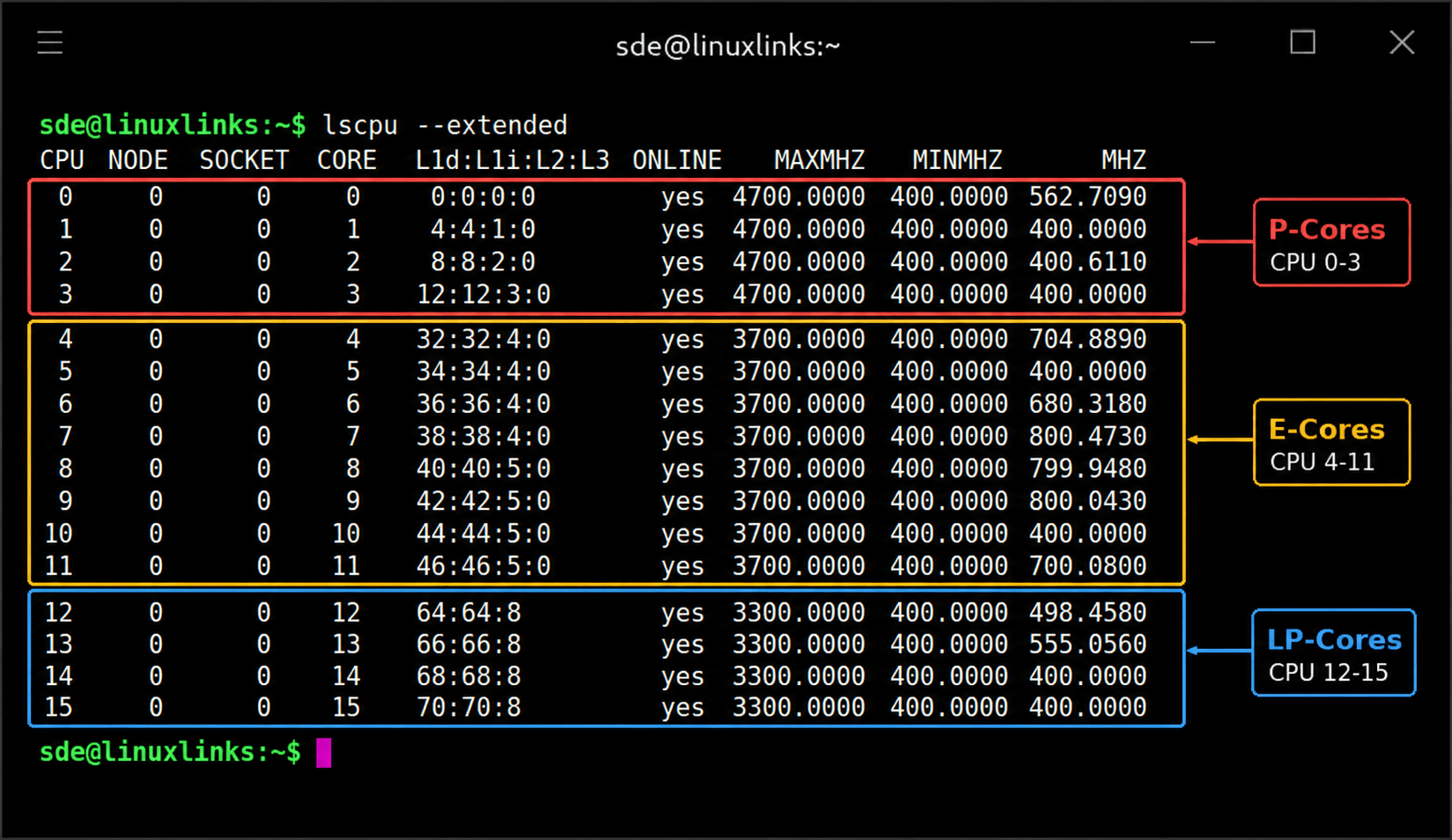
The machine was under light load when the image was taken. The CPU is clocking down rather than sitting at high frequencies unnecessarily.
The cache figures are healthy for this class of processor. The 24 MiB L2 cache is notable because hybrid designs often spread cache differently across core clusters, so cache-sensitive workloads won’t behave the same as on older Intel Core i5/i7 chips with a simpler layout.
The flags shown confirm support for common acceleration paths used by Linux software. avx and avx2 matter for media, compression, scientific code, emulators, and some AI/ML workloads. vmx confirms Intel virtualization support, useful for KVM, VirtualBox, GNOME Boxes, and similar tools.
Graphics
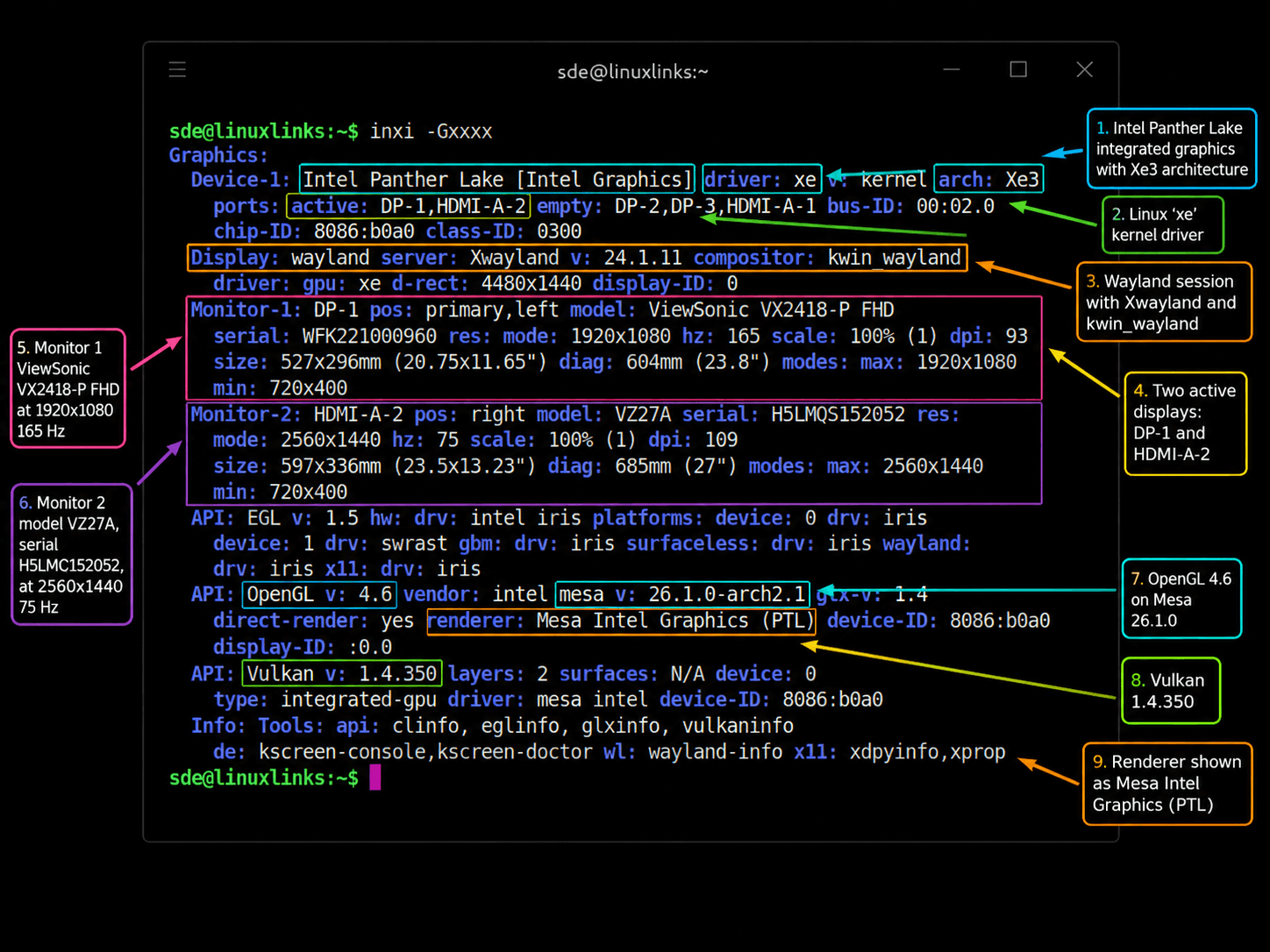
Linux is detecting the Intel Panther Lake graphics correctly, using the modern xe driver, running a Wayland Plasma session, and driving two mixed-resolution displays without falling back to software rendering. I’ve got two monitors attached via DisplayPort and HDMI. The M2 also supports a third external display via USB4, giving triple 4K output across HDMI, DisplayPort, and USB4.
Disk
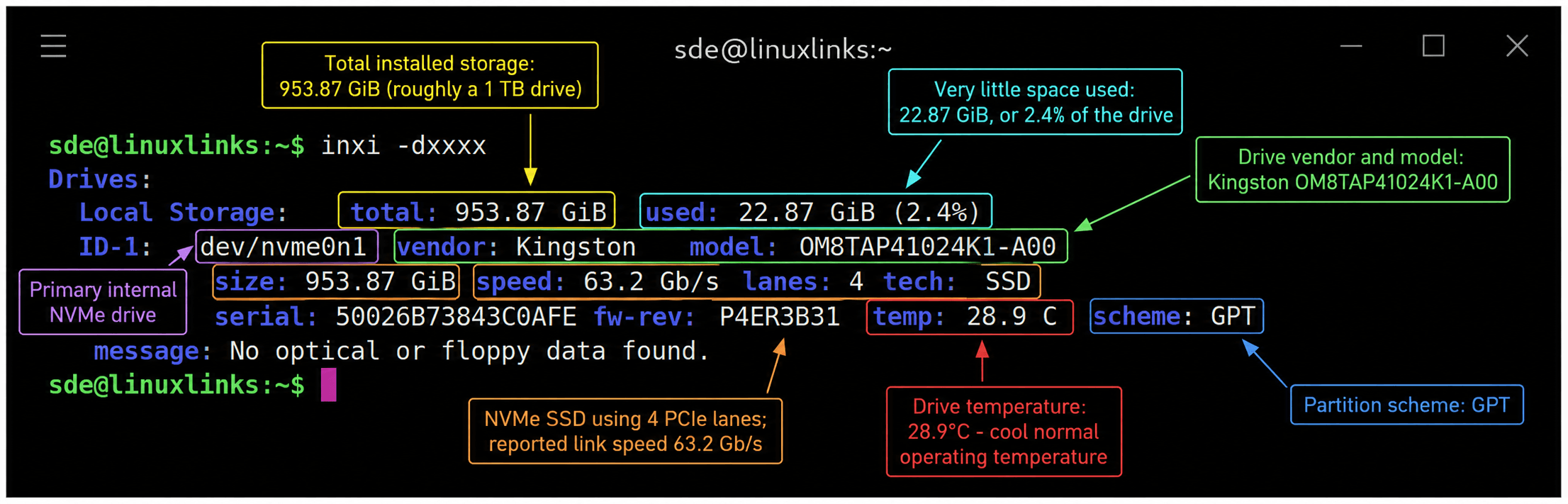
My machine came with the Kingston NVMe installed. Kingston is a well-respected storage brand, especially in the mainstream and OEM market.
It’s a 1TB M.2 2280 PCIe Gen4 x4 NVMe SSD using QLC NAND. This model offers up to 6,100MB/s sequential read and up to 5,300MB/s sequential write. It’s a DRAM-less design, relying on the NVMe controller and host memory rather than a dedicated onboard DRAM cache.
For everyday Linux desktop use it feels very responsive. The trade-off is that it’s unlikely to match premium DRAM-equipped NVMe drives under sustained heavy writes, large file transfers, or demanding mixed workloads.
At the time I took this screenshot, I’d already installed a sizeable selection of software on the machine, including ONLYOFFICE, RStudio, Shortwave, Fooyin, and many other applications.
Memory
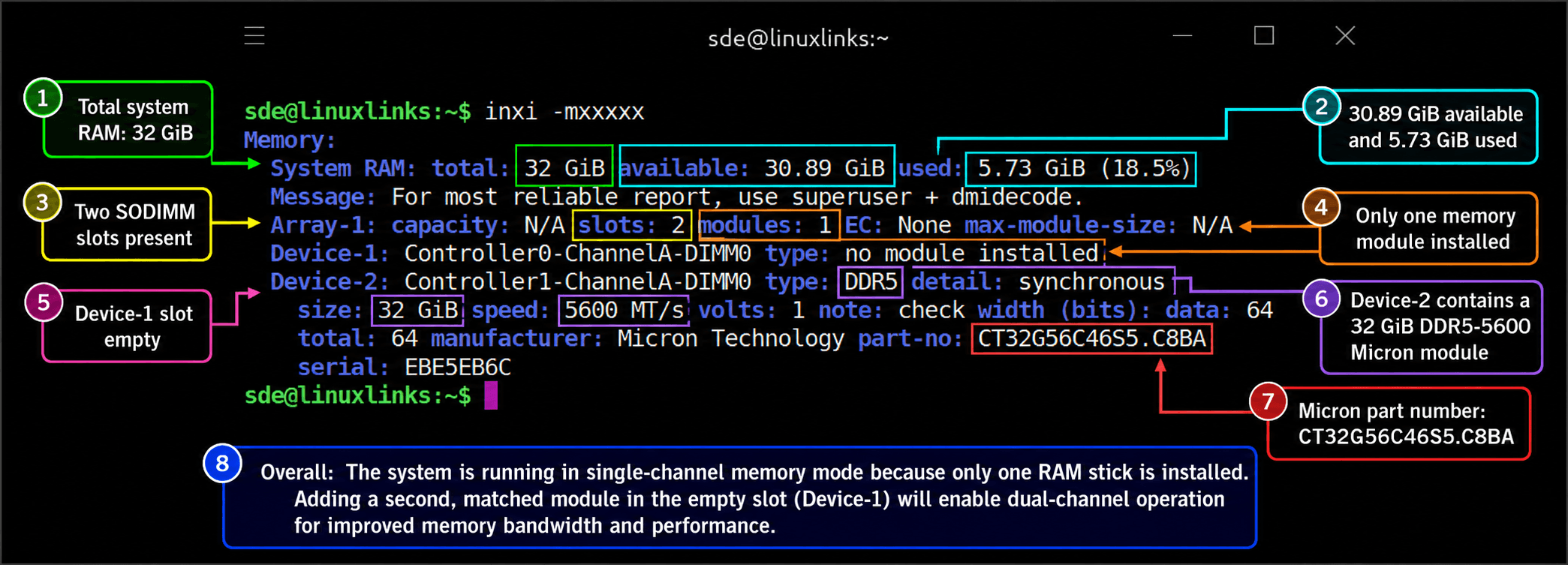
For a machine marketed around AI and modern high-performance use, shipping the 32GB configuration as 1 × 32GB SODIMM rather than 2 × 16GB is surprising. It means the system is running in single-channel memory mode out of the box, leaving a lot of memory bandwidth on the table. Minisforum’s website notes that the Time Spy GPU score improves by 31% running with dual-channel memory.
The good news is that the installed RAM is from a reputable manufacturer, and the spare slot makes upgrading straightforward. Even so, from both a performance and marketing perspective, I think a mini PC positioned around AI capabilities should ship with dual-channel memory enabled by default. Alternatively, the barebones version may be the better option, as it lets you install a matched pair of SODIMMs from the outset.
My unit came from Amazon UK, so it’s possible the single-SODIMM configuration is specific to this batch or retail channel. It’s worth checking with MINISFORUM whether units sold through other channels ship with paired RAM modules.
I ran the benchmarks using the machine’s supplied configuration. As shown on page 4 of this article, I later opened the system and added a second 32GB SODIMM. That should provide a fairer indication of the hardware’s performance with dual-channel memory enabled.
Audio
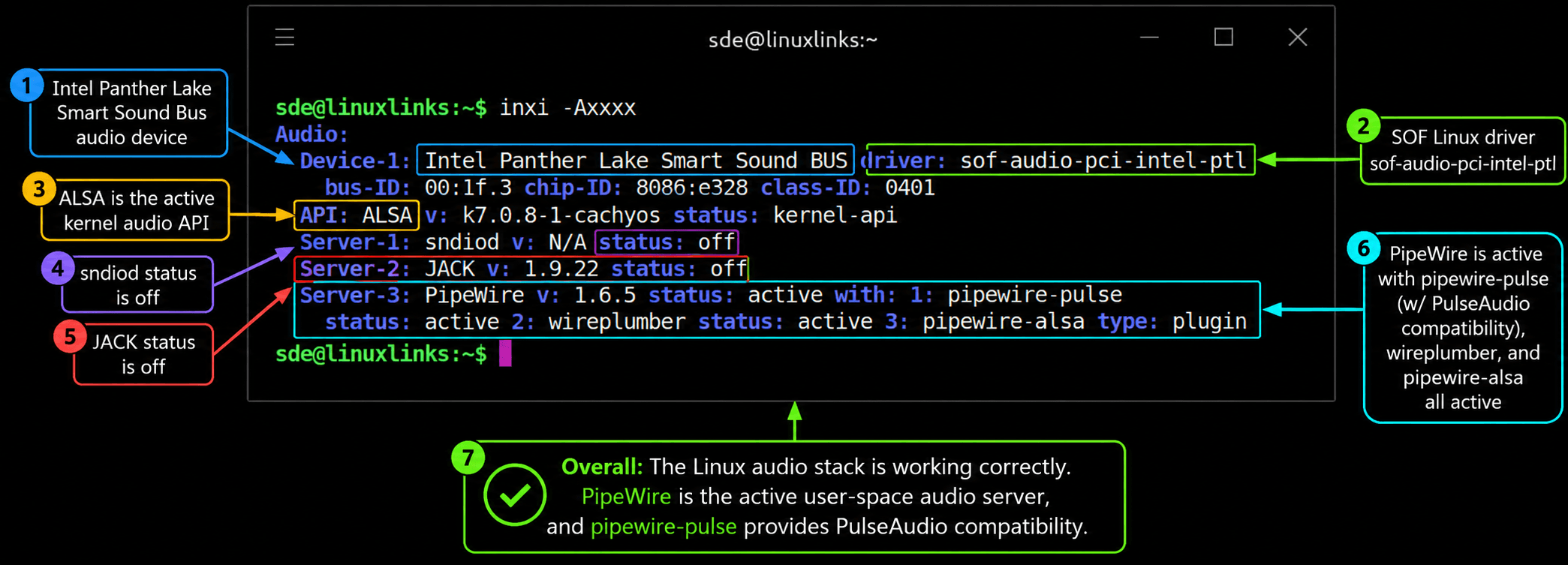
Linux audio is detected cleanly on this Panther Lake system, with no fallback, missing-driver, or “dummy output” problem shown in the inxi output.
Bluetooth
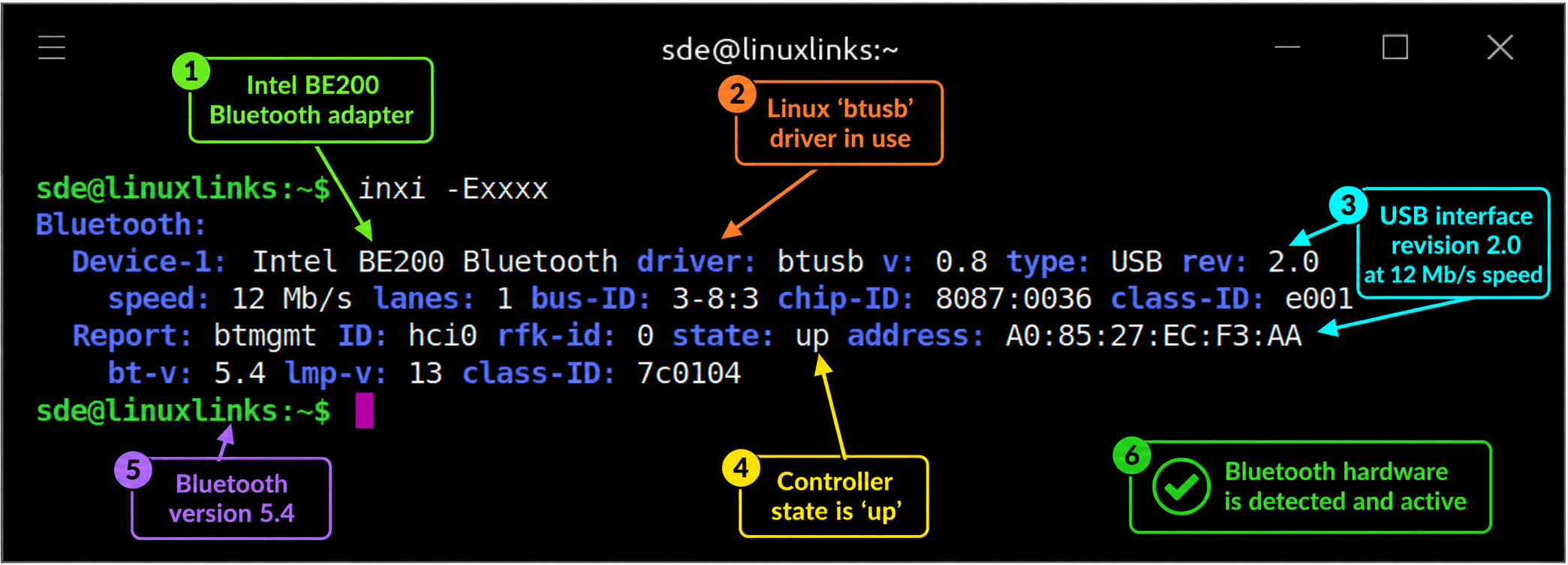
Bluetooth support is working well under Linux. The Intel BE200 Bluetooth controller is detected correctly, handled by the standard btusb driver, exposed as hci0, and reported as active with Bluetooth 5.4 support. I paired a range of devices, including Edifier speakers, an HHKB mechanical keyboard, and several mice. All worked flawlessly in both CachyOS and Ubuntu.
Network
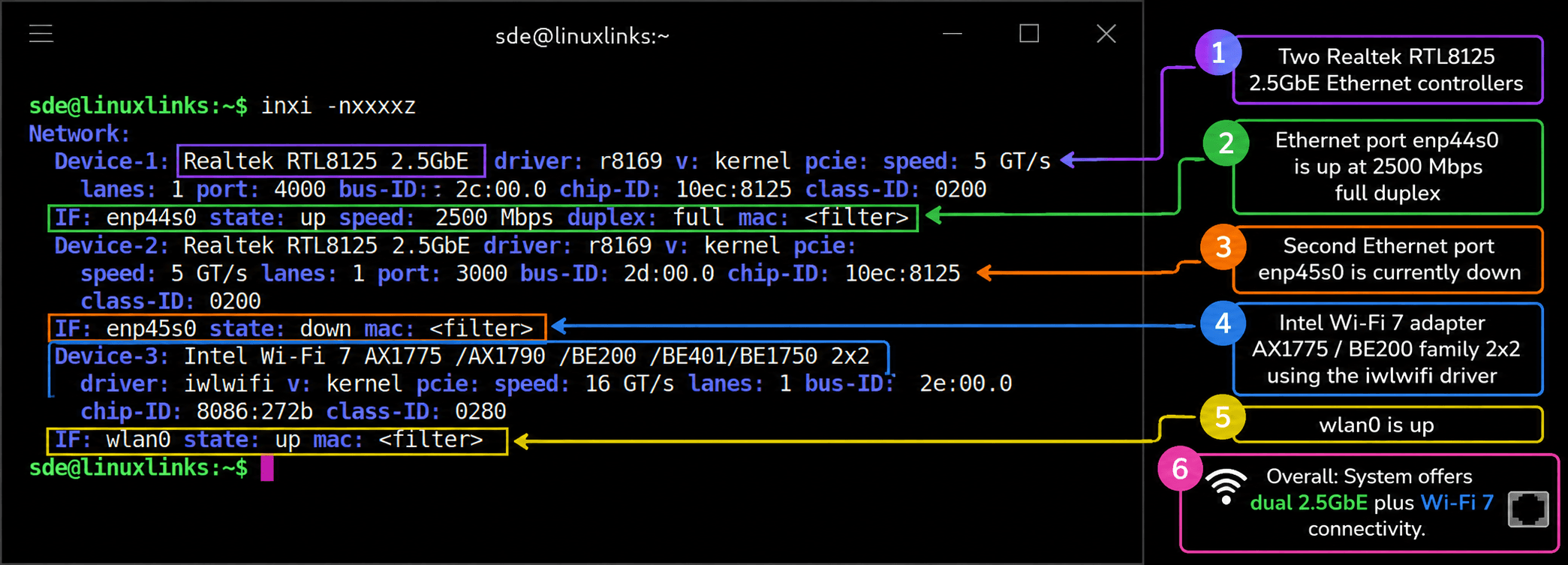
Networking is a strong point. Linux detects both Realtek RTL8125 2.5GbE controllers with the in-kernel r8169 driver, with one port already linked at 2500Mb/s full duplex. The second port is present but idle, as nothing is connected. Wireless support is healthy, with the Intel Wi-Fi 7-class 2×2 adapter handled by the iwlwifi driver and exposed as wlan0. Wi-Fi works out of the box.
Temperature
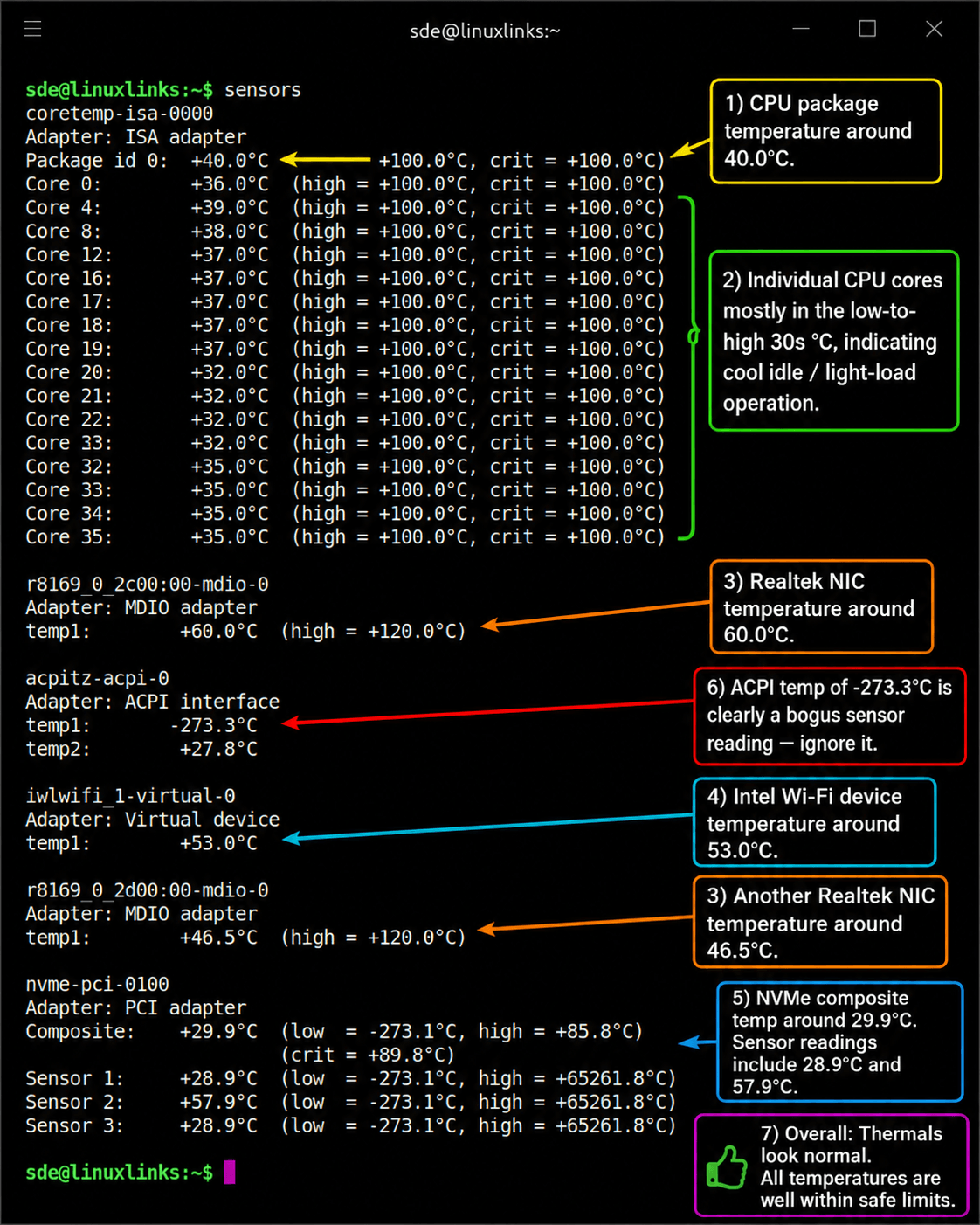
This snapshot was taken with the machine under light load, with an ambient room temperature of 18°C.
The active Realtek 2.5GbE controller reports 60°C in an 18°C room, which is warmer than the CPU cores and NVMe drive but still well within the sensor’s stated limit. The second Realtek controller is cooler at 46.5°C, as it isn’t linked. I’d class the active NIC as warm rather than worrying, though it’s something I’ll revisit under sustained 2.5GbE network load.
Next page: Page 4 – Adding RAM
Pages in this article:
Page 1 – Introduction and Design
Page 2 – Installing Linux
Page 3 – Interrogation of the System
Page 4 – Adding RAM
Complete list of articles in this series:
| MINISFORUM M2 Core Ultra 7 356H Mini PC | |
|---|---|
| Introduction | Introduction to the series and interrogation of the machine |
| NPU | Setting up and testing the NPU |
| Benchmarks | I run a series of benchmarks focusing on the CPU, GPU, Memory, and Disk performance |
| Power | Testing and comparing the power consumption |
| BIOS | In the world of computing, BIOS, which stands for Basic Input/Output System, plays a crucial role |
| Cores | A look at Intel’s hybrid architecture |
| Intel processors | P-Cores, E-Cores and LP E-Cores Compared Across 4 Intel Processors |
| NPU | NPU and Llama |
| Next articles in the series will continue to focus on the machine's NPU | |
Please read our Comment Policy before commenting.