
Last Updated on July 11, 2021
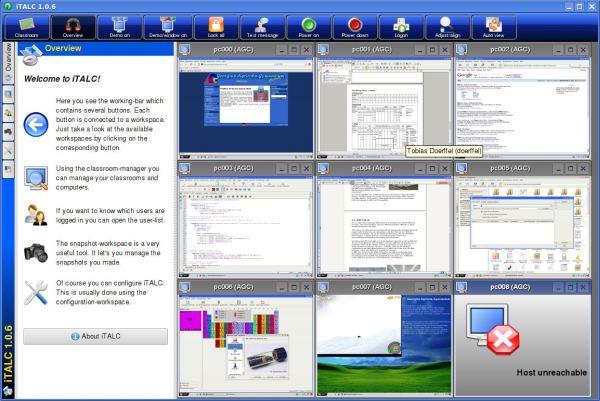
Intelligent Teaching And Learning with Computers (iTALC) is a useful and powerful didactical tool which lets you view and control computers in your labs and interact with students in a modern way. This software makes it possible, to access and influence the pupils’ activities just from the computer of the teacher. With the help of iTALC, the teacher is able to see the content of the pupils’ screens on his/her screen. If a pupil needs help, the teacher can access the pupils desktop and give support from his computer.
The pupil can watch all activities, the teacher is doing on his desktop. So the pupil can learn new processes. For teaching something to all pupils, you can switch into demo-mode where all screens of the pupils show the teacher-screen. Furthermore things like locking pupil’s screens, killing games, power on/off clients and much more can be done with iTALC.
As iTALC works completely with TCP connections, it has the advantage of permitting demo and remote control over local area networks.
Features include:
- Easy to use interface.
- Overview mode (allow previewing screens for each pupil computers in a small preview window).
- Remote control computers to support and help other people.
- Previewing computers in predefined classroom segment.
- Show a demo (either in full screen or in a window) – the teacher’s screen is shown on all students’ computers in realtime.
- Lock workstations for moving undivided attention to teacher.
- Send text messages to students.
- Define several groups of users. These groups can differ in which clients they are allowed to access.
- Powering on/off and rebooting computers per remote.
- Remote logon and logoff and remote execution of arbitrary commands/scripts.
- Snapshots for evidence protection, e.g. during infringement of any user rules.
- Home schooling – iTALC’s network-technology is not restricted to a subnet and therefore students at home can join lessons via VPN-connections just by installing iTALC client.
- Easy installation.
Website: veyon.io
Support: GitHub
Developer: Tobias Doerffel, Andrei Krueger
License: GNU GPL v2
iTALC is written in C++. Learn C++ with our recommended free books and free tutorials.
Return to Classroom Tools Home Page | Return to Education Top Picks Home Page
| Explore Linux | |
|---|---|
 | Best Free and Open Source Software - A huge collection of recommended free and open source software covering every major category. |
 | In-depth Linux Software Reviews - Detailed assessments of Linux software covering features, usability and overall quality. |
 | The Big List of Active Linux Distros - An extensive collection of actively developed Linux distributions. |
 | Open Source Alternatives - Alternatives to software and services from Google, Microsoft, Apple, Adobe, IBM, Autodesk, Oracle and others. |
 | Essential Linux System Tools - Indispensable utilities for monitoring, maintaining and managing Linux systems. |
 | Linux Productivity Tools - Useful utilities for improving productivity and streamlining everyday tasks. |
 | Alternatives to Popular CLI Tools - Modern alternatives to familiar command-line utilities supplied with Linux systems. |
 | Awesome Free Linux Game Tools - Tools, utilities and companion software that improve gaming on Linux. |
 | Machine Learning on Linux - Machine learning and deep learning software, self-hosted applications and practical tools. |
 | Saving Money with Linux - Practical ways to reduce electricity consumption and lower computing costs with Linux. |
 | Linux Candy - Fun, entertaining and sometimes delightfully quirky software from the lighter side of Linux. |
Please read our Comment Policy before commenting.