
Last Updated on July 11, 2021
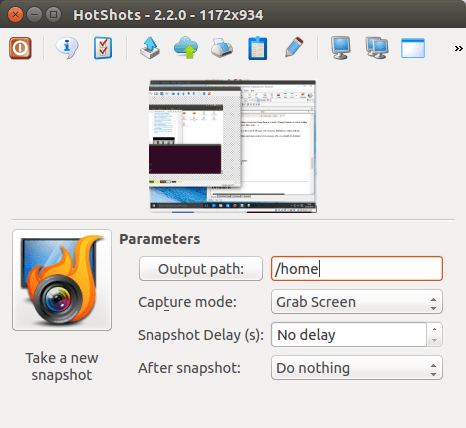
HotShots is an application for capturing screens and saving them in a variety of image formats as well as adding annotations and graphical data (arrows, lines, texts, …).
You can also upload your creations to the web (FTP/some web services). HotShots is written with Qt.
HotShots is not available in Ubuntu’s Software Center. But it’s easy to install by typing at the command line:
sudo add-apt-repository ppa:ubuntuhandbook1/apps
sudo apt-get update
sudo apt-get install hotshots
Features include:
- Simple to use.
- Full featured.
- Built-in editor.
- Hotkeys.
- Built-in magnification.
- Freehand and multi-screen capture.
- Supported Output Formats: Black & Whte (bw), Encapsulated PostScript (eps, epsf), Encapsulated PostScript Interchange (epsi), OpenEXR (exr), PC Paintbrush Exchange (pcx), Photoshop Document (psd), ras, rgb, rgba, Irix RGB (sgi), Truevision Targa (tga), eXperimental Computing Facility (xcf), Windows Bitmap (bmp), DirectDraw Surface (dds), Graphic Interchange Format (gif), Icon Image (ico), Joint Photographic Experts Group 2000 (jp2), Joint Photographic Experts Group (jpeg, jpg), Multiple-image Network Graphics (mng), Portable Pixmap (ppm), Scalable Vector Graphics (svg), svgz, Tagged Image File Format (tif, tiff), webp, X11 Bitmap (xbm), X11 Pixmap (xpm), and Khoros Visualization (xv).
- Internationalization support: Basque, Chinese, Czech, French, Galician, German, Greek, Italian, Japanese, Lithuanian, Polish, Portuguese, Romanian, Russian, Serbian, Singhalese, Slovak, Spanish, Turkish, Ukrainian, and Vietnamese.
Website: sourceforge.net/projects/hotshots
Support:
Developer: xbee
License: GNU GPL v2
HotShots is written in C++. Learn C++ with our recommended free books and free tutorials.
Return to Screen Capture Home Page
| Explore Linux | |
|---|---|
 | Best Free and Open Source Software - A huge collection of recommended free and open source software covering every major category. |
 | In-depth Linux Software Reviews - Detailed assessments of Linux software covering features, usability and overall quality. |
 | The Big List of Active Linux Distros - An extensive collection of actively developed Linux distributions. |
 | Open Source Alternatives - Alternatives to software and services from Google, Microsoft, Apple, Adobe, IBM, Autodesk, Oracle and others. |
 | Essential Linux System Tools - Indispensable utilities for monitoring, maintaining and managing Linux systems. |
 | Linux Productivity Tools - Useful utilities for improving productivity and streamlining everyday tasks. |
 | Alternatives to Popular CLI Tools - Modern alternatives to familiar command-line utilities supplied with Linux systems. |
 | Awesome Free Linux Game Tools - Tools, utilities and companion software that improve gaming on Linux. |
 | Machine Learning on Linux - Machine learning and deep learning software, self-hosted applications and practical tools. |
 | Saving Money with Linux - Practical ways to reduce electricity consumption and lower computing costs with Linux. |
 | Linux Candy - Fun, entertaining and sometimes delightfully quirky software from the lighter side of Linux. |
Please read our Comment Policy before commenting.