
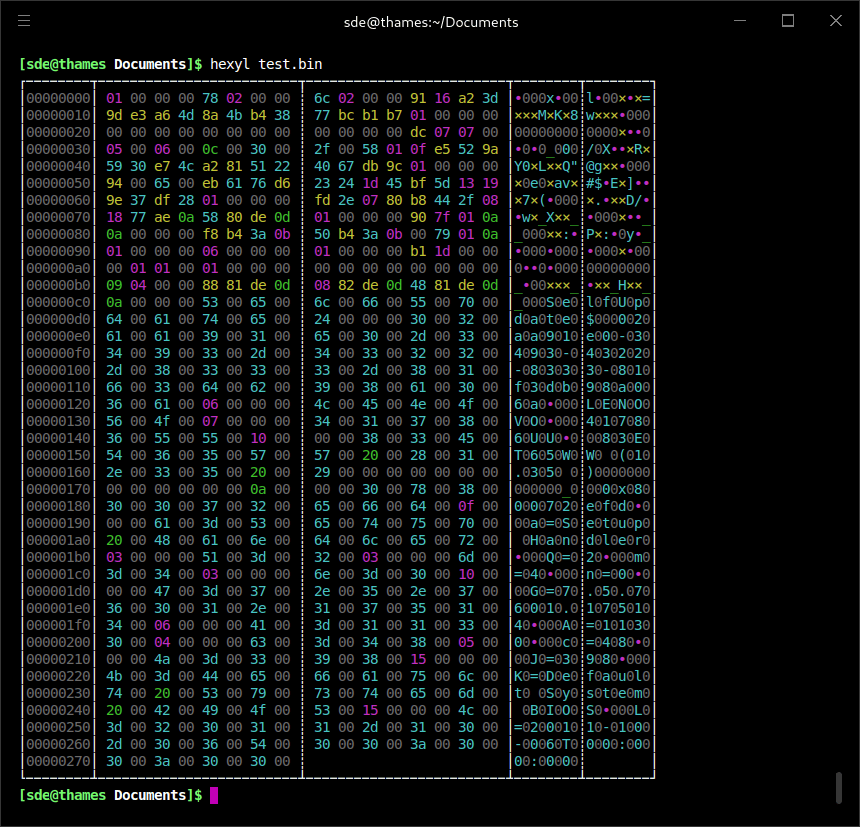
hexyl is a terminal hex viewer designed to make raw binary data easier to inspect. It uses colour to distinguish null bytes, printable ASCII characters, whitespace, other ASCII characters and non-ASCII data.
The display is highly configurable. Users can choose how byte values are represented, how they are grouped, which character table is used and whether several data panels are shown. Input can be read from a file or standard input, making hexyl useful both interactively and as part of command pipelines.
This is free and open source software.
Key Features
- Uses colour to distinguish different categories of bytes.
- Reads data from files or standard input.
- Limits output to a specified number of bytes.
- Skips forward from the start of input or uses negative offsets relative to the end of a file.
- Accepts decimal and binary size units as well as hexadecimal values for lengths and offsets.
- Collapses repeated groups of identical lines unless squeezing is disabled.
- Offers Unicode, ASCII or borderless display styles.
- Adds an arbitrary value to displayed file offsets without changing the data being read.
- Displays byte values in binary, octal, decimal or hexadecimal form.
- Controls how many bytes are grouped together and supports little- and big-endian display.
- Supports configurable numbers of data panels and adapts output to terminal width.
- Offers character tables including ASCII, Code Page 437, EBCDIC and Braille-oriented display.
- Can hide the character or position panels for a more compact display.
- Allows colours to be customised through environment variables, including RGB values.
- Honours the NO_COLOR convention when colour output is unwanted.
- Can print its colour table for reference.
- Provides functionality that can also be used as a Rust library.
Website: github.com/sharkdp/hexyl
Support:
Developer: David Peter
License: Apache License 2.0 / MIT License
hexyl is written in Rust. Learn Rust with our recommended free books and free tutorials.
Related Software
| Console-Based Hex Editors | |
|---|---|
| hexyl | Colored command-line hex viewer |
| hyx | Minimalistic hex editor |
| hexedit | View and edit hexadecimal files |
| hexer | Multi-buffer editor for binary files |
| dz6 | Terminal hex editor with Vim-inspired key bindings |
| hx | Hex editor using plain C and POSIX libs |
| poke | Extensible editor for inspecting and modifying structured binary data |
| Hextazy | Colorful hexadecimal editor |
| HexPatch | Interactive TUI for viewing, editing and patching binary files |
| hexhog | Configurable hex viewer and editor |
| DHEX | ncurses-based hex editor with diff mode |
| fileobj | ncurses based hex editor |
| vbl | Terminal-based hexadecimal viewer and editor for binary files |
| HexMe | Written in C++ that uses the Curses library |
| hexcurse-ng | Written in C |
| ddhx | Simple multi-platform modal text UI hex editor |
| bvi | Based on the vi text editor |
| XVI | Hex editor using ncurses |
| Hexit | Minimalistic hex editor |
Read our verdict in the software roundup.
| Alternatives to hexdump | |
|---|---|
| hexyl | Colored command-line hex viewer |
| DHEX | ncurses-based hex editor with diff mode |
| hexedit | View and edit hexadecimal files |
| hyx | Minimalistic but powerful hex editor |
| hexer | Multi-buffer editor for binary files |
| xxd | Make a hexdump or do the reverse |
| hx | Hex editor using plain C and POSIX libs |
 LinuxLinks helps you discover the best free and open source software for Linux. Explore our extensive collection of recommended applications, including alternatives to popular proprietary software. LinuxLinks helps you discover the best free and open source software for Linux. Explore our extensive collection of recommended applications, including alternatives to popular proprietary software.We also publish software reviews, Linux tutorials, hardware reviews, free programming books and articles covering the wider open source community. Browse our Linux resources to discover more. Know a useful free and open source Linux application we haven't covered? Suggest a program for inclusion. Has your software been featured on LinuxLinks? Display one of our Featured on LinuxLinks badges on your website or GitHub README. |
Please read our Comment Policy before commenting.