

gsty is a terminal-based theme browser for the Ghostty terminal emulator. Written in Rust, it provides an interactive interface for finding, previewing and applying installed themes.
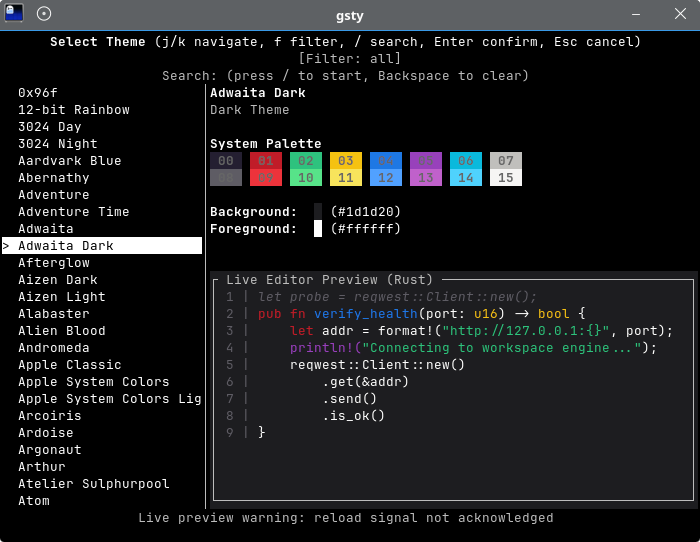
Themes are previewed in real time, with gsty signalling running Ghostty instances to reload their configuration. The interface displays each theme’s colour palette and rendered sample code, while filtering and search tools make large theme collections easier to navigate.
This is free and open source software.
Key Features
- Browse installed Ghostty themes from a terminal interface.
- Preview themes in real time before confirming a selection.
- Display 16-colour palettes, foreground and background colours.
- Render syntax-highlighted sample code using the selected theme.
- Filter themes by dark, light or all colour schemes.
- Search for themes by name.
- Restore the previous theme when cancelling a selection.
- List available themes as plain text for scripts and non-TTY environments.
- Discover themes from system and user configuration directories.
Website: github.com/tappunk/gsty
Support:
Developer: tappunk
License: MIT License
gsty is written in Rust. Learn Rust with our recommended free books and free tutorials.
 Explore our carefully curated directory of recommended free and open source software, covering every major software category. Explore our carefully curated directory of recommended free and open source software, covering every major software category.The directory forms part of our extensive collection of articles for Linux enthusiasts. It includes hundreds of detailed reviews, together with free and open source alternatives to proprietary software from companies such as Google, Microsoft, Apple, Adobe, IBM, Cisco, Oracle, and Autodesk. LinuxLinks also covers interesting projects worth exploring, Linux-compatible hardware, free programming books and tutorials, and much more. Know a useful free and open source Linux application that we haven’t covered? Tell us about it using our submission form. |
Please read our Comment Policy before commenting.