

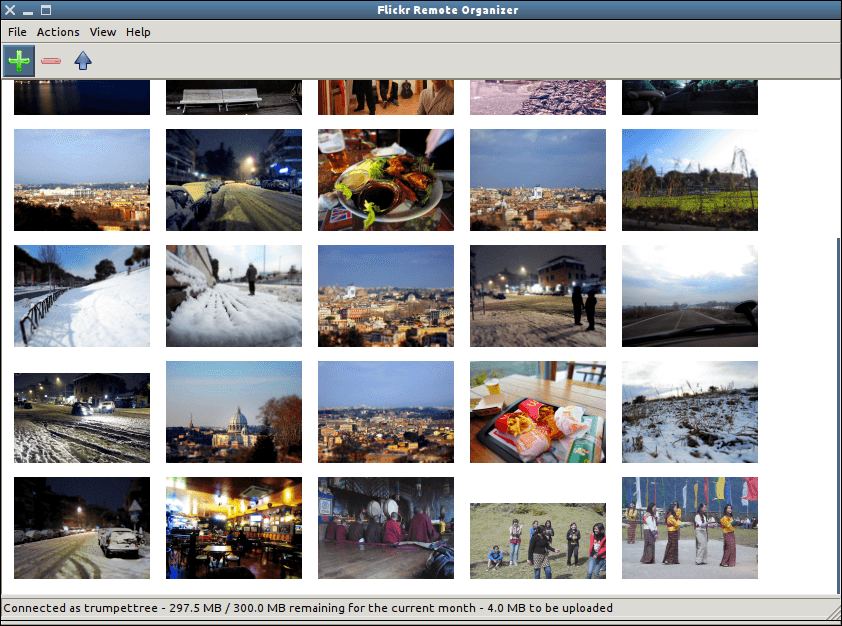
Flickr Remote Organizer (Frogr) is a small open source application for the GNOME desktop that allows users to manage their accounts in the Flickr image hosting website. It supports all the basic Flickr features, including uploading pictures, adding descriptions, setting tags and managing sets and groups pools.
Frogr intends to be a complete GNOME application to remotely manage a Flickr account from the desktop.
Frogr uses flicksoup, a libsoup-based library to communicate with the server through the publicly available flickr REST API.
Key Features
- Allow to upload pictures and videos to flickr, specifying details such as title, description, tags, visibility, content type, safety level and whether the to “show up on global search results”, both individually or to several elements at once.
- Allow uploading pictures and videos located in remote machines, through typically supported protocols (SAMBA, SSH, FTP…).
- Allow loading/saving the work session from/to ‘project’ files.
- Allow sorting pictures and videos by title, size and date taken, besides the default order (“as loaded”).
- Allow adding tags to elements, opposite to just set them through the ‘details’ dialog.
- Allow setting specific licenses and geolocation information for pictures right from the desktop.
- Allow specifying sets and group pools for the elements to be added to after the upload process.
- Allow to create sets right from frogr, opposite to just adding elements to already existing ones.
- Allow specifying a list of pictures and/or videos to be loaded from command line.
- Import tags from picture’s metainformation if present when loading.
- Open pictures and videos from frogr in the default image viewer, both from the details dialog and the main view.
- Auto-completion in ‘tags’ entries, based in tags already present for the active account.
- Registered as image mime types handler, so it’s possible to load stuff on it from other applications (e.g. nautilus or eog).
- Support for drag’n’drop to load elements right from other apps.
- Support for handling multiple Flickr accounts.
- Support for internationalization (i18n) messages.
- Support for specifying HTTP proxies manually.
- Support for using the GNOME general proxy settings.
- Support for the new OAuth-based authentication system. Previous versions of frogr using the old system will be seamlessly updated.
- Integrated with GNOME.
- Manual translated into Czech, German, English, Spanish, French, Russian, and Slovenian.
- Translated to Czech, Danish, German, Greek, English, Spanish, French, Galician, Italian, Polish, Brazilian Portuguese, Russian, Slovenian, Swedish, Turkish, Ukrainian, and Chinese.
Website: wiki.gnome.org/Apps/Frogr
Support: GitLab Code Repository
Developer: Mario Sanchez Prada
License: GNU General Public License v3.0
Frogr is written in C. Learn C with our recommended free books and free tutorials.
Related Software
| Flickr Tools | |
|---|---|
| Frogr | Manage your accounts in the Flickr image hosting website |
| digiKam | Has built-in support for Flickr |
| Shotwell | Personal photo management with Flickr support |
| GNOME Photos | Access, organize and share your photos on GNOME |
| Nautilus Flickr Uploader | Upload pictures to the Flickr service from the Nautilus file browser |
Read our verdict in the software roundup.
 Explore our comprehensive directory of recommended free and open source software. Our carefully curated collection spans every major software category. Explore our comprehensive directory of recommended free and open source software. Our carefully curated collection spans every major software category.This directory is part of our ongoing series of informative articles for Linux enthusiasts. It features hundreds of detailed reviews, along with open source alternatives to proprietary solutions from major corporations such as Google, Microsoft, Apple, Adobe, IBM, Cisco, Oracle, and Autodesk. You’ll also find interesting projects to try, hardware coverage, free programming books and tutorials, and much more. Discovered a useful open source Linux program that we haven’t covered yet? Let us know by completing this form. |