

element shows the periodic table on the command line.
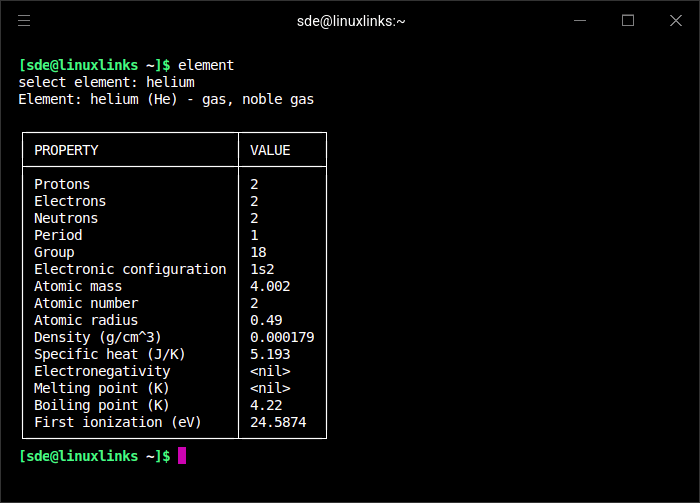
Using element is element-ary! Run element and use the autocompletion menu to select the item to display properties of! Or, if you already know, run element directly.
This is free and open source software.
Key Features
- element – prompt autocompletion menu to select from.
- element iron – directly display properties of iron,
- element random – display properties of a random element,
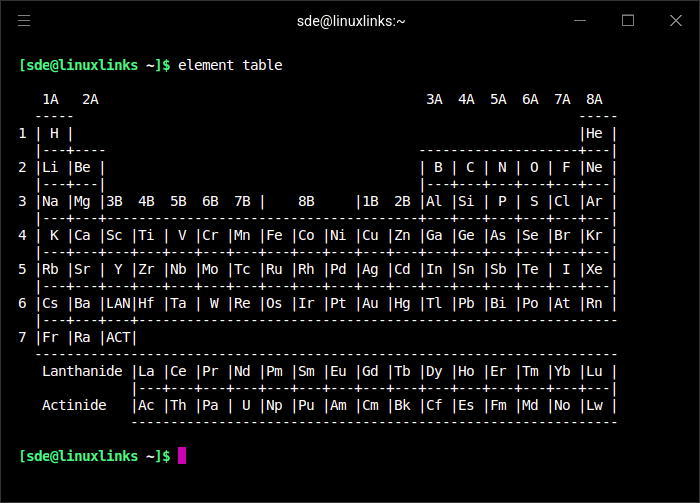
- element table – display the periodic table in ascii format. The output is shown in the second image below.
- element version – print current program version,
Website: github.com/gennaro-tedesco/element
Support:
Developer: Gennaro Tedesco
License: Apache License 2.0
element is written in Go. Learn Go with our recommended free books and free tutorials.
Related Software
| Periodic Table Tools | |
|---|---|
| periodic-table-cli | Interactive periodic table of elements app for the console |
| Nucleus | Browse the chemical elements |
| Kalzium | Full-featured chemistry application for KDE 5 |
| P-Table | Beautiful TUI periodic table for Linux terminals coded in C |
| Periotable | Modern periodic table app |
| multiElement | Alternative versions of the periodic table of chemical elements |
| element | Periodic table on the command line |
Read our verdict in the software roundup.
 Explore our comprehensive directory of recommended free and open source software. Our carefully curated collection spans every major software category. Explore our comprehensive directory of recommended free and open source software. Our carefully curated collection spans every major software category.This directory is part of our ongoing series of informative articles for Linux enthusiasts. It features hundreds of detailed reviews, along with open source alternatives to proprietary solutions from major corporations such as Google, Microsoft, Apple, Adobe, IBM, Cisco, Oracle, and Autodesk. You’ll also find interesting projects to try, hardware coverage, free programming books and tutorials, and much more. Discovered a useful open source Linux program that we haven’t covered yet? Let us know by completing this form. |
Please read our Comment Policy before commenting.