
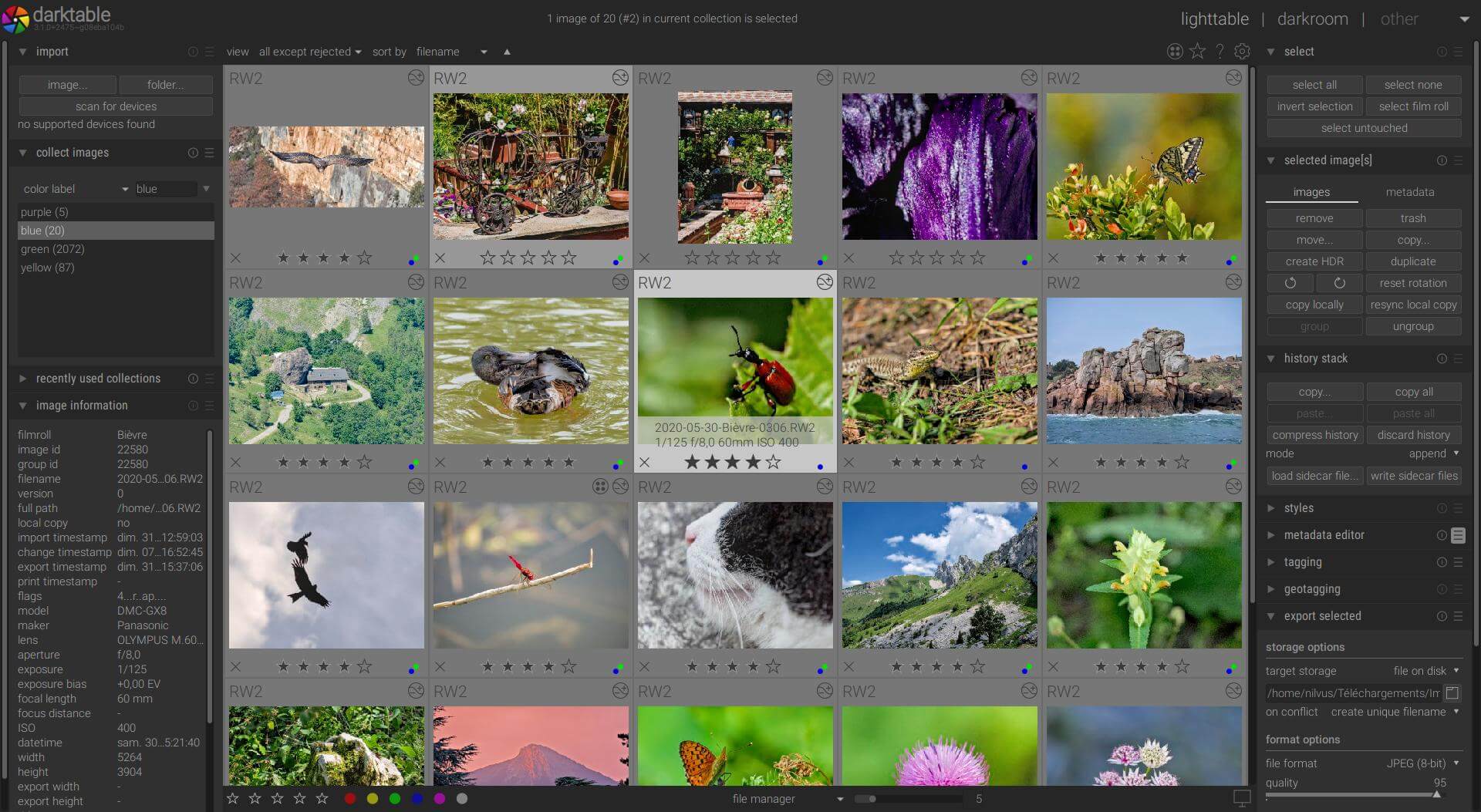
darktable is a first-class photography workflow application and raw developer built around a lighttable for organising photographs and a darkroom for processing them. It is designed for photographers who need to work through large collections while retaining the original camera files.
Its editing pipeline is non-destructive. Processing instructions are stored separately from the source image, while the catalogue keeps track of metadata, ratings, labels, tags and editing history. darktable combines image management, raw development, colour management and export tools in a single desktop application.
This is free and open source software.
Key Features
- 32-bit floating-point processing pipeline designed for high-quality raw development.
- GPU-accelerated image processing through OpenCL where supported by the hardware and driver.
- Professional colour-management workflow with ICC profile support and display-profile handling.
- Extensive darkroom modules for exposure, tone, colour, sharpening, denoising, lens correction, retouching and creative processing.
- Powerful masking system with drawn, parametric and raster masks for selective adjustments.
- Lighttable tools for culling, comparing, rating, colour-labelling, tagging, grouping and filtering photographs.
- Flexible collection queries based on metadata and other catalogue properties.
- Support for a broad range of camera raw formats together with common standard and high-dynamic-range image formats.
- Tethered shooting with live view for supported cameras.
- XMP sidecar support for storing metadata and processing information alongside image files.
- Export to formats including JPEG, PNG, TIFF, PPM, EXR and other supported targets.
- Lua scripting support for extending the workflow and automating repetitive tasks.
Website: www.darktable.org
Support:
Developer: darktable team
License: GNU General Public License v3.0
Darktable is written in C. Learn C with our recommended free books and free tutorials.
Related Software
| RAW Processing Tools | |
|---|---|
| Darktable | Virtual lighttable and darkroom for photographers |
| digiKam | Professional photo management |
| RawTherapee | RAW image processing application |
| LightZone | Professional-level digital darkroom software |
| ART | Fork of RawTherapee |
| ansel | Fork of Darktable |
| RapidRAW | Non-destructive, and GPU-accelerated RAW image editor |
| Filmulator | RAW photo editing application with library management |
| Photivo | Photo processor for RAW and Bitmap images |
| nUFRaw | Import and edit RAW images from digital cameras |
| UFRaw | Standalone tool to import RAW data from high-end digital cameras |
| Rawstudio | RAW image converter |
| vkdt | Workflow toolbox for raw stills and video |
| DNGLab | Camera RAW utility and DNG converter |
| GTKRawGallery | Workflow oriented photo retouching software |
| rawbit | Camera RAW image preprocessor and importer |
Read our verdict in the software roundup.
| Camera Tools | |
|---|---|
| darktable | Virtual lighttable and darkroom for photographers |
| digiKam | Digital photo management application with revamped camera support |
| gPhoto | Digital camera command-line client |
| ExifTool | Library and program to read and write meta information in multimedia files |
| RawTherapee | RAW image processing application |
| RapidRAW | Non-destructive, and GPU-accelerated RAW image editor |
| Entangle | Tethered camera control and capture |
| Kamera | KDE integration for gphoto2 cameras |
| cameractrls | Set camera controls |
| rawbit | Camera RAW image preprocessor and importer |
Read our verdict in the software roundup.
| Photo Management Software | |
|---|---|
| digiKam | Image organiser and editor using KDE |
| darktable | Photography workflow application and raw developer |
| TagStudio | Tag-based photo and file organization program |
| gThumb | Image viewer and organizer for the GNOME desktop environment |
| Shotwell | Personal photo management |
| KPhotoAlbum | Tool for indexing, searching and viewing images for KDE |
| Pix | Image viewer and browser utility which is based on gThumb |
| Lap | Photo manager with private search and smart organisation |
| Tropy | Explore your research photos |
| Rapid Photo Downloader | Photo and video downloader |
| Allusion-rafauc | Fork of Allusion |
| Allusion | Organize your visual library |
| GNOME Photos | Access, organize and share your photos on GNOME |
| Snu Photo Manager | Feature-rich photo manager |
| Fotocx | Image editing and collection management |
| FerrumPix | Photo manager with RAW development and extensive editing |
Read our verdict in the software roundup.
 Explore our carefully curated directory of recommended free and open source software, covering every major software category. Explore our carefully curated directory of recommended free and open source software, covering every major software category.The directory forms part of our extensive collection of articles for Linux enthusiasts. It includes hundreds of detailed reviews, together with free and open source alternatives to proprietary software from companies such as Google, Microsoft, Apple, Adobe, IBM, Cisco, Oracle, and Autodesk. LinuxLinks also covers interesting projects worth exploring, Linux-compatible hardware, free programming books and tutorials, and much more. Know a useful free and open source Linux application that we haven’t covered? Tell us about it using our submission form. |
Please read our Comment Policy before commenting.
This is very much out of date. You need to have a look at the features of in the latest release.
I don’t think LinuxLinks *needs* to do anything. They provide tons of content for free and yet you just make what are at best sarky comments.
As a forum administrator of Manjaro frequently said, if you want something done, you can
a) do it yourself
b) pay for someone to do it