

Backup software creates copies of files, databases, operating systems, or entire servers so that data can be restored if something goes wrong. These backups allow users to recover information after hardware failure, accidental deletion, corruption, malware, or other unexpected events. Depending on the tool, backups may include individual files, selected directories, full system images, or snapshot-based copies that capture the state of a system at a specific moment.
Regular backups are one of the most important safeguards for any computer system. Hard drives and storage devices can fail without warning, and data loss is frequently caused by human error such as accidental deletion or overwriting files. Malware, software bugs, and system misconfiguration can also destroy or corrupt valuable data. Without reliable backups, lost information may be impossible to recover, even with the help of professional recovery services.
Linux offers a wide range of backup solutions. Traditional command line tools such as rsync, tar, and dump provide powerful and flexible methods for creating backups, but they may be intimidating for beginners. To address this, many projects provide graphical interfaces that simplify scheduling, managing backup locations, and restoring files. Other tools focus on advanced techniques such as incremental backups, deduplication, encryption, and filesystem snapshots.
In this article we explore a diverse range of Linux backup utilities, including user-friendly graphical applications, snapshot-based backup systems, and robust command line tools designed for automation and scripting.
To provide an insight into the quality of software available for Linux, we have compiled a list of 39 high quality free backup tools. These programs help individuals and organisations protect their data and ensure that important files can be recovered quickly when problems occur.
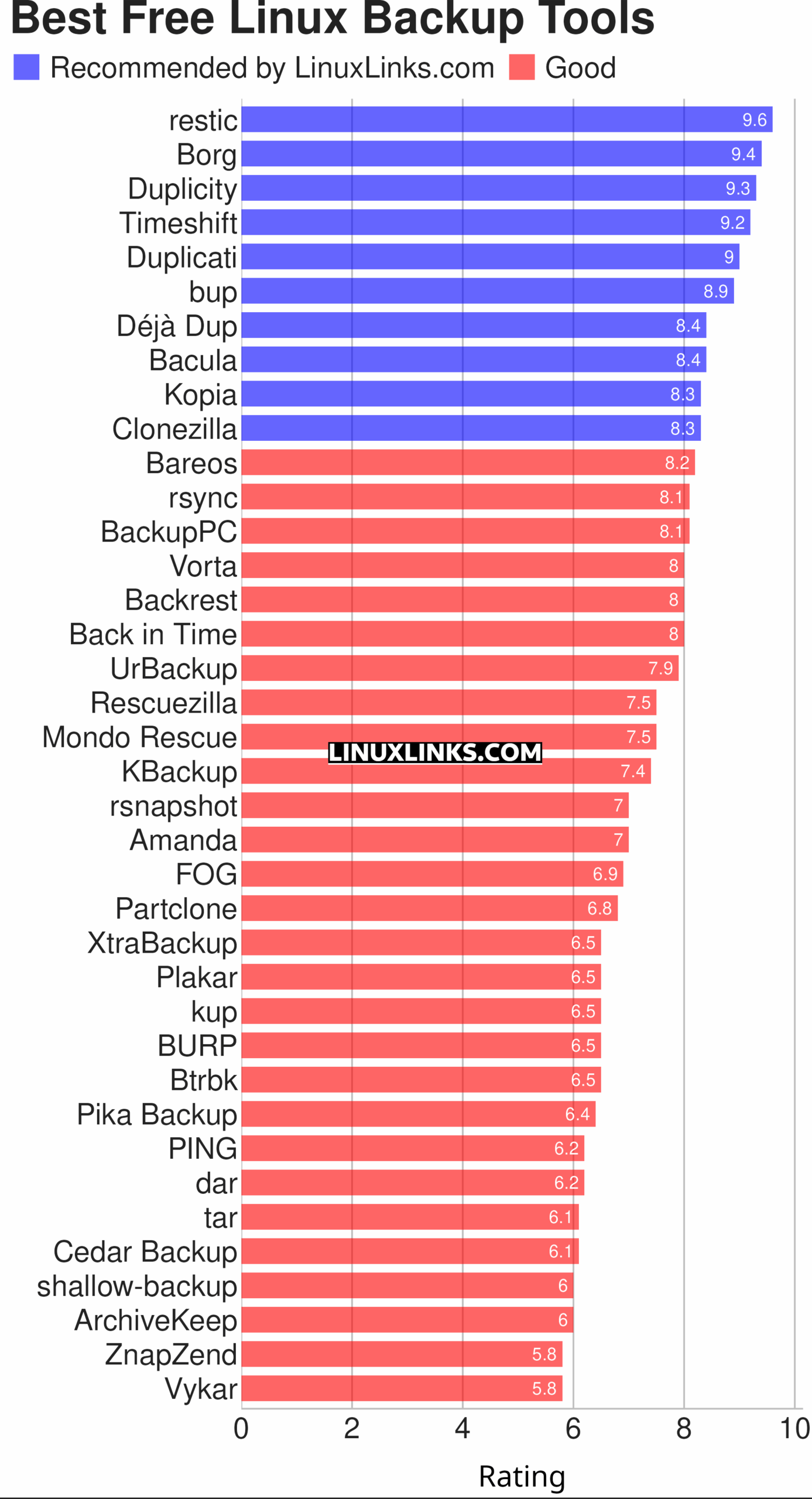
Note that the compilation is not exhaustive as other backup tools are also covered in other roundups. Check our System Administration section for other related roundups.
Let’s explore the 39 backup tools at hand. For each title we have compiled its own portal page, providing a screenshot of the software in action (where relevant), a full description with an in-depth analysis of its features, together with links to relevant resources.
| Backup Tools | |
|---|---|
| restic | Fast, efficient and secure backup software |
| Borg | Deduplicating backup software |
| Duplicity | Encrypted bandwidth-efficient backup |
| TimeShift | Takes regular incremental snapshots of the filesystem |
| Duplicati | Store encrypted backups online |
| bup | Backup a system based on the git packfile format |
| Déjà Dup | Hides the complexity of doing backups the Right Way |
| Bacula | Network backup, recovery and verification |
| Kopia | Secure backup/restore tool that allows you to create encrypted snapshots |
| Clonezilla | Offers similar functionality to Symantec Ghost |
| Bareos | Backup Archiving Recovery Open Sourced |
| rsync | Fast remote file copy program |
| BackupPC | High-performance, enterprise-grade system for backing up PCs |
| Vorta | Desktop client for Borg Backup |
| Backrest | Web UI and orchestrator for restic backup |
| Back in Time | Equivalent of OS X's Time Machine |
| UrBackup | Easy to setup open source client/server backup system |
| Rescuezilla | Easy backup, recovery & bare metal restore |
| Mondo Rescue | A powerful disaster recovery suite |
| KBackup | Backup program targeted at non-computer experts |
| rsnapshot | Local and remote filesystem snapshot utility |
| Amanda | Advanced Maryland Automatic Network Disk Archiver |
| FOG | Cloning / imaging solution / rescue suite |
| Partclone | Provides utilities to save and restore used blocks on a partition |
| XtraBackup | Backup tool for InnoDB and XtraDB databases |
| Plakar | Scalable backup solution |
| kup | Backup scheduler for the Plasma desktop |
| BURP | Uses librsync to save network traffic and space |
| Btrbk | Backup tool for btrfs subvolumes |
| Pika Backup | App focused on backups of personal data |
| PING | Also offers similar functionality to Symantec Ghost |
| dar | Full featured archiver with support for differential backups |
| tar | Tar archiving utility |
| Cedar Backup | Local and remote backups to CD or DVD media |
| shallow-backup | Git-integrated backup tool |
| ArchiveKeep | Keeps your files archived in multiple places |
| ZnapZend | ZFS centric backup tool |
| Vykar | Fast, encrypted, deduplicated backups in Rust |
 Explore our comprehensive directory of recommended free and open source software. Our carefully curated collection spans every major software category. Explore our comprehensive directory of recommended free and open source software. Our carefully curated collection spans every major software category.This directory is part of our ongoing series of informative articles for Linux enthusiasts. It features hundreds of detailed reviews, along with open source alternatives to proprietary solutions from major corporations such as Google, Microsoft, Apple, Adobe, IBM, Cisco, Oracle, and Autodesk. You’ll also find interesting projects to try, hardware coverage, free programming books and tutorials, and much more. Know a useful open source Linux program that we haven’t covered yet? Let us know by completing this form. |