

Mastodon is a free and open source microblogging platform similar to X (formerly Twitter), but with user privacy and decentralization in mind. It’s one of many protocols that interacts with the Fediverse of protocols like Pleroma, GNU Social, and others. Unlike X, Mastodon is not one social network.
Getting started with Mastodon can be confusing for newcomers. Mastodon is a federated service. This means its similar to email. You can create an email account with many different providers. And that’s the same with Mastodon. The service lets you sign up to one of many sites that run Mastodon software, called instances. A user can communicate with other Mastodon users on different instances. The instances are themed – many by country, city, or interest.
Signup to Mastodon is simple. Just supply a username, email address and password and you’re set.
Mastodon is open source, so (unsurprisingly) developers have contributed several ways to set it up. You can run it as a software package on your server, or run it as a Docker image, or even as a Heroku service.
Here’s our verdict captured in a legendary LinuxLinks-ratings chart. They are all free and open source goodness.
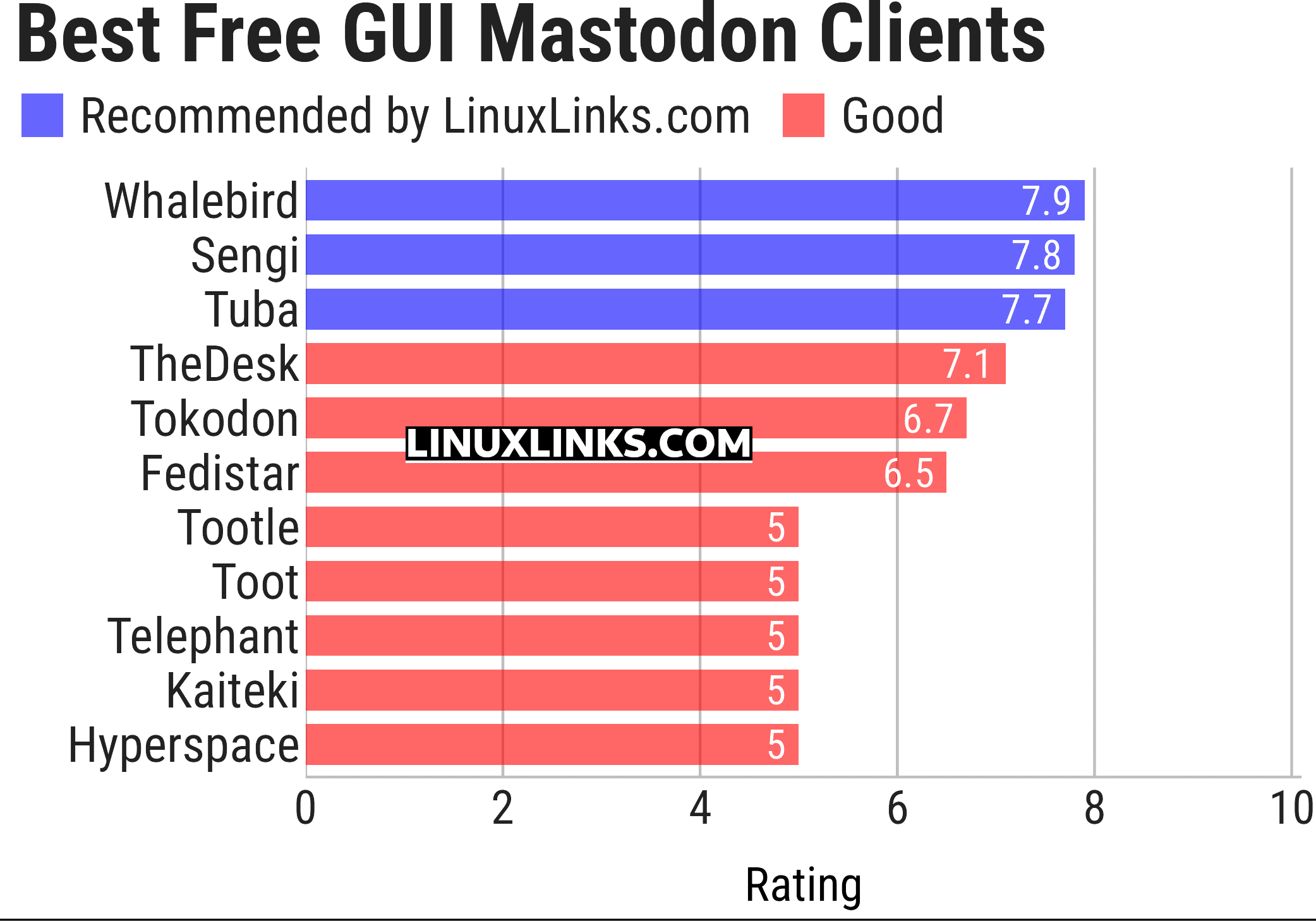
Let’s explore the 11 GUI-based Mastodon clients. For each title we have compiled its own portal page, a full description with an in-depth analysis of its features, together with links to relevant resources.
| Mastodon Clients | |
|---|---|
| Whalebird | Mastodon, Pleroma, and Misskey client |
| Sengi | Multi-account Mastodon and Pleroma desktop client |
| Tuba | Explore the federated social web with Tuba for GNOME |
| TheDesk | Manages multiple Mastodon accounts and trending hashtags |
| Tokodon | Modern Mastodon client for Plasma and Plasma Mobile |
| Fedistar | Fediverse client application for the desktop |
| Tootle | GTK client providing a clean, native interface |
| Toot | Mastodon client for COSMIC |
| Telephant | Lightweight and modern Mastodon client for the desktop |
| Kaiteki | Fediverse client for social-media sites |
| Hyperspace | Simplistic Mastodon desktop client |
This article has been updated to reflect the changes outlined in our recent announcement.
 Explore our carefully curated directory of recommended free and open source software, covering every major software category. Explore our carefully curated directory of recommended free and open source software, covering every major software category.The directory forms part of our extensive collection of articles for Linux enthusiasts. It includes hundreds of detailed reviews, together with free and open source alternatives to proprietary software from companies such as Google, Microsoft, Apple, Adobe, IBM, Cisco, Oracle, and Autodesk. LinuxLinks also covers interesting projects worth exploring, Linux-compatible hardware, free programming books and tutorials, and much more. Know a useful free and open source Linux application that we haven’t covered? Tell us about it using our submission form. |
Please read our Comment Policy before commenting.
I just stick with the web interface for the mastodon.cloud instance.