
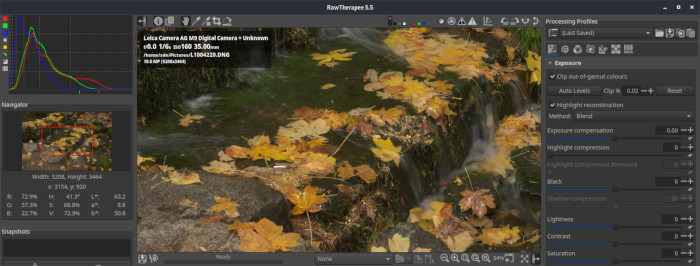
RawTherapee (The Experimental Raw Photo Editor) is a cross-platform raw image processing application.
RawTherapee involves the concept of non-destructive editing, similar to that of some other raw conversion software.
The raw loading engine of RawTherapee is based on dcraw. This means that all cameras supported by dcraw that use a classical RGB Bayer pattern sensor are also supported by RawTherapee.
Key Features
- Intuitive interface with separate file browser and processing queue tabs.
- Fast and smooth zooming and panning.
- Selectable high performance demosaicing (EAHD, HPHD and VNG-4 algorithms).
- Using DCRaw 8.82/1.398 for decoding RAW images.
- Image post processing in 16 bit / channel mode:
- Exposure control in RGB space.
-
-
- Auto exposure with adjustable clipping point / Exposure compensation / Shadow and highight compression / Contrast adjustment, curve editor.
-
-
- White balance adjustment in RGB space.
-
- With in-camera, automatic and spot white balance options / Temperature/Green tint fine tuning.
- Advanced highlight recovery algorithms and shadow/highlight controls.
- Basic Luminance curve tool to modify the luminance channel in CIELab color space:
- Brightness / Contrast adjustment, curve editor.
- USM sharpening applied on the CIELab luminance channel:
- Classical USM parameters (Radius, Amount, Threshold) / Option to avoid noise amplification / Sharpening halo control.
- Optional RL Deconvolution based sharpening for even better sharpening results.
- Color shift control in CIELab color space:
- Allows color shift by shifting the CIELab “a” and “b” channels.
- Color booster applied on the CIELab “a” and “b” channels:
- Amplifies color channels “a” and “b” together or separately / Avoids color overamplification in high chrominance areas / Option to avoid clipping caused by too high color boosting.
- Luminance denoising algorithm applied on the CIELab luminance channel:
- Edge sensitive method to preserve as much details as possible.
- Color denoising tool applied on the CIELab “a” and “b” channels:
- Classical gaussian blur or edge sensitive bluring of the color channels.
- Profiles with ability to load, save and copy profiles between images.
- Image flipping horizontally or vertically, rotation by 90 degrees clockwise or counter clockwise.
- Arbitrary image rotation (straightening tool):
- with fill function or automatic crop.
- Crop tool.
- Resize.
- Processing queue.
- Open multiple images simultaneously.
- Chromatic Aberration correction tool.
- Channel Mixer for Red, Green and Blue channels.
- Simple lens distortion correction.
- C/A Correction.
- Vignetting Correction.
- ICC based color management.
- Change History with bookmarks to support before/after checking.
- Output options:
- Supported file formats:.
-
-
- JPEG (8 bit), PNG (8 or 16 bit), TIFF (8 or 16 bit).
-
-
- Image ouput size could be set.
-
- EXIF data is preserved in JPEG output (except crw files).
-
- Output directory and automatic file naming highly customizable.
- File browsing with thumbnails.
- Localization supported (utf8 language file):
- Already included languages are: czech, deutsch, english, espanol, italian, latvian, magyar, nederlands, polish, russian, slovak, swedish.
Website: rawtherapee.com
Support:
Developer: Gábor Horváth
License: GNU General Public License v3.0
RawTherapee is written in C++. Learn C++ with our recommended free books and free tutorials.
Related Software
| HDR Imaging Software | |
|---|---|
| RawTherapee | The Experimental Raw Photo Editor |
| OpenEXR | HDR image file format and HDR utilities |
| Hugin | Panorama photo stitching program |
| tev | High dynamic range image comparison tool |
| HyperHDR | Ambient lighting implementation for television and music sets |
| HDRView | Depth-map and high-dynamic range image viewer |
| Luminance HDR | Provides a workflow for HDR imaging |
| Radiance | Lighting simulation and rendering system |
| HDRMerge | Combine two or more raw images into a single raw |
| pfstools | Command line HDR manipulation programs |
| SimpleImageViewer | High-performance image viewer |
| CinePaint | Works with 16-bit and floating point pixels for HDR imaging |
Read our verdict in the software roundup.
| Camera Tools | |
|---|---|
| darktable | Virtual lighttable and darkroom for photographers |
| digiKam | Digital photo management application with revamped camera support |
| gPhoto | Digital camera command-line client |
| ExifTool | Library and program to read and write meta information in multimedia files |
| RawTherapee | RAW image processing application |
| RapidRAW | Non-destructive, and GPU-accelerated RAW image editor |
| DCamProf | Digital camera profiling tool |
| Rawstudio | RAW image converter |
| nufraw | Import and edit RAW images from digital cameras |
| Entangle | Tethered camera control and capture |
| UFRaw | Standalone tool to import RAW data from high-end digital cameras |
| Kamera | KDE integration for gphoto2 cameras |
| fspy | Quick and easy still image camera matching |
| cameractrls | Set camera controls |
| rawbit | Camera RAW image preprocessor and importer |
Read our verdict in the software roundup.
| RAW Processing Tools | |
|---|---|
| Darktable | Virtual lighttable and darkroom for photographers |
| digiKam | Professional photo management |
| RawTherapee | RAW image processing application |
| LightZone | Professional-level digital darkroom software |
| ART | Fork of RawTherapee |
| ansel | Fork of Darktable |
| RapidRAW | Non-destructive, and GPU-accelerated RAW image editor |
| Filmulator | RAW photo editing application with library management |
| Photivo | Photo processor for RAW and Bitmap images |
| nUFRaw | Import and edit RAW images from digital cameras |
| UFRaw | Standalone tool to import RAW data from high-end digital cameras |
| Rawstudio | RAW image converter |
| vkdt | Workflow toolbox for raw stills and video |
| DNGLab | Camera RAW utility and DNG converter |
| GTKRawGallery | Workflow oriented photo retouching software |
| rawbit | Camera RAW image preprocessor and importer |
Read our verdict in the software roundup.
 Explore our carefully curated directory of recommended free and open source software, covering every major software category. Explore our carefully curated directory of recommended free and open source software, covering every major software category.The directory forms part of our extensive collection of articles for Linux enthusiasts. It includes hundreds of detailed reviews, together with free and open source alternatives to proprietary software from companies such as Google, Microsoft, Apple, Adobe, IBM, Cisco, Oracle, and Autodesk. LinuxLinks also covers interesting projects worth exploring, Linux-compatible hardware, free programming books and tutorials, and much more. Know a useful free and open source Linux application that we haven’t covered? Tell us about it using our submission form. |
Please read our Comment Policy before commenting.