
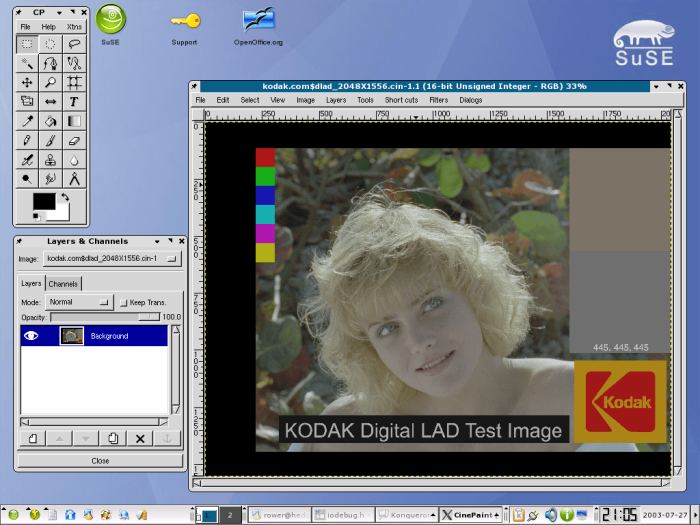
CinePaint is a collection of free open source software tools for painting, manipulation and image processing. It offers much of the functionality provided by Adobe Photoshop. It’s a fork of GIMP.
CinePaint is used for motion picture frame-by-frame retouching, dirt removal, wire rig removal, render repair, background plates, and 3d model textures. It has been used to make many feature films, including The Last Samurai, Harry Potter, and Scooby-Doo, Spider-Man, and Showtime. It is also being used by professional photographers who need extensive color fidelity.
CinePaint is different from many other painting tools in that it handles high fidelity image formats such as Kodak Cineon, SMPTE DPX, and ILM-NVIDIA OpenEXR. To do that properly requires a 32-bit per channel color engine core so that data isn’t crushed into 8-bit color channels. The CinePaint core is 8-bit, 16-bit, and 32-bit as needed.
Key Features
- Frame Manager with onion skinning (a technique used in the creation of animated cartoons).
- 16-bit and floating point pixels for HDR.
- 16-bit color (48-bit RGB) manager workflow including CIE*Lab and CMYK editing.
- Handles deep color image formats such as Kodak Cineon, SMPTE DPX, and ILM-NVIDIA OpenEXR.
- Handles 8-bit images in common image formats such as JPEG, TIFF, and PNG.
Website: sourceforge.net/projects/cinepaint
Support:
Developer: Robin Rowe (Project Manager) – 10 developers
License: GNU General Public License v2.0
CinePaint is written in C. Learn C with our recommended free books and free tutorials.
Related Software
| HDR Imaging Software | |
|---|---|
| RawTherapee | The Experimental Raw Photo Editor |
| OpenEXR | HDR image file format and HDR utilities |
| Hugin | Panorama photo stitching program |
| tev | High dynamic range image comparison tool |
| HyperHDR | Ambient lighting implementation for television and music sets |
| HDRView | Depth-map and high-dynamic range image viewer |
| Luminance HDR | Provides a workflow for HDR imaging |
| Radiance | Lighting simulation and rendering system |
| HDRMerge | Combine two or more raw images into a single raw |
| pfstools | Command line HDR manipulation programs |
| SimpleImageViewer | High-performance image viewer |
| CinePaint | Works with 16-bit and floating point pixels for HDR imaging |
Read our verdict in the software roundup.
| Raster Image Editors | |
|---|---|
| GIMP | GNU Image Manipulation Program |
| JS Paint | Classic MS Paint recreation with modern browser-based features |
| Pinta | Mimics the usability of Paint.Net |
| Photoflare | Cross-platform image editor |
| LazPaint | Image editor with layers and transparency |
| dibuja | Simple to use paint program like Paintbrush for Mac or classic MS Paint |
| Drawing | Basic raster image editor similar to Microsoft Paint |
| Textual Paint | MS Paint in your terminal |
| Pixelitor | Feature-rich editing with layers, filters and effects |
| paint.software | Accessible Paint.NET-style raster editing application |
| Brushshe | Simple and user-friendly raster graphics editor |
| KolourPaint | Easy-to-use paint program by KDE |
| CinePaint | Tools for painting, manipulation and image processing |
Read our verdict in the software roundup.
 Explore our comprehensive directory of recommended free and open source software. Our carefully curated collection spans every major software category. Explore our comprehensive directory of recommended free and open source software. Our carefully curated collection spans every major software category.This directory is part of our ongoing series of informative articles for Linux enthusiasts. It features hundreds of detailed reviews, along with open source alternatives to proprietary solutions from major corporations such as Google, Microsoft, Apple, Adobe, IBM, Cisco, Oracle, and Autodesk. You’ll also find interesting projects to try, hardware coverage, free programming books and tutorials, and much more. Discovered a useful open source Linux program that we haven’t covered yet? Let us know by completing this form. |
Please read our Comment Policy before commenting.