

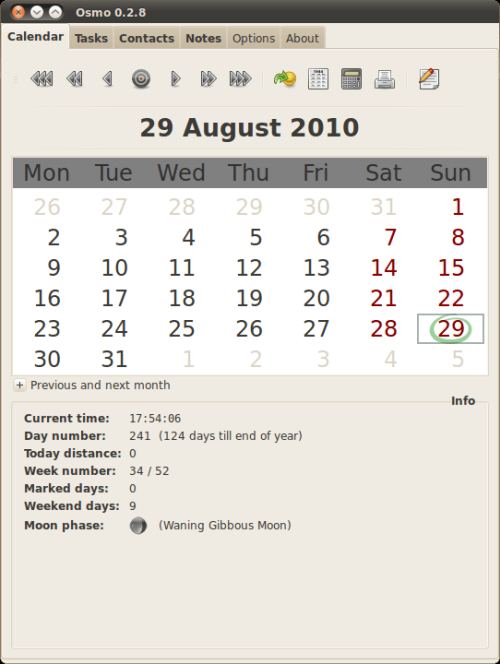
Osmo is a personal organizer, which includes calendar, task manager and address book modules.
It aims to be easy to use and configurable to meet the user’s preferences, and runs particularly well on smaller monitors. It sports a neat and compact interface.
Osmo is a GTK+ based tool which uses a plain XML database to store all personal data.
Key Features
- General:
- Compact interface.
- Configurable GUI layout (horizontal/vertical).
- Encrypted private data backup.
- Calendar:
- Day notes with text attributes (italic, bold, underline, etc.)
- Date calculator.
- Built-in full year calendar.
- Compact mode.
- Auxiliary calendars for next and previous month.
- Basic iCalendar support (import/export).
- Integration with Tasks and Contacts modules.
- Tasks:
- Advanced reminder.
- Alarm actions per task (commands, sounds, etc.)
- Tasks list printing.
- Category filter.
- Due date modification on the fly.
- Basic iCalendar support (export).
- Date dependent task coloring.
- Contacts:
- Robust search functionality.
- Birthdays browser.
- Addresses location on the map using Google Maps.
- Basic import/export filters (csv, xhtml).
- Notes:
- Handy notes selector.
- Category filter.
- Optional encryption using user-defined password.
- Text attributes (italic, bold, underline, etc.)
Website: osmo-pim.sourceforge.net
Support:
Developer: Tomasz Maka, Piotr Mak
License: GNU General Public License v2.0
Osmo is written in C. Learn C with our recommended free books and free tutorials.
Related Software
| GUI-Based Calendars | |
|---|---|
| Nextcloud | Personal cloud storage, text editor, photo gallery, file share, calendaring |
| Kontact | PIM with good calendar support |
| Evolution | Provides integrated mail, address book and calendaring functionality |
| Calindori | Touch friendly calendar application |
| Merkuro Calendar | Kirigami-based calendar and task management application |
| GNOME Calendar | Simple and attractive calendar |
| StarCalendar | Full-featured international calendar |
| Orage | Graphical calendar for the Xfce Desktop Environment |
| Karlender | Adaptive calendar app for GNOME and Phosh |
| renCal | Modern, local-first desktop calendar application |
| AgenDAV | CalDAV web client which features an AJAX interface |
| gsimplecal | Simple and lightweight GTK calendar |
| Osmo | Personal organizer with calendar, task manager and address book |
| Pagume | Ethiopian calendar |
Read our verdict in the software roundup.
| Personal Information Managers | |
|---|---|
| Kontact | Unites mature and proven applications |
| Evolution | Integrated mail, addressbook and calendaring functionality |
| TagSpaces | Offline, open source, personal data manager |
| Org mode | Mode for the Emacs text editor |
| Makagiga | To-do manager, RSS reader, notepad, widgets, image viewer |
| TreeTag | Personal data manager |
| TreeLine | Stores almost any kind of information |
| BORG Calendar | Desktop calendar and task manager with scheduling and reminder features |
| Osmo | Includes calendar, task manager and address book modules |
| LXQt Organizer | Lightweight personal organizer for managing events, tasks, and contacts |
Read our verdict in the software roundup.
 LinuxLinks helps you discover the best free and open source software for Linux. Explore our extensive collection of recommended applications, including alternatives to popular proprietary software. We also publish software reviews, Linux tutorials, hardware reviews, free programming books and articles covering the wider open source community. Browse our Linux resources to discover more. Know a useful free and open source Linux application we haven't covered? Suggest a program for inclusion. Has your software been featured on LinuxLinks? Display one of our Featured on LinuxLinks badges on your website or GitHub README. |
Please read our Comment Policy before commenting.
it sometimes delete the entries i put during the day… for example, i lost the data i entered yesterday… because i shutdown the computer without closing osmo before? maybe… but it is not sure… it already deleted my entries of the day without having shutdown the computer. 🙂 too bad… 🙁