

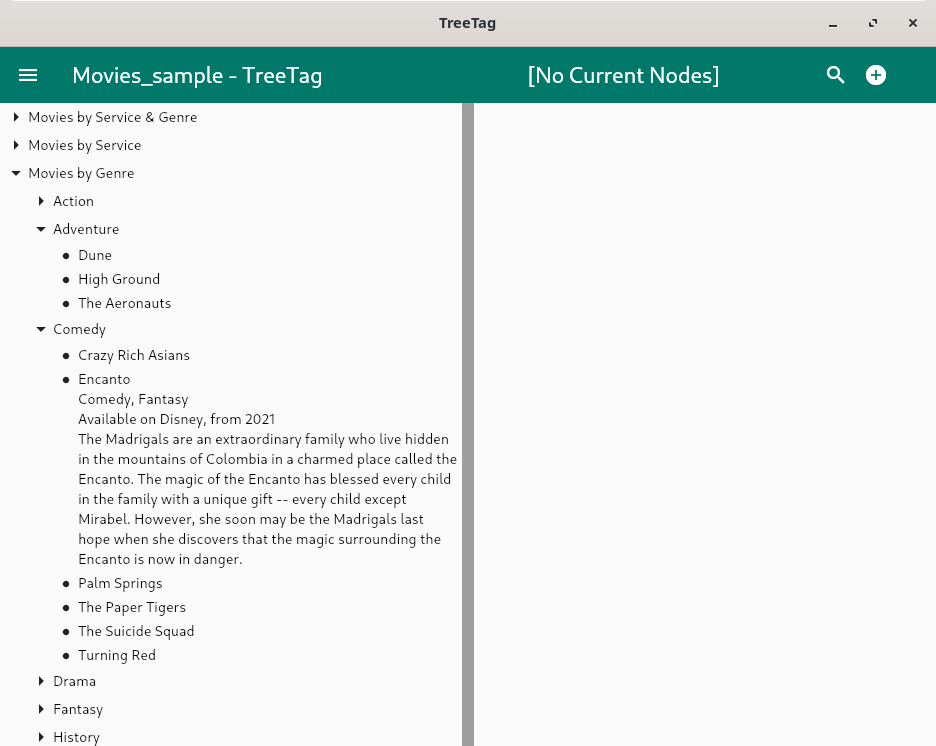
TreeTag is a personal data manager. It stores information in a hierarchy (the “Tree” part of the name). But unlike other tree-based applications, TreeTag automatically positions items in the tree based on field values (the “Tag” part of the name).
The data items are generally configured to contain several fields. Different types of fields are available, including text, numbers, dates, times and predefined choices. The output format of each field can be defined for group headings, for data item titles and for data item output.
The user configures the base portion of the tree, defining rules that will group the data items into desired categories. The same items can appear in multiple locations, with sections of the tree structure using different fields for grouping or sorting. For example, data items can be arranged by a date field in one section, by a name field sorted alphabetically in another, and by a category field in another. This allows the differently organized portions of the tree to act much like predefined searches.
This is free and open source software.
Key Features
- Stores almost any type of information, including plain text, formatted text, numbers, dates, times, booleans, URLs, etc.
- Nodes can have several fields that form a mini-database.
- The user-defined tree structure keeps things organized automatically.
- The same nodes can appear in multiple locations.
- Users can drill down into various sections of the tree to find nodes using different criteria.
- Pressing on a leaf node in the tree expands it to show its full output.
- A long or double press on a node in the tree opens a detail view showing the full output of the node and any children.
- Creating a new leaf node when the detail view shows a grouping node will pre-populate fields to match the group.
- Phrase, keyword and regular expression searches will list all matching nodes from an active group or from the entire tree.
- String replace operations can be performed on search results.
- By default, the text field editor will show misspelled English words with a red underline.
- An option can be set to support Markdown text formatting in all text fields.
- When using Markdown, links can be added that will open web pages in an external browser.
- When using Markdown on desktop platforms, file links can be added that will open files using their default applications.
- An option can be set to allow multiple entries in a field, so leaf nodes can show up in multiple categories.
- Undo operations are stored in the files, so operations from a previous session can be undone.
- The data from a two TreeTag files can be merged together.
- Files can be imported and exported to or from both TreeLine and CSV files.
- Files can be exported to indented text files.
- TreeTag can interface with a Kinto storage server to store and retrieve files from the cloud.
- Cross-platform software – runs under Linux, Android, and Windows.
Website: treetag.bellz.org
Support: GitHub Code Repository
Developer: Douglas W. Bell
License: GNU General Public License v2.0
TreeTag is written in Dart. Learn Dart with our recommended free books and free tutorials.
Related Software
| Personal Information Managers | |
|---|---|
| Kontact | Unites mature and proven applications |
| Evolution | Integrated mail, addressbook and calendaring functionality |
| TagSpaces | Offline, open source, personal data manager |
| Org mode | Mode for the Emacs text editor |
| Makagiga | To-do manager, RSS reader, notepad, widgets, image viewer |
| TreeTag | Personal data manager |
| TreeLine | Stores almost any kind of information |
| Osmo | Includes calendar, task manager and address book modules |
Read our verdict in the software roundup.
 Explore our comprehensive directory of recommended free and open source software. Our carefully curated collection spans every major software category. Explore our comprehensive directory of recommended free and open source software. Our carefully curated collection spans every major software category.This directory is part of our ongoing series of informative articles for Linux enthusiasts. It features hundreds of detailed reviews, along with open source alternatives to proprietary solutions from major corporations such as Google, Microsoft, Apple, Adobe, IBM, Cisco, Oracle, and Autodesk. You’ll also find interesting projects to try, hardware coverage, free programming books and tutorials, and much more. Discovered a useful open source Linux program that we haven’t covered yet? Let us know by completing this form. |
Please read our Comment Policy before commenting.