

Last Updated on July 11, 2021
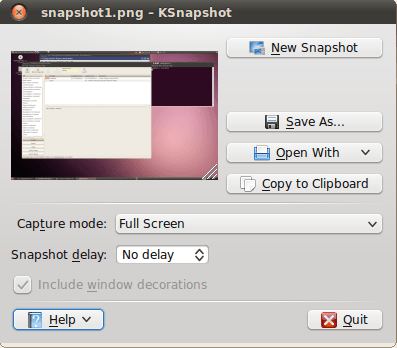
KSnapshot is a simple utility for taking screenshots. It can capture images of the whole desktop, a single window, a section of a window or a selected region. Images can then be saved in a variety of different formats.
KSnapshot also allows users to use hotkeys to take a screenshot. Besides saving the screenshot, it can be copied to the clipboard or opened with any program that is associated with image files.
KSnapshot is part of the KDE 4 graphics module.
Features include:
- Snapshot delay – allows you to enter an arbitrary time delay, in seconds, between the time that you press the Take a New Snapshot button and the time that the snapshot is taken.
- Exclude window decorations – when you only want to capture the application itself without the surrounding window decoration.
- Copy the snapshot to the clipboard.
- Hotkeys.
- Can be scripted using its D-Bus interface.There are two ways to use the D-Bus interface: Qt’s GUI qdbusviewer and the command line qdbus.
Website: invent.kde.org/unmaintained/ksnapshot
Support:
Developer: KDE, Richard J. Moore, Aaron J. Seigo, Matthias Ettrich
License: GNU GPL v2
KSnapshot is written in C++. Learn C++ with our recommended free books and free tutorials.
Return to Screen Capture Home Page
| Popular series | |
|---|---|
 | The largest compilation of the best free and open source software in the universe. Each article is supplied with a legendary ratings chart helping you to make informed decisions. |
 | Hundreds of in-depth reviews offering our unbiased and expert opinion on software. We offer helpful and impartial information. |
 | The Big List of Active Linux Distros is a large compilation of actively developed Linux distributions. |
 | Replace proprietary software with open source alternatives: Google, Microsoft, Apple, Adobe, IBM, Autodesk, Oracle, Atlassian, Corel, Cisco, Intuit, SAS, Progress, Salesforce, and Citrix |
 | Awesome Free Linux Games Tools showcases a series of tools that making gaming on Linux a more pleasurable experience. This is a new series. |
 | Machine Learning explores practical applications of machine learning and deep learning from a Linux perspective. We've written reviews of more than 40 self-hosted apps. All are free and open source. |
 | New to Linux? Read our Linux for Starters series. We start right at the basics and teach you everything you need to know to get started with Linux. |
 | Alternatives to popular CLI tools showcases essential tools that are modern replacements for core Linux utilities. |
 | Essential Linux system tools focuses on small, indispensable utilities, useful for system administrators as well as regular users. |
 | Linux utilities to maximise your productivity. Small, indispensable tools, useful for anyone running a Linux machine. |
 | Surveys popular streaming services from a Linux perspective: Amazon Music Unlimited, Myuzi, Spotify, Deezer, Tidal. |
 | Saving Money with Linux looks at how you can reduce your energy bills running Linux. |
 | Home computers became commonplace in the 1980s. Emulate home computers including the Commodore 64, Amiga, Atari ST, ZX81, Amstrad CPC, and ZX Spectrum. |
 | Now and Then examines how promising open source software fared over the years. It can be a bumpy ride. |
 | Linux at Home looks at a range of home activities where Linux can play its part, making the most of our time at home, keeping active and engaged. |
 | Linux Candy reveals the lighter side of Linux. Have some fun and escape from the daily drudgery. |
 | Getting Started with Docker helps you master Docker, a set of platform as a service products that delivers software in packages called containers. |
 | Best Free Android Apps. We showcase free Android apps that are definitely worth downloading. There's a strict eligibility criteria for inclusion in this series. |
 | These best free books accelerate your learning of every programming language. Learn a new language today! |
 | These free tutorials offer the perfect tonic to our free programming books series. |
 | Linux Around The World showcases usergroups that are relevant to Linux enthusiasts. Great ways to meet up with fellow enthusiasts. |
 | Stars and Stripes is an occasional series looking at the impact of Linux in the USA. |