

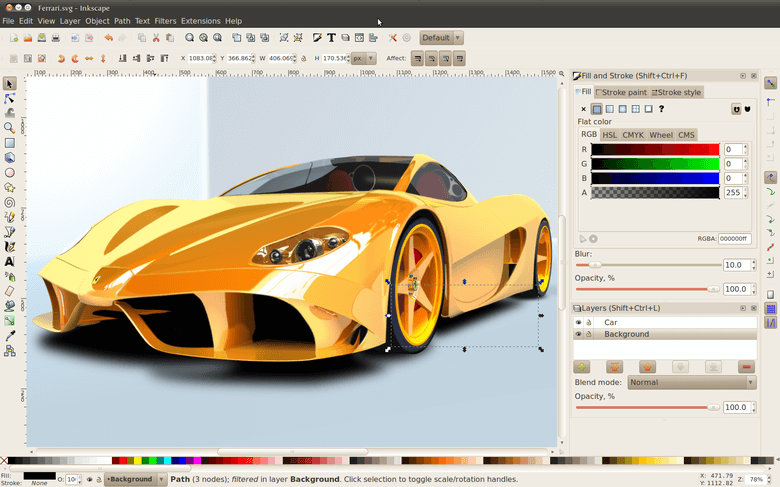
Inkscape is an Open Source vector graphics editor, with capabilities similar to Illustrator, Freehand, CorelDraw, and Xara X. The interface is designed to be comfortable and efficient for skilled users, while remaining conformant to GNOME standards so that users familiar with other GNOME applications can learn its interface rapidly. It uses the W3C standard Scalable Vector Graphics (SVG) file format, which is an open, industry-standard XML-based format for vector graphics developed by the W3C organisation. The popularity of this format is growing fast.
Supported SVG features include shapes, paths, text, markers, clones, alpha blending, transforms, gradients, patterns, and grouping. Inkscape also supports Creative Commons meta-data, node editing, layers, complex path operations, bitmap tracing, text-on-path, flowed text, direct XML editing, and more. It imports formats such as JPEG, PNG, TIFF, and others and exports PNG as well as multiple vector-based formats.
Inkscape natively supports opening only SVG and SVGZ (gzipped SVG) formats.
Inkscape can natively save as SVG, SVGZ, Postscript/EPS/EPSi, Adobe Illustrator (*.ai), LaTeX (*.tex), and POVRay (*.pov).
With the help of extensions, Inkscape can open/save as PDF, EPS, AI, Dia, Sketch and some others.
Inkscape can natively import most raster formats (JPG, PNG, GIF, etc.) as bitmap images, but it can only export PNG bitmaps.
Although Inkscape does not have all the features of the leading commercial vector editors, the latest version provides a large portion of basic vector graphics editing capabilities. People report successfully using Inkscape in a lot of very different projects (web graphics, technical diagrams, icons, creative art, logos, maps).
Translations available in Belarusian, Bulgarian, Catalan, Chinese (Simplified), Chinese (Traditional), Czech, Danish, Dutch, English, French, Galician, German, Greek, Hungarian, Irish Gaelic, Italian, Japanese, Korean, Lithuanian, Norwegian, Panjabi, Polish, Portuguese, Russian, Serbian, Slovak, Slovene, Spanish, Swedish, Thai, Turkish, Ukrainian, and Vietnamese.
Website: inkscape.org
Support: FAQ
Developer: Over 100 developers
License: GNU General Public License v2.0
Inkscape is written in C++. Learn C++ with our recommended free books and free tutorials.
Related Software
| Vector Graphics Editors | |
|---|---|
| Inkscape | Vector-based drawing program |
| Graphite | 2D vector and raster editor |
| OpenPencil | Combines visual design tools with automation facilities |
| SVG-edit | Complete vector graphics editor in the browser (in JavaScript) |
| Xfig | Draw and manipulate objects interactively |
| GodSVG | Editor for Scalable Vector Graphics files |
| LibreOffice Draw | Vector graphics editor and diagramming tool |
| LateXDraw | Vector drawing program for LaTeX using PSTricks |
| sK1 | High quality illustration program |
| Karbon | Vector drawing and editing application |
| Ipe | Extensible drawing editor |
Read our verdict in the software roundup.
| GUI Prototyping Tools | |
|---|---|
| Penpot | Design tool that’s web based. Penpot requires a browser, that’s it. |
| Inkscape | Powerful design software with flexible drawing tools |
| Pencil | Easy GUI Prototyping with a good range of built-in shape collections |
| Akira | Design application for prototyping |
| Workbench | Prototype with GNOME technologies |
| mydraft | Wireframing tool |
Read our verdict in the software roundup.
 Explore our comprehensive directory of recommended free and open source software. Our carefully curated collection spans every major software category. Explore our comprehensive directory of recommended free and open source software. Our carefully curated collection spans every major software category.This directory is part of our ongoing series of informative articles for Linux enthusiasts. It features hundreds of detailed reviews, along with open source alternatives to proprietary solutions from major corporations such as Google, Microsoft, Apple, Adobe, IBM, Cisco, Oracle, and Autodesk. You’ll also find interesting projects to try, hardware coverage, free programming books and tutorials, and much more. Discovered a useful open source Linux program that we haven’t covered yet? Let us know by completing this form. |
Right now (2022) Inkscape is only suitable for logos and small artwork. Using GPU acceleration is way above CYMJ and other new features. I use video editors with complex effects and a lot of tracks and the OpenGL acceleration is awesome. Even though I really dislike what windows have become and being a linux user for 15 years is unusable for me and I still need Illustrator for complex artwork. GIMP also falls in that. It can barely deal with today’s DSLR images.