

xcut is a command-line utility that extends the traditional Unix cut tool with more flexible ways to extract and filter fields from structured text.
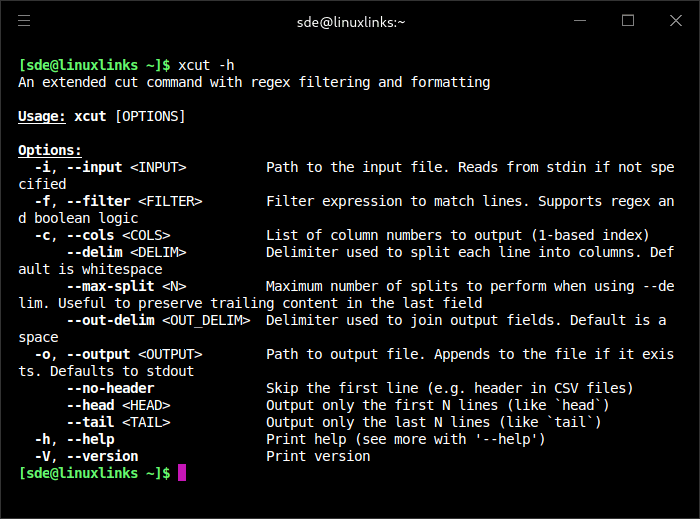
Written in Rust, it supports custom delimiters, boolean and regular expression based filtering, column selection, header skipping, and output control, making it useful for processing logs, delimited text files, and data piped through standard input.
This is free and open source software.
Key Features
- Select specific columns using 1-based column indexes.
- Filter rows with boolean expressions and regular expressions.
- Use custom input delimiters and control the maximum number of splits.
- Customize output delimiters and write results to stdout or a file.
- Skip header rows for CSV-style input.
- Restrict output to the first or last N lines.
- Read from standard input when no input file is specified.
- Cross-platform support – runs on Linux, macOS, and Windows environments.
Website: github.com/kyotalab/xcut
Support:
Developer: kyotalab
License: MIT License
xcut is written in Rust. Learn Rust with our recommended free books and free tutorials.
Related Software
| Alternatives to cut | |
|---|---|
| hck | Drop-in replacement that can use a regex delimiter instead of a fixed string |
| tuc | Drop-in replacement for cut |
| choose | Human-friendly and fast alternative to cut |
| ccut | Colum's cut |
| cuts | Perl command-line utility |
| xcut | Extends the traditional Unix cut tool |
 LinuxLinks helps you discover the best free and open source software for Linux. Explore our extensive collection of recommended applications, including alternatives to popular proprietary software. We also publish software reviews, Linux tutorials, hardware reviews, free programming books and articles covering the wider open source community. Browse our Linux resources to discover more. Know a useful free and open source Linux application we haven't covered? Suggest a program for inclusion. Has your software been featured on LinuxLinks? Display one of our Featured on LinuxLinks badges on your website or GitHub README. |
Please read our Comment Policy before commenting.