

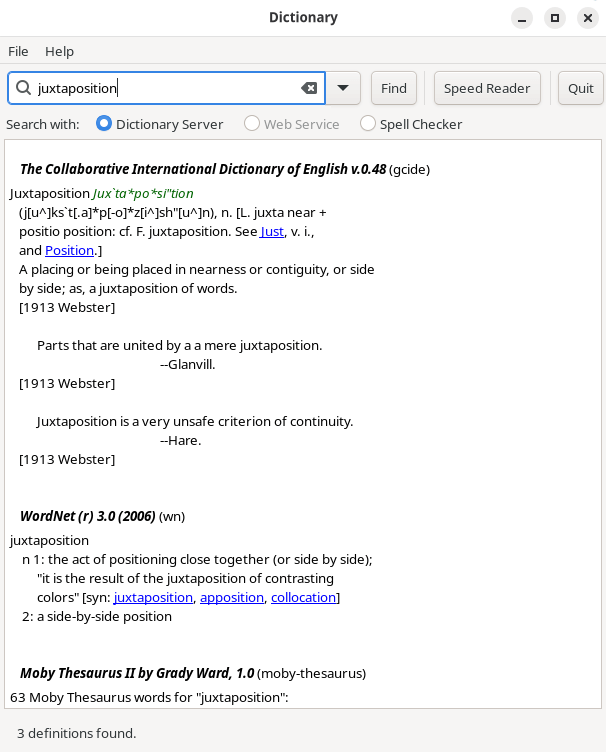
xfce4-dict lets you search different types of dictionary service for words and phrases from a single application.
It can query servers implementing the DICT protocol, launch configurable web-based dictionary searches and perform spelling searches using tools such as aspell, ispell or enchant.
The package provides both a standalone application and an Xfce panel plugin. Version 0.8.10 also introduced optional support for querying locally running large language models.
This is free and open source software.
Key Features
- Queries dictionary servers using the DICT protocol.
- Select individual dictionaries offered by a DICT server.
- Configurable web-based dictionary searches.
- Spell checking based searches.
- Search-result highlighting.
- Standalone desktop application.
- Xfce panel plugin.
- Command-line options for launching searches.
- Can be assigned to desktop keyboard shortcuts.
- Optional support for querying locally running large language models.
Website: gitlab.xfce.org/apps/xfce4-dict
Support:
Developer: Enrico Tröger and Xfce contributors
License: GNU General Public License v2.0
xfce4-dict is written in C. Learn C with our recommended free books and free tutorials.
Related Software
| Dictionary Tools | |
|---|---|
| GoldenDict-ng | Advanced dictionary lookup program, supporting many formats |
| GoldenDict | Feature-rich tool offering translations of words and phrases |
| PyGlossary | Tool for converting dictionary files aka glossaries |
| OpenDict | Supports popular computer dictionary formats including Slowo and Mova |
| xfce4-dict | Client program to query dictionaries |
| SilverDict | Web-based alternative to GoldenDict |
| Wordbook | Offline English-English dictionary application built for GNOME |
| Quick Lookup | Simple GTK dictionary application |
| sdcv | Simple cross-platform text-base utility |
| AyanDict | Basic dictionary app |
| Slob Dictionary | Flexible GTK dictionary application supporting multiple dictionary formats |
| dictd | Dictionary database server implementing the DICT protocol |
| charcoal | Command line dictionary that's an alternative to wudao-dict |
| tuidict | Fast FreeDict dictionary TUI with search-as-you-type |
| rdict | Offline CLI dictionary using data from wiktionary. |
| Kotoba | Japanese – English dictionary |
Read our verdict in the software roundup.
 LinuxLinks helps you discover the best free and open source software for Linux. Explore our extensive collection of recommended applications, including alternatives to popular proprietary software. LinuxLinks helps you discover the best free and open source software for Linux. Explore our extensive collection of recommended applications, including alternatives to popular proprietary software.We also publish software reviews, Linux tutorials, hardware reviews, free programming books and articles covering the wider open source community. Browse our Linux resources to discover more. Know a useful free and open source Linux application we haven't covered? Suggest a program for inclusion. Has your software been featured on LinuxLinks? Display one of our Featured on LinuxLinks badges on your website or GitHub README. |
Please read our Comment Policy before commenting.