
Last Updated on July 13, 2021
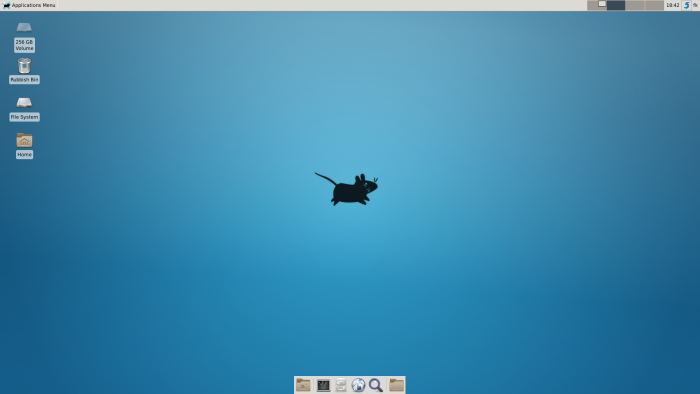
Xfce is a free software desktop environment which aims to be fast and lightweight, yet at the same time being attractive and easy to use. Its configuration is entirely mouse-driven and the configuration files are hidden from the desktop user.
Xfce is mainly used for its ability to run a modern desktop environment on relatively modest hardware.
The Xfce project contains several separated projects for each part of the desktop. The core components include a window manager, session manager, panel, printing helper, desktop manager, and a settings manager.
Included in the Xfce project are also various desktop applications such as a text editor (called Mousepad), a terminal emulator, a modern file manager (called Thunar), a frontend CD/DVD burning application (Xfburn), a simple calendar application, a media player based on the xine engine, an image viewer (called Ristretto), an archive manager (Xarchiver), and more.
Features include:
- Lightweight desktop environment.
- Basic and lightweight applications.
- Goodies for maximum features:
- Xfwm integrates its own compositing manager.
- Orage – calendar that integrates well into the Xfce desktop.
- Thunar – a file manager designed for speed and a low memory footprint, which resembles GNOME Files. It has advanced features such as a bulk file renaming capability.
- Text editor.
- Settings manager to customize your desktop environment.
- Session manager – save the current session, autostart applications, shutdown, reboot, suspend or hibernate your computer.
- Real multiscreen and Xinerama.
- Kiosk mode to restrict the configuration.
- Configuration is entirely mouse-driven.
- Translated in more than 40 languages.
- Freedesktop specifications compliance:
- Extended Window Manager hints.
- Desktop Menus.
- Icon themes.
- XDG Base directory.
- XSETTINGS protocol.
- Drag-and-Drop protocol.
Website: xfce.org
Support: Xfce Goodies Project
Developer: Olivier Fourdan (Project Leader), and many other core developers
License: GNU GPL and LGPL
Xfce is written in C. Learn C with our recommended free books and free tutorials.
Return to Lean Desktop Environments Home Page | Return to Desktop Environments Home Page
| Explore Linux | |
|---|---|
 | Best Free and Open Source Software - A huge collection of recommended free and open source software covering every major category. |
 | In-depth Linux Software Reviews - Detailed assessments of Linux software covering features, usability and overall quality. |
 | The Big List of Active Linux Distros - An extensive collection of actively developed Linux distributions. |
 | Open Source Alternatives - Alternatives to software and services from Google, Microsoft, Apple, Adobe, IBM, Autodesk, Oracle and others. |
 | Essential Linux System Tools - Indispensable utilities for monitoring, maintaining and managing Linux systems. |
 | Linux Productivity Tools - Useful utilities for improving productivity and streamlining everyday tasks. |
 | Alternatives to Popular CLI Tools - Modern alternatives to familiar command-line utilities supplied with Linux systems. |
 | Awesome Free Linux Game Tools - Tools, utilities and companion software that improve gaming on Linux. |
 | Machine Learning on Linux - Machine learning and deep learning software, self-hosted applications and practical tools. |
 | Saving Money with Linux - Practical ways to reduce electricity consumption and lower computing costs with Linux. |
 | Linux Candy - Fun, entertaining and sometimes delightfully quirky software from the lighter side of Linux. |
Please read our Comment Policy before commenting.