

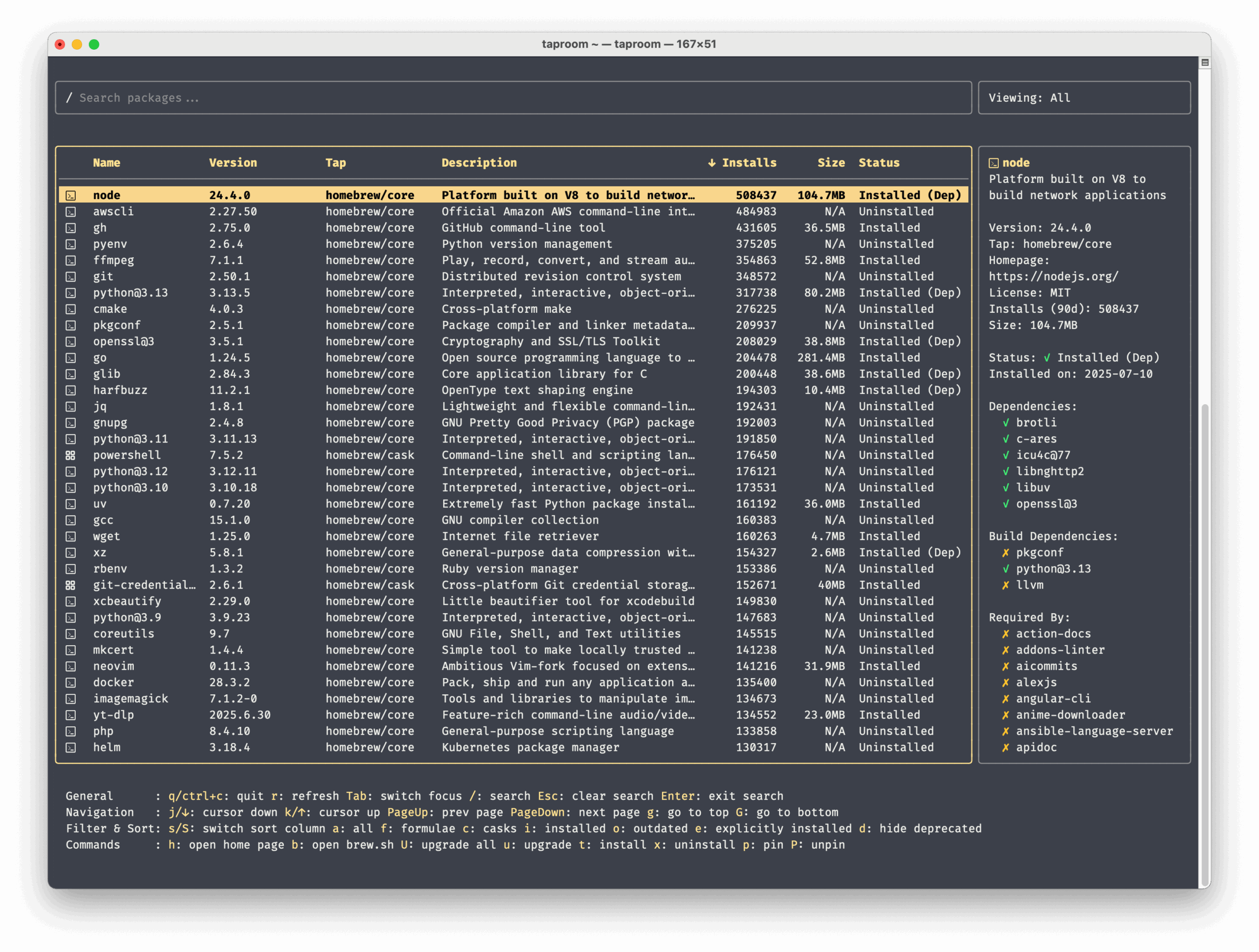
taproom is a terminal user interface (TUI) for Homebrew. It provides a fast and fluid way to explore formulae and casks directly in your terminal.
Homebrew is a package manager that allows users to install, update, and manage software directly from the terminal without requiring root/sudo privileges.
This is free and open source software.
Key Features
- Table View: Overview of all available formulae and casks in Homebrew.
- Detailed View: Get more info on any package, including its description, version, homepage, license, dependencies, and 90-day install count.
- Also shows dependencies recursively (only when the dependencies are not installed).
- Also shows dependents (which other packages depend on this one).
- Search: Quickly find packages by keywords.
- Default: match each keyword in either name or description.
- Prefix n:: match the keyword only in the name.
- Prefix d:: match the keyword only in description.
- Prefix t:: match the keyword only in tap.
- Prefix h:: match the keyword only in the home page.
- Prefix -: turn into a negative keyword, can be combined with prefixes.
- For example: ebook -facebook – search for ebook but not facebook.
- Filtering: View all packages, or filter by:
- Formulae only
- Casks only.
- Installed packages.
- Outdated packages.
- Packages you installed explicitly (not as dependencies).
- Flexible Sorting: Sort packages alphabetically by name or by 90-day popularity.
- Status Indicators: See at a glance which packages are installed, outdated, or pinned.
- Execute brew commands: upgrade, install, uninstall, pin, or unpin packages directly in the TUI.
Website: github.com/hzqtc/taproom
Support:
Developer: Vito
License: MIT License
taproom is written in Go. Learn Go with our recommended free books and free tutorials.
| Explore Linux | |
|---|---|
 | Best Free and Open Source Software - A huge collection of recommended free and open source software covering every major category. |
 | In-depth Linux Software Reviews - Detailed assessments of Linux software covering features, usability and overall quality. |
 | The Big List of Active Linux Distros - An extensive collection of actively developed Linux distributions. |
 | Open Source Alternatives - Alternatives to software and services from Google, Microsoft, Apple, Adobe, IBM, Autodesk, Oracle and others. |
 | Essential Linux System Tools - Indispensable utilities for monitoring, maintaining and managing Linux systems. |
 | Linux Productivity Tools - Useful utilities for improving productivity and streamlining everyday tasks. |
 | Alternatives to Popular CLI Tools - Modern alternatives to familiar command-line utilities supplied with Linux systems. |
 | Awesome Free Linux Game Tools - Tools, utilities and companion software that improve gaming on Linux. |
 | Machine Learning on Linux - Machine learning and deep learning software, self-hosted applications and practical tools. |
 | Saving Money with Linux - Practical ways to reduce electricity consumption and lower computing costs with Linux. |
 | Linux Candy - Fun, entertaining and sometimes delightfully quirky software from the lighter side of Linux. |
Please read our Comment Policy before commenting.