
I’m always on the look out for small indispensable utilities that make the Linux experience even better. This week, I’m seeking to garnish support for peek. It’s an unpretentious utility written in Vala. The utility has no delusion of grandeur. But it has qualities that carves out its own niche in the open source world.
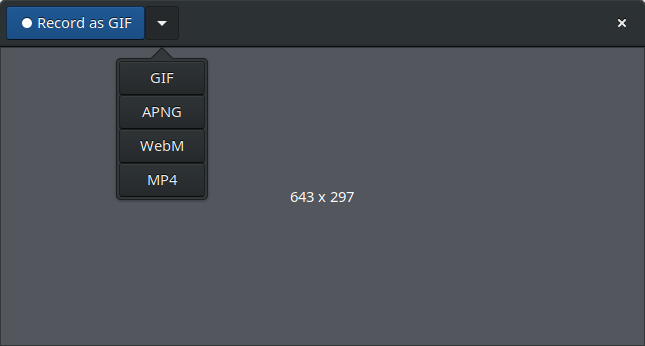
Peek is designed to make short screencasts. It’s not a general purpose screencast application like OBS Studio. Instead, peek captures silent screencasts of part of the screen. Examples of its usage including demonstrating user interface features of software, or creating a visual bug report. The software supports recording in GIF, APNG, WebM and MP4 formats.
Configuration options also allow Peek to automatically downscale recorded videos. Unlike some of the older screencasting tools, Peek works under Wayland inside a GNOME Shell Wayland session.
Installation
Peek is simple to use. If you run openSUSE, Gentoo, Arch, or Parabola, the developer provides packages. Most popular distributions offer peek in their software repositories. And the software can be installed on any distribution supporting Flatpak, which provides a sandbox environment in which users can run applications in isolation from the rest of the system. There used to be snap support but this was discontinued.
Naturally, the full source code is available from the developer’s GitHub.
In operation
One of the joys of Peek is its simplicity. You simply resize and place the Peek window over the area you wish to record, and press the Record button at the top of the window.
Peek is not designed to record a whole monitor or the whole desktop.
Other Features:
- Quick format selection.
- GIF conversion uses FFmpeg.
- WebM recording uses VP9, an open and royalty-free video coding format developed by Google.
- Support for the gifski GIF generator, which offers high quality GIF animations. By combining separate frames it can create GIFs that display thousands of colors in a single frame.
- Enable/disable desktop notifications after saving.
- Recording backend – ffmpeg or gnome-shell.
- Option to start peek without the header bar.
- Internationalization support – translations are available for Arabic, Basque, Chinese (Simplified), Chinese (Traditional), Czech, Dutch, Esperanto, French, German, Italian, Lithuanian, Norwegian Bokmål, Polish, Portuguese (Brazilian), Russian, Serbian, Swedish, and Ukrainian.
Summary
Peek is a useful tool. It’s important to realize its limitations — it’s not a general screencast tool. But in certain situations, it’s a goto app.
Website: github.com/phw/peek
Support:
Developer: Philipp Wolfer, Alessandro Toia and contributors
License: GNU General Public License v3.0
Peek is written in Vala. Learn Vala with our recommended free books and free tutorials.
Related Software
| Screen Recorders | |
|---|---|
| OBS Studio | Complete video recording and live streaming solution |
| GPU Screen Recorder | Minimizes system performance by recording using the GPU only |
| vokoscreenNG | Easy to use screencast creator |
| Kooha | Simple GTK-based app to “elegantly record your screen” |
| screenkey | Screencasting software inspired by Screenflick |
| FFmpeg | Record, convert and stream audio and video |
| SimpleScreenRecorder | Easy to use screencast creator |
| wf-recorder | Utility for wlroots-based Wayland compositors |
| Casterr | Screen recorder, editor and video browse |
| Green Recorder | Simple screen recorder supporting Xorg and Wayland |
| Blue Recorder | Simple screen recorder written in Rust |
| wl-screenrec | wlroots screen recording, featuring hardware encoding |
| peek | Animated GIF screen recorder |
| wayfarer | Screen recorder for GNOME / Wayland / Pipewire |
| ScreenStudio | Streaming made easy |
| Kazam | Well designed and easy to use interface |
Read our verdict in the software roundup.
 Explore our carefully curated directory of recommended free and open source software, covering every major software category. Explore our carefully curated directory of recommended free and open source software, covering every major software category.The directory forms part of our extensive collection of articles for Linux enthusiasts. It includes hundreds of detailed reviews, together with free and open source alternatives to proprietary software from companies such as Google, Microsoft, Apple, Adobe, IBM, Cisco, Oracle, and Autodesk. LinuxLinks also covers interesting projects worth exploring, Linux-compatible hardware, free programming books and tutorials, and much more. Know a useful free and open source Linux application that we haven’t covered? Tell us about it using our submission form. |
Please read our Comment Policy before commenting.