
Optical Character Recognition (OCR) is the conversion of scanned images of handwritten, typewritten or printed text into searchable, editable documents. OCR software is able to recognise the difference between characters and images, and between characters themselves.
The use of paper has been displaced from some activities. For example, the vast majority of journeys on the London Underground are made using the Oyster card without a paper ticket being issued. We have witnessed talk of a paperless office for more than 40 years. However, the office environment has shown a resistance to remove the mountain of paper generated. Things have changed in the past few years, with a marked shift in the paperless office concept. Paper documents contain a wealth of important management data and information that would be better stored electronically. There is computer software that makes this conversion possible. The benefit of scanning documents is not purely for archival reasons. OCR technology is vital for gaining access to paper-based information, as well as integrating that information in digital workflows.
OCR software is not mainstream so open source alternatives to proprietary heavyweight software are fairly thin on the ground. Matters are also complicated by the fact that OCR computer software needs very sophisticated algorithms to translate the image of text into accurate actual text. The software also has to cope with images that contain a lot more than text, such as layouts, images, graphics, tables, in single or multi pages.
The selection of the right OCR tool is dependent on specific needs. For some, online OCR services may be useful, but there are privacy concerns and file size limitations. This article focuses on desktop, open source OCR software that offer good recognition accuracy and file formats. OCR engines have a separate roundup and are covered here.
Here’s our verdict captured in a legendary LinuxLinks-style ratings chart. Only free and open source software is eligible for inclusion here.
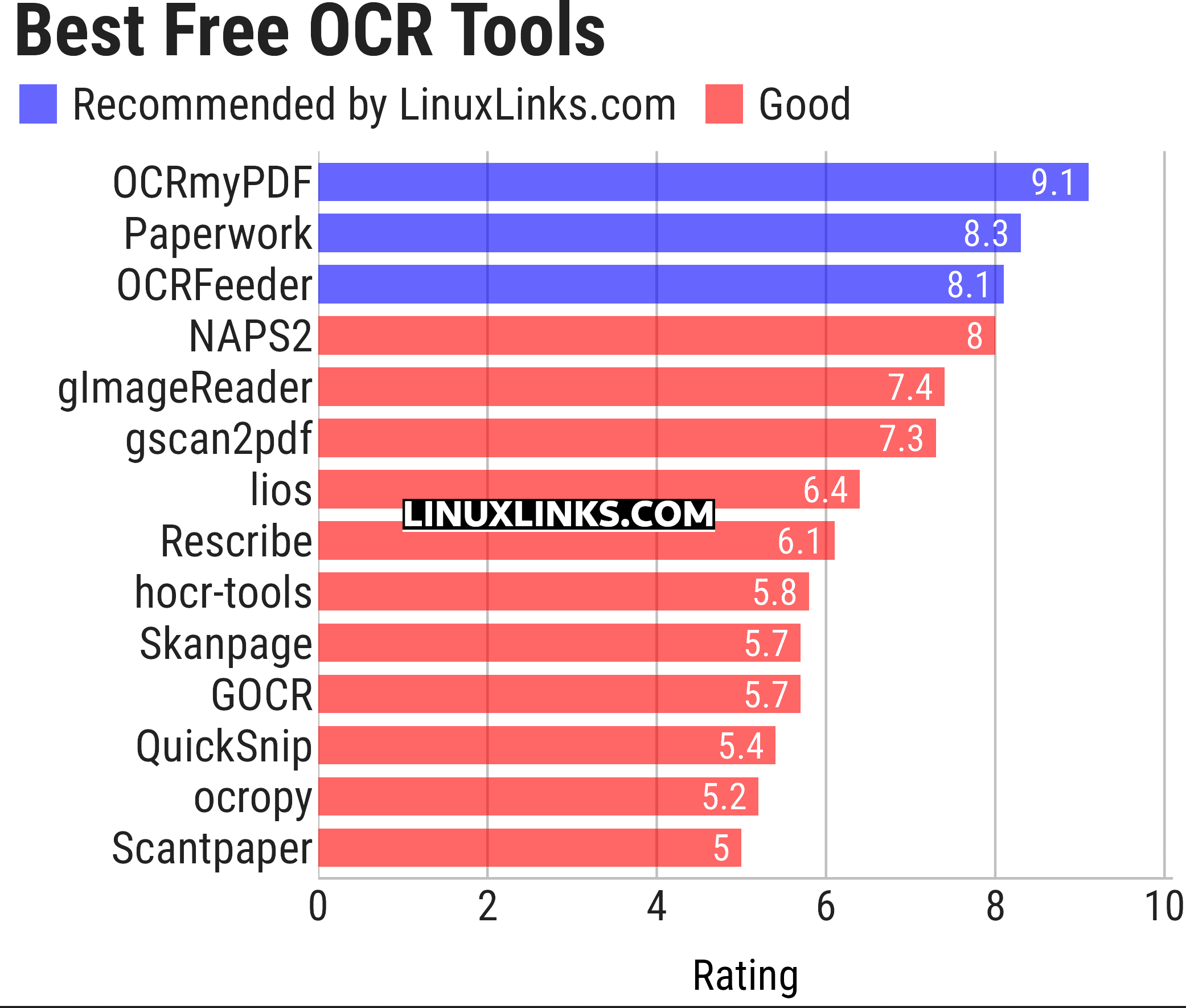
Click the links in the table below to learn more about each tool.
| OCR Tools | |
|---|---|
| OCRmyPDF | Adds an OCR text layer to scanned PDFs using the unpaper utility |
| Paperwork | Simplify the management of your paperwork |
| OCRFeeder | Desktop OCR suite featuring a complete GTK graphical user interface |
| NAPS2 | Easy-to-use document scanning with OCR and PDF output |
| gImageReader | Simple Gtk/Qt front-end to Tesseract |
| gscan2pdf | GUI to produce PDFs or DjVus from scanned documents |
| lios | linux-intelligent-ocr-solution for converting print into text |
| Rescribe | Desktop OCR tool for cleaning and processing scanned books |
| hocr-tools | Manipulate and evaluate hOCR format |
| Skanpage | Simple scanning application optimized for multi-page document scanning |
| GOCR | Reads images in many formats |
| QuickSnip | OCR and Google Lens search |
| ocropy | Open source document analysis and OCR system |
| Scantpaper | Scan documents and export them to PDF or DjVu |
This article has been updated to reflect the changes outlined in our recent announcement.
 Explore our carefully curated directory of recommended free and open source software, covering every major software category. Explore our carefully curated directory of recommended free and open source software, covering every major software category.The directory forms part of our extensive collection of articles for Linux enthusiasts. It includes hundreds of detailed reviews, together with free and open source alternatives to proprietary software from companies such as Google, Microsoft, Apple, Adobe, IBM, Cisco, Oracle, and Autodesk. LinuxLinks also covers interesting projects worth exploring, Linux-compatible hardware, free programming books and tutorials, and much more. Know a useful free and open source Linux application that we haven’t covered? Tell us about it using our submission form. |
Please read our Comment Policy before commenting.