
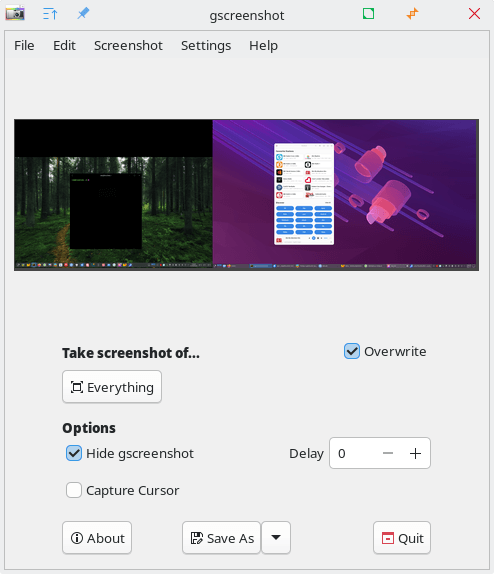
gscreenshot is a screenshot utility for Linux that provides both a graphical interface and command line frontend for multiple screenshot backends. It supports X11 and Wayland environments, automatically detects the available backend tools on the system, and can adapt its functionality based on the installed dependencies.
Along with taking full-screen, window, and region screenshots, it can copy captures to the clipboard, open them in the default image viewer, save them in a range of formats, and show notifications after capture.
This is free and open source software.
Key Features
- Supports both graphical and command line use.
- Works with multiple screenshot backends including scrot, ImageMagick, grim, xdg-desktop-portal, PIL, and imlib2.
- Automatically detects the best available backend for the current system.
- Supports X11 and Wayland sessions.
- Captures full-screen, window, and selected screen regions.
- Can capture screenshots with a delay.
- Can include the mouse cursor in screenshots, including alternate cursor glyphs where supported.
- Supports saved regions for non-interactive region capture.
- Can copy screenshots to the system clipboard.
- Can open screenshots in the configured application after capture.
- Saves screenshots in formats including BMP, EPS, GIF, JPEG, PCX, PDF, PPM, TIFF, PNG, and WebP.
- Automatically degrades functionality when optional dependencies are missing.
Website: github.com/thenaterhood/gscreenshot
Support:
Developer: Nate Levesque
License: GNU General Public License v2.0
gscreenshot is written in Python. Learn Python with our recommended free books and free tutorials.
Related Software
| Screen Capture Tools | |
|---|---|
| Shutter | Feature-rich screenshot program |
| Ksnip | Qt-based cross-platform tool that provides many annotation features |
| Spectacle | Simple KDE application for capturing desktop screenshots |
| flameshot | Complete screen capture and snipping tool with unique features |
| ScreenGrab | Competent Qt-based tool |
| Perl Screenshot Tool | Works best on X11. It also supports Gnome Wayland |
| CoreShot | Simple lightweight screen capture utility for C-Suite |
| GNOME Screenshot | Screen capture tool for GNOME |
| GIMP | The GNU Image Manipulation Program |
Read our verdict in the software roundup.
 Explore our comprehensive directory of recommended free and open source software. Our carefully curated collection spans every major software category. Explore our comprehensive directory of recommended free and open source software. Our carefully curated collection spans every major software category.This directory is part of our ongoing series of informative articles for Linux enthusiasts. It features hundreds of detailed reviews, along with open source alternatives to proprietary solutions from major corporations such as Google, Microsoft, Apple, Adobe, IBM, Cisco, Oracle, and Autodesk. You’ll also find interesting projects to try, hardware coverage, free programming books and tutorials, and much more. Discovered a useful open source Linux program that we haven’t covered yet? Let us know by completing this form. |