

In Operation
Here’s Glide in action.
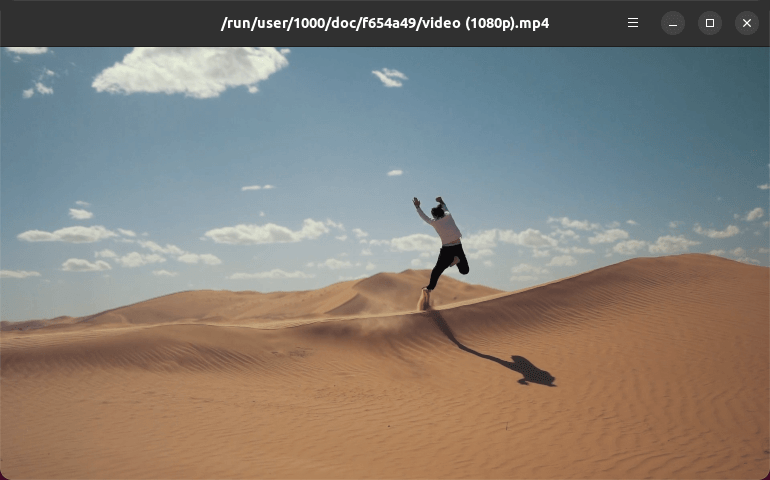
Glide plays any multimedia format supported by GStreamer, locally or remotely hosted. We tested a number of different formats without issues.
What other features does Glide offer?
- Playback – increase or decrease playback speed.
- Video frame stepping, allowing to seek frame by frame.
- Subtitles support.
- Select audio track.
- Proper video aspect-ratio handling.
- Full screen mode.
- Drag and drop playback.
- Track synchronization – audio and subtitle track synchronization.
- Keyboard shortcuts.
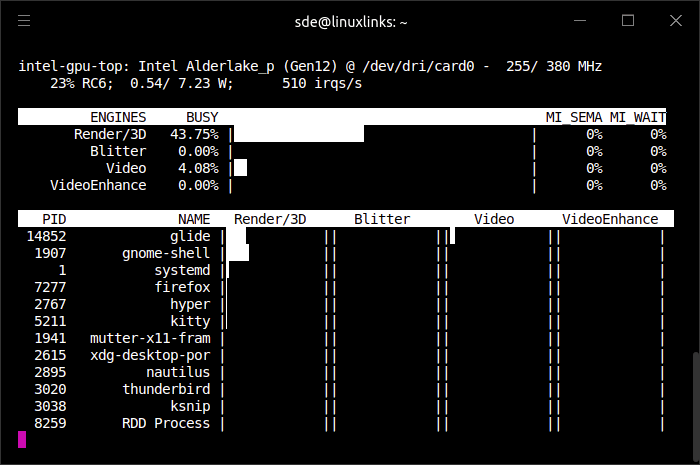
Hardware acceleration works out of the box. We tested Glide using an Intel NUC 13 Pro, a mini PC which only offers onboard graphics albeit the capable Iris Xe.
Here’s the output from intel-gpu-top with a video being played on Glide. As you can see, processing of the video is aided by the Video engine.
Summary
Glide is a basic media player but it might be all you need. While many consider VLC to bamboozle users with its plethora of options, the converse is true with Glide.
Even for minimalists, there is useful functionality we’d like addded such as image adjustment, a file chooser interface, and support for remote videos.
Website: philn.github.io/glide
Support: GitHub Code Repository
Developer: Philippe Normand
License: MIT License
Glide is written in Rust. Learn Rust with our recommended free books and free tutorials
Pages in this article:
Page 1 – Introduction and Installation
Page 2 – In Operation and Summary
Related Software
| Media Players | |
|---|---|
| VLC | Cross-platform multimedia player and framework |
| mpv | Media player for the command line. libmpv is used by many front-ends |
| QMPlay2 | Qt based video and audio player |
| MPlayer | Movie player which runs on many systems |
| SMPlayer | Qt based MPlayer front-end |
| GridPlayer | Play multiple videos simultaneously |
| Parole | Modern simple media player based on the GStreamer framework |
| MPC-QT | Clone of Media Player Classic |
| clapper | GNOME media player built using GJS with GTK4 toolkit |
| Totem | Movie player for the GNOME desktop based on GStreamer |
| Dragon Player | Multimedia player with a focus on simplicity rather than features |
| xine | Video player for playing CDs, DVDs, BluRays and VCDs. |
| Showtime | GNOME media player |
| Glide | Simple and minimalistic media player |
| Phantom Player | Simple video player |
| Daikhan | Media player for the modern desktop |
| QtAV | Cross-platform multimedia framework based on Qt and FFmpeg |
| Rage | Simple video and audio player |
| Kaffeine | Simple, easy to use, full featured media player |
Read our verdict in the software roundup.
 Explore our comprehensive directory of recommended free and open source software. Our carefully curated collection spans every major software category. Explore our comprehensive directory of recommended free and open source software. Our carefully curated collection spans every major software category.This directory is part of our ongoing series of informative articles for Linux enthusiasts. It features hundreds of detailed reviews, along with open source alternatives to proprietary solutions from major corporations such as Google, Microsoft, Apple, Adobe, IBM, Cisco, Oracle, and Autodesk. You’ll also find interesting projects to try, hardware coverage, free programming books and tutorials, and much more. Discovered a useful open source Linux program that we haven’t covered yet? Let us know by completing this form. |
Not sure I see the benefit of another video player.
This one is written in Rust.
It seems odd that people still quote VLC, as opposed to MPV, as the first option.
Comparing this with MPV would be more productive – there’s a reason MPV is far more popular (i.e. VLC’s complicated menus).
This does have the nice ‘Goom’ visualisation for playing an audio track – though I generally prefer just the cover art view in MPV.
Many issues, however – for example there’s no ‘quit’ so it won’t remember your choice of visualisation etc… the only way to close this is to close the window or kill it.
No audiophile is interested in graphic frippery like visualisation.
For listening to audio, I wouldn’t recommend either VLC or mpv, they are really only good for video playback.
While no one disputes that VLC offers a labyrinth of options, the point being made is that it’s hugely popular. If users want a simple media player they can still use VLC without delving into all the options; just drag a video from a file manager into its window…
Linux doesn’t have any decent media players. At least not free ones.
Have you read The Sea of Trolls?