

filesplitter is a command-line tool for dividing large text files into smaller files containing a specified number of lines. It is intended for situations where opening or processing a large text file as a single document is inconvenient.
The utility reads the source file sequentially and writes its contents into numbered output files. By default, each output contains 1,000 lines, apart from the final file, which contains any remaining lines.
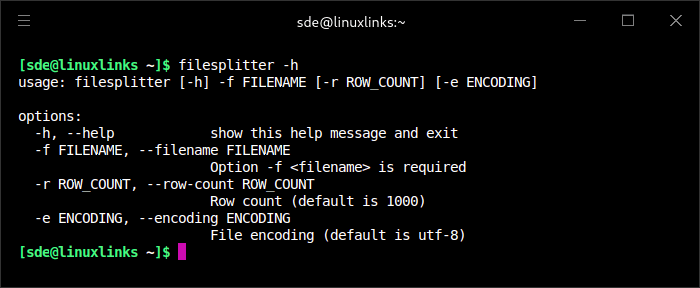
Users can change the number of lines per output file and specify the character encoding used when reading the input. The program preserves the source filename extension and adds a numeric component to distinguish the resulting files.
filesplitter operates on text lines rather than arbitrary byte ranges. It is therefore suited to splitting large logs and other line-oriented text data, rather than dividing binary archives into fixed-size fragments.
This is free and open source software.
Key Features
- Divide large text files into smaller files.
- Use a default output size of 1,000 lines per file.
- Specify a different number of lines using -r or –row-count.
- Read the source filename using -f or –filename.
- Select the source text encoding using -e or –encoding.
- Use UTF-8 as the default input encoding.
- Process the source file line by line.
- Create sequentially numbered output files.
- Retain the original filename extension in generated files.
- Write remaining lines to the final output file.
- Display progress messages identifying output files as they are created.
- Report the total number of files generated.
Website: github.com/asrmarco13/the-file-splitter
Support:
Developer: Marco Orfei
License: GNU General Public License v3.0
filesplitter is written in Python. Learn Python with our recommended free books and free tutorials.
| Explore Linux | |
|---|---|
 | Best Free and Open Source Software - A huge collection of recommended free and open source software covering every major category. |
 | In-depth Linux Software Reviews - Detailed assessments of Linux software covering features, usability and overall quality. |
 | The Big List of Active Linux Distros - An extensive collection of actively developed Linux distributions. |
 | Open Source Alternatives - Alternatives to software and services from Google, Microsoft, Apple, Adobe, IBM, Autodesk, Oracle and others. |
 | Essential Linux System Tools - Indispensable utilities for monitoring, maintaining and managing Linux systems. |
 | Linux Productivity Tools - Useful utilities for improving productivity and streamlining everyday tasks. |
 | Alternatives to Popular CLI Tools - Modern alternatives to familiar command-line utilities supplied with Linux systems. |
 | Awesome Free Linux Game Tools - Tools, utilities and companion software that improve gaming on Linux. |
 | Machine Learning on Linux - Machine learning and deep learning software, self-hosted applications and practical tools. |
 | Saving Money with Linux - Practical ways to reduce electricity consumption and lower computing costs with Linux. |
 | Linux Candy - Fun, entertaining and sometimes delightfully quirky software from the lighter side of Linux. |
Please read our Comment Policy before commenting.