
Last Updated on September 1, 2020
I stumbled upon the bat utility rather inadvertently. I’m a devoted user of insect, a high precision scientific calculator supporting physical units. insect is written by David Peter. While looking through David’s GitHub repositories, I noticed bat had received considerable attention (and stars). My interest was aroused. So what’s bat?
bat is a drop-in replacement for the cat command adding advanced syntax highlighting and Git integration to show file modifications. It’s a really useful utility that is a massive leap up from cat. bat’s written in the Rust programming language.
For anyone new to Linux, cat is a frequently used commands on Unix-like operating systems. It has three related functions with regard to text files: displaying them, combining copies of them and creating new ones. The most common use of cat is to read the contents of files. The name comes from its function to concatenate (i.e. join) files.
Installation
The project provides 32 and 64 bit packages for Debian, as well as the usual tarballs. Compiling the source on my Ubuntu system proceeded smoothly.
In operation
Luke Baker published an interesting feature on castero, a command-line podcast player written in Python. Here’s one of its Python source files beautifully colorized by bat.
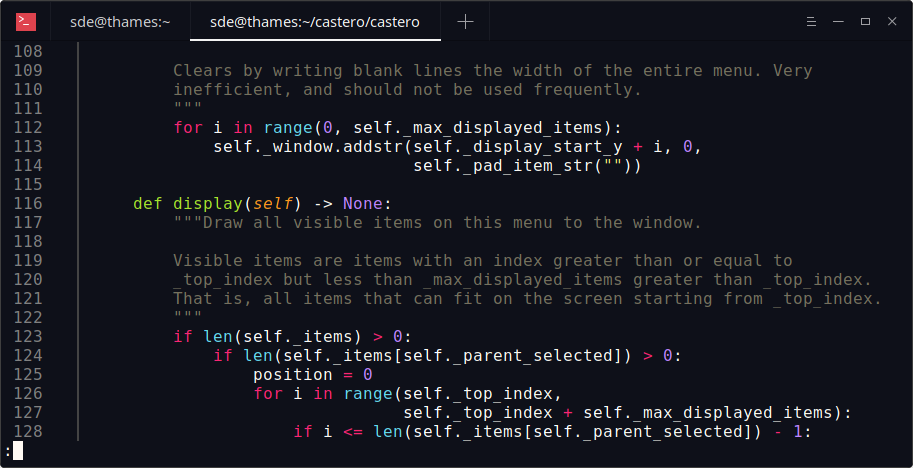
Python is one of the many languages that are supported. See the end of this article for a complete list of supported programming and markup languages.
Besides colorizing programming code, bat also communicates with git to show modifications with respect to the index. And there’s the ability to pipe its own output to less if the output is too large for one screen.
bat uses the syntect library for syntax highlighting. syntect is a popular syntax highlighting library for Rust that uses Sublime Text syntax definitions.
There’s a variety of themes available for bat if you’re so inclined. The themes are DarkNeon, Default, GitHub, Monkai Extended, Monokai Extended Bright, Monokai Extended Light, Monokai Extended Origin, and TwoDark.
Other features include:
- Gutter – shows line numbers and changes.
- Automatic paging by integrating with less.
- Support for text wrapping. Lines automatically wrap at a character boundary. The gutter as well as syntax coloring also wraps.
- Support for bold, italic and underline font styles.
- Support for writing to non-interactive terminals (pipes, files, ..).
- Extensible (languages, themes).
- 32 bit and 64 bit systems are supported.
Summary
bat receives my strongest recommendation. It’s such a useful utility that you’ll wonder how you managed without it.
Website: github.com/sharkdp/bat
Support: David Peter’s website
Developer: David Peter and contributors
License: Apache License Version 2.0 or MIT
bat is written in Python. Learn Python with our recommended free books and free tutorials.
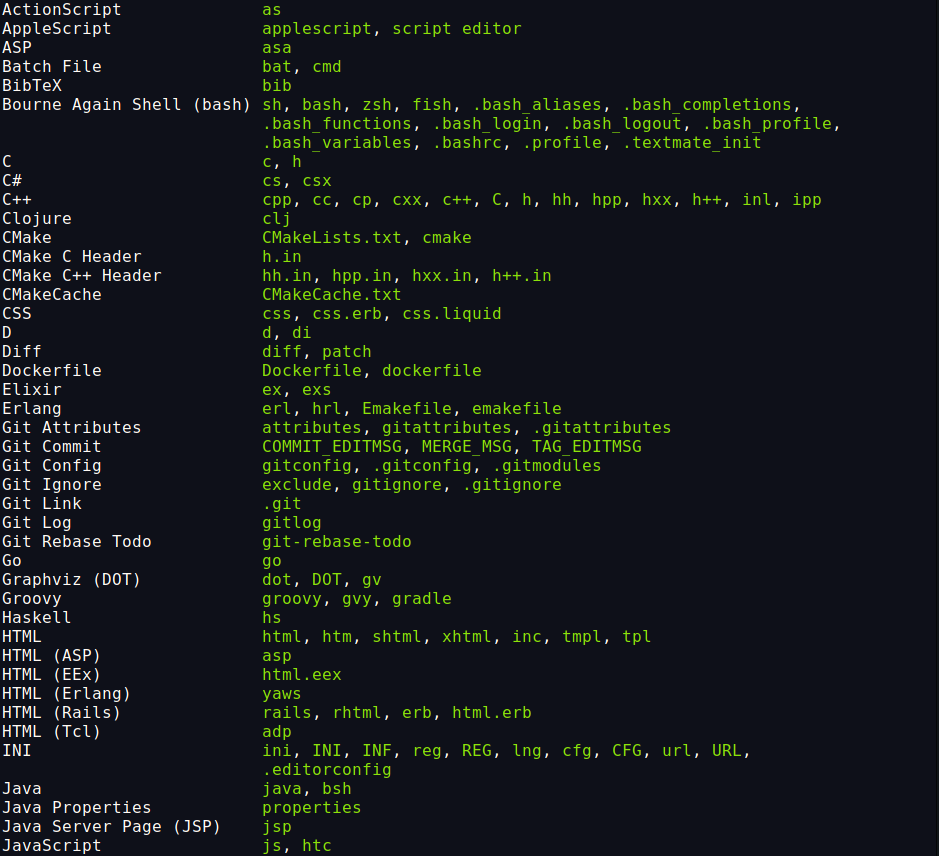
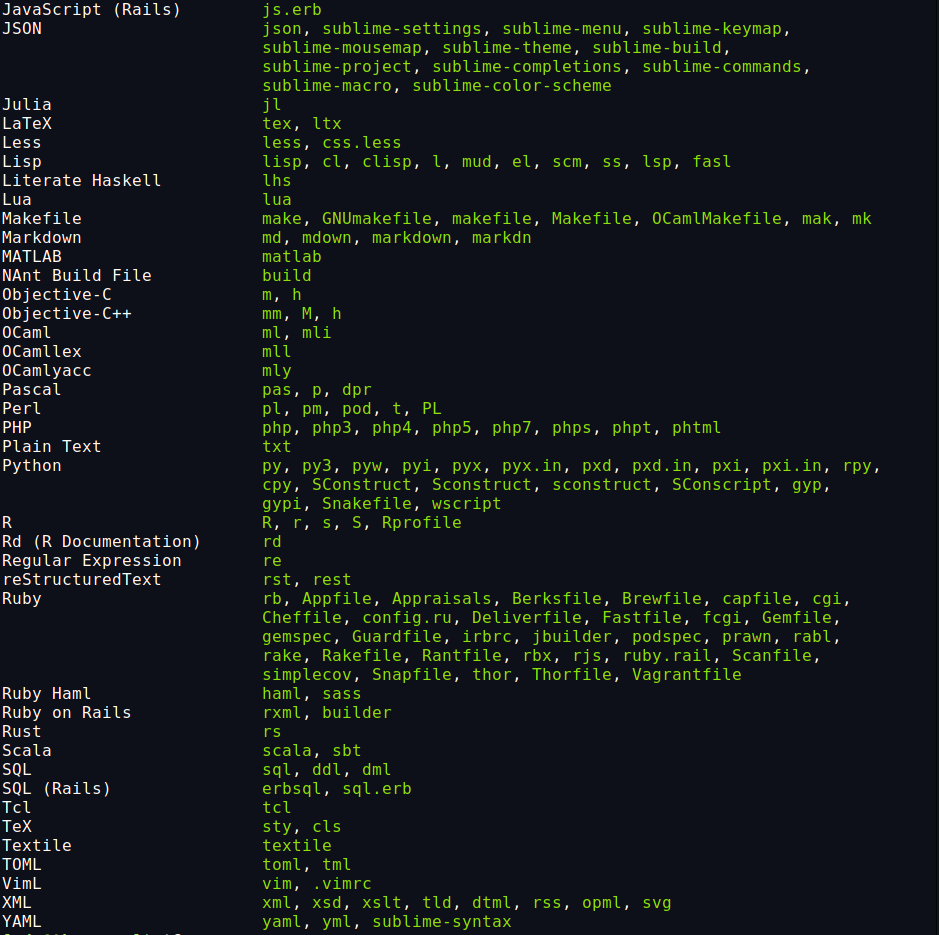
Supported languages:
Related Software
| Alternatives to cat | |
|---|---|
| bat | Super charged cat - Features in our Top 100 CLI Apps |
| mdcat | Sophisticated Markdown rendering for the terminal - Features in our Top 100 TUI Apps |
| grcat | Frontend for generic colouriser grc |
| tac | Concatenate and print files in reverse |
| ccat | Colorizing cat |
| see | Cute cat replacement |
| lolcat | Add some zest to the cat command. Features in our Linux Candy series |
| kat | cat command that almost tastes like chocolate |
| meow | Renders text using your existing Neovim configuration |
| mcat | Extended cat command |
| batdoc | cat for Office documents and PDFs |
| umber | Designed to replace cat for reading source code and other text files |
| rucat | Aimed at developers and system administrators |
| peek | Multi-buffer terminal pager |
 Explore our comprehensive directory of recommended free and open source software. Our carefully curated collection spans every major software category. Explore our comprehensive directory of recommended free and open source software. Our carefully curated collection spans every major software category.This directory is part of our ongoing series of informative articles for Linux enthusiasts. It features hundreds of detailed reviews, along with open source alternatives to proprietary solutions from major corporations such as Google, Microsoft, Apple, Adobe, IBM, Cisco, Oracle, and Autodesk. You’ll also find interesting projects to try, hardware coverage, free programming books and tutorials, and much more. Discovered a useful open source Linux program that we haven’t covered yet? Let us know by completing this form. |
I’ve been using Pygments for a long time, but bat seems worth trying. Thanks!