

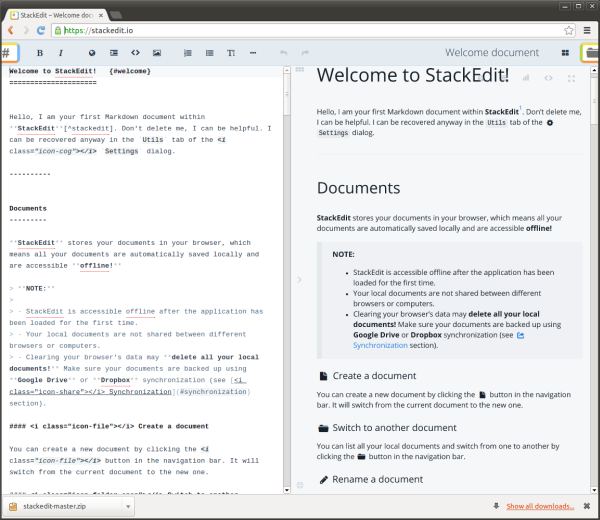
StackEdit is a full-featured, open-source Markdown editor based on PageDown, the Markdown library used by Stack Overflow and the other Stack Exchange sites.
StackEdit stores your documents in your browser, which means all your documents are automatically saved locally and are accessible offline.
Full access to Dropbox or Google Drive is required to be able to import any document in StackEdit. Imported documents are downloaded in your browser and are not transmitted to a server.
Key Features
- Manage multiple Markdown documents online or offline.
- Export your documents in Markdown, HTML or PDF and format it using a template.
- Synchronize your Markdown documents in the Cloud.
- Edit existing Markdown documents from Google Drive, Dropbox and your local hard drive.
- Post your Markdown document on Blogger/Blogspot, WordPress, Tumblr – Publish your Markdown document on GitHub, Gist, Google Drive, Dropbox or any SSH server.
- Share a link to a Markdown document that renders it in a nice viewer – Show statistics about your document.
- Convert HTML to Markdown.
- Real-time HTML preview with Scroll Link feature to bind editor and preview scrollbars.
- Markdown Extra/GitHub Flavored Markdown support and Prettify/Highlight.js syntax highlighting.
- LaTeX mathematical expressions using MathJax.
- WYSIWYG control buttons.
- Configurable layout.
- Theming support with different themes available.
- A la carte extensions.
- Offline editing.
- Online synchronization using Google Drive (multi-accounts) and Dropbox.
- One click publish on Blogger, Dropbox, Gist, GitHub, Google Drive, any SSH server, Tumblr, WordPress.
Website: stackedit.io
Support: GitHub
Developer: Benoit Schweblin
License: Apache License
StackEdit is written in JavaScript. Learn JavaScript with our recommended free books and free tutorials.
Related Software
| Markdown Editors | |
|---|---|
| Mark Text | Simple and elegant Markdown editor |
| Zettlr | Billed as the Markdown editor for the 21st century |
| CodiMD | Realtime collaborative markdown notes |
| ghostwriter | Distraction-free Markdown editor |
| Yank Note | Extensible note app with plugins, diagrams, and code execution |
| NoteGen | Cross-platform note manager with local storage and clean organisation |
| MindForger | Thinking notebook and Markdown editor |
| MarkFlowy | Modern and intelligent Markdown editor |
| ReText | Supports Markdown and reStructuredText markup languages |
| Apostrophe | Distraction free Markdown editor |
| HedgeDoc | Real-time collaborative note-taking for teams and documentation |
| StackEdit | Full-featured Markdown editor based on PageDown |
| PanWriter | Distraction-free Markdown writing environment |
| Looksyk | Simple personal knowledge platform |
| Remarkable | Python-based editor with live preview, MathJax support and more |
| Folio | Markdown note-taking app for GNOME |
| Scratchmark | Organized Markdown editor |
| Rucola | Terminal-based markdown note manager |
| Marker | Simple yet robust Markdown editor |
| ThiefMD | Markdown and Fountain editor and file manager inspired by Ulysses |
| Marknote | Create rich text notes |
| SoloMD | Local-first writing tool focused on privacy and offline editing |
| Norka | Continuous text editing |
| MerMark Editor | Live editor with Mermaid diagram previews and export tools |
| Notes-Up | Write beautiful notes fast and easy using Markdown |
| Marko | WYSIWYG writing app with instant preview and clean formatting |
| Cedilla | Distraction-free editor for structured notes and long-form drafts |
| Abricotine | Markdown editor built for desktop |
Read our verdict in the software roundup.
 Explore our carefully curated directory of recommended free and open source software, covering every major software category. Explore our carefully curated directory of recommended free and open source software, covering every major software category.The directory forms part of our extensive collection of articles for Linux enthusiasts. It includes hundreds of detailed reviews, together with free and open source alternatives to proprietary software from companies such as Google, Microsoft, Apple, Adobe, IBM, Cisco, Oracle, and Autodesk. LinuxLinks also covers interesting projects worth exploring, Linux-compatible hardware, free programming books and tutorials, and much more. Know a useful free and open source Linux application that we haven’t covered? Tell us about it using our submission form. |
Please read our Comment Policy before commenting.