

Technology tools do have their limits. No one will become a master chef simply because they use chef-endorsed saucepans, the finest ingredients, or have access to sought-after recipes. For example, a diary application can make it easier for individuals to keep track of their daily activities and thoughts, but will the application really bring order into a chaotic world? Time tracker apps help users keep track of how much time is spent on various activities during the day, but still the user has to remember to start them.
Don’t get us wrong. There’s a real burning passion inside us for small productivity tools. Lean tools that focus on a single productivity enhancing activity can make an enormous difference to the way time is spent. Bloated, complex productivity tools tend to only slow you down, and complex solutions require too much maintenance.
The GUI software featured in this article fall into the first category; small lean applications that focus on speed and efficiency, cutting down time spent on hunting for snippets of text.
Linux has a number of proficient clipboard managers. This type of application lets you copy and manage items to your clipboard. Copying, searching, managing and sharing clips is common functionality offered by this type of application. Keeping tabs on reusable text snippets can make a real difference for people who need to swap parcels of text. Some tools go further supporting and storing pictures and HTML, and even synchronizing clippings between computers.
We have evaluated each application. Here’s our verdict. Only free and open source software is included.
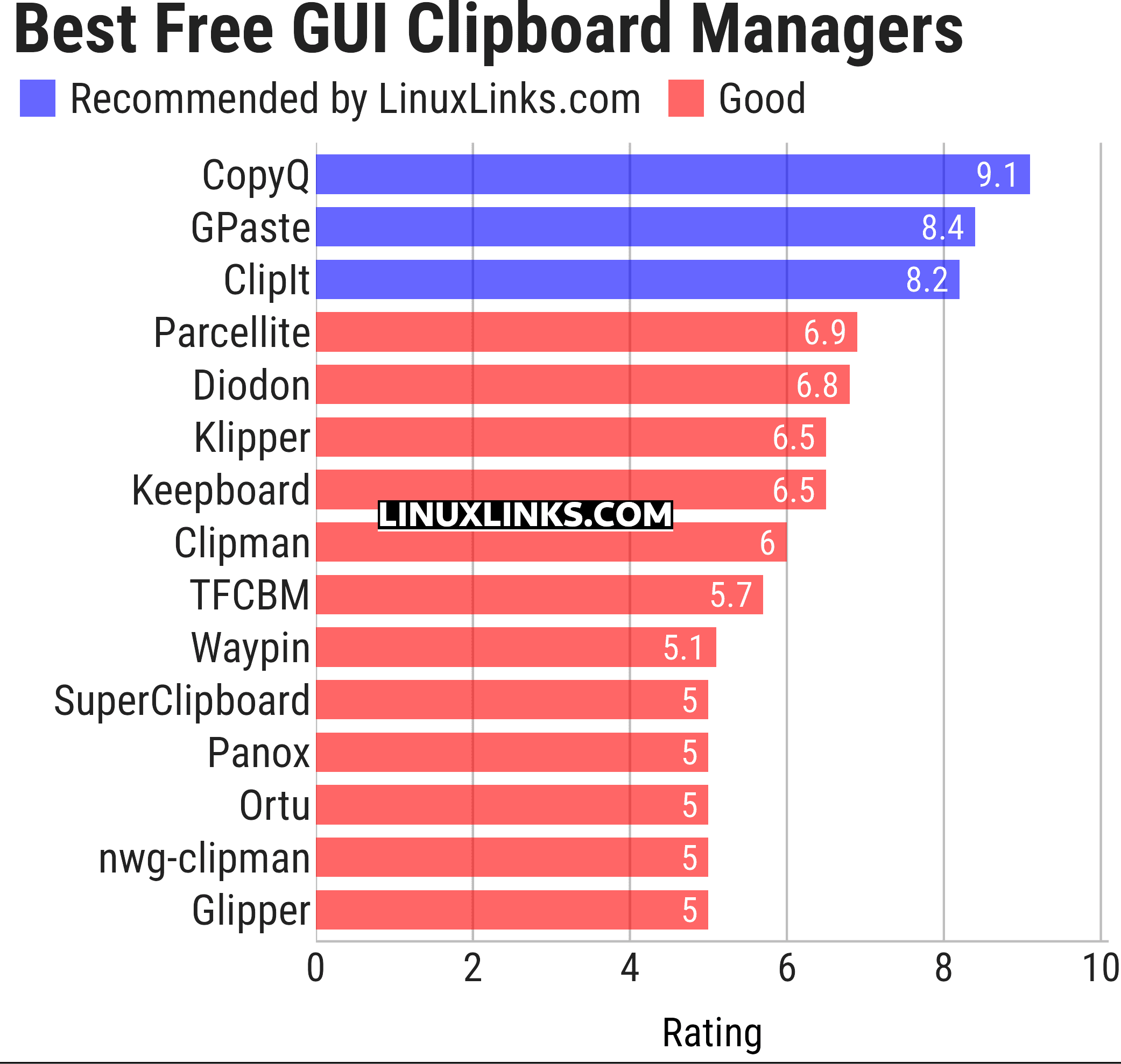
Let’s explore the 15 GUI clipboard managers at hand. For each title we have compiled its own portal page, a full description with an in-depth analysis of its features, a screenshot, together with links to relevant resources.
| GUI Clipboard Managers | |
|---|---|
| CopyQ | Awesome clipboard manager with advanced features, written in C++ and Qt |
| GPaste | Clipboard management system |
| ClipIt | A fork of Parcellite which adds many bugfixes and features |
| Parcellite | Lightweight GTK+ Clipboard Manager |
| Diodon | Lightweight clipboard manager written in Vala |
| Klipper | Clipboard manager for the KDE interface |
| Keepboard | Cross-platform clipboard manager, written in Java |
| Clipman | Clipboard manager for Xfce |
| TFCBM | Keeps a searchable history of everything you copy |
| Waypin | Sleek clipboard viewer |
| SuperClipboard | Manage your clipboard history with a clean UI |
| Panox | Viisually appealing clipboard manager designed specifically for Wayland |
| Ortu | Local-first clipboard manager built with Tauri, Rust, and SvelteKit |
| nwg-clipman | GUI for cliphist |
| Glipper | Clipboard utility for the GNOME panel |
This article has been updated to reflect the changes outlined in our recent announcement.
 Explore our comprehensive directory of recommended free and open source software. Our carefully curated collection spans every major software category. Explore our comprehensive directory of recommended free and open source software. Our carefully curated collection spans every major software category.This directory is part of our ongoing series of informative articles for Linux enthusiasts. It features hundreds of detailed reviews, along with open source alternatives to proprietary solutions from major corporations such as Google, Microsoft, Apple, Adobe, IBM, Cisco, Oracle, and Autodesk. You’ll also find interesting projects to try, hardware coverage, free programming books and tutorials, and much more. Know a useful open source Linux program that we haven’t covered yet? Let us know by completing this form. |
Please read our Comment Policy before commenting.
Keepboard is another one for Linux, but it’s written in Java so it can run on Windows and Mac also.
Keepboard is open source software too, published under the GPL.
Clipcat is another clipboard manager for Linux.
It is easy to integrate with window manager such as i3, leftwm, qtile, spectrwm.
It invokes rofi or dmenu for selecting clipboard entry.
Thanks, we’ll take a look at Clipcat.
I prefer this one;
Moderator: URL removed in compliance with our Comment FAQ