

Bibliographic software (also known as citation software or reference managers) plays a very important role in research. This type of software helps research to be published more quickly. Researchers amass a huge collection of bibliographic references which are pertinent to their field of research, and they need to cite relevant references in their published journal articles.
Consequently, the effective management of bibliographic references is important to these individuals, saving them time to find the required citations. Some of the other ways the process is streamlined is that this type of software helps researchers to organise bibliographies, by formatting citations for academic papers, importing citations from websites and databases, and by taking notes on articles.
A bibliographic manager will typically let the user search academic and non-academic databases, store the reference, annotate them, import / export between different formats, and present the data to standard formats.
There are a wide range of open source software which offers similar functionality (and more besides) available for Linux. A special mention is reserved here for BibTeX. BibTeX is a program and file format designed by Oren Patashnik and Leslie Lamport in 1985 for the LaTeX document preparation system.
A common misconception is that bibliography tools are really only useful for academics. However, this type of software is a type of reference manager offering the ability to collect large amounts of metadata.
To provide an insight into the quality of software that is available, we have compiled a list of 11 useful GUI-based bibliographic software. Hopefully, there will be something of interest here for anyone who wants to publish their research more quickly. Terminal-based bibliography tools are explored in a separate roundup.
Here’s our verdict captured in a legendary LinuxLinks-style ratings chart. Only free and open source software is eligible for inclusion.
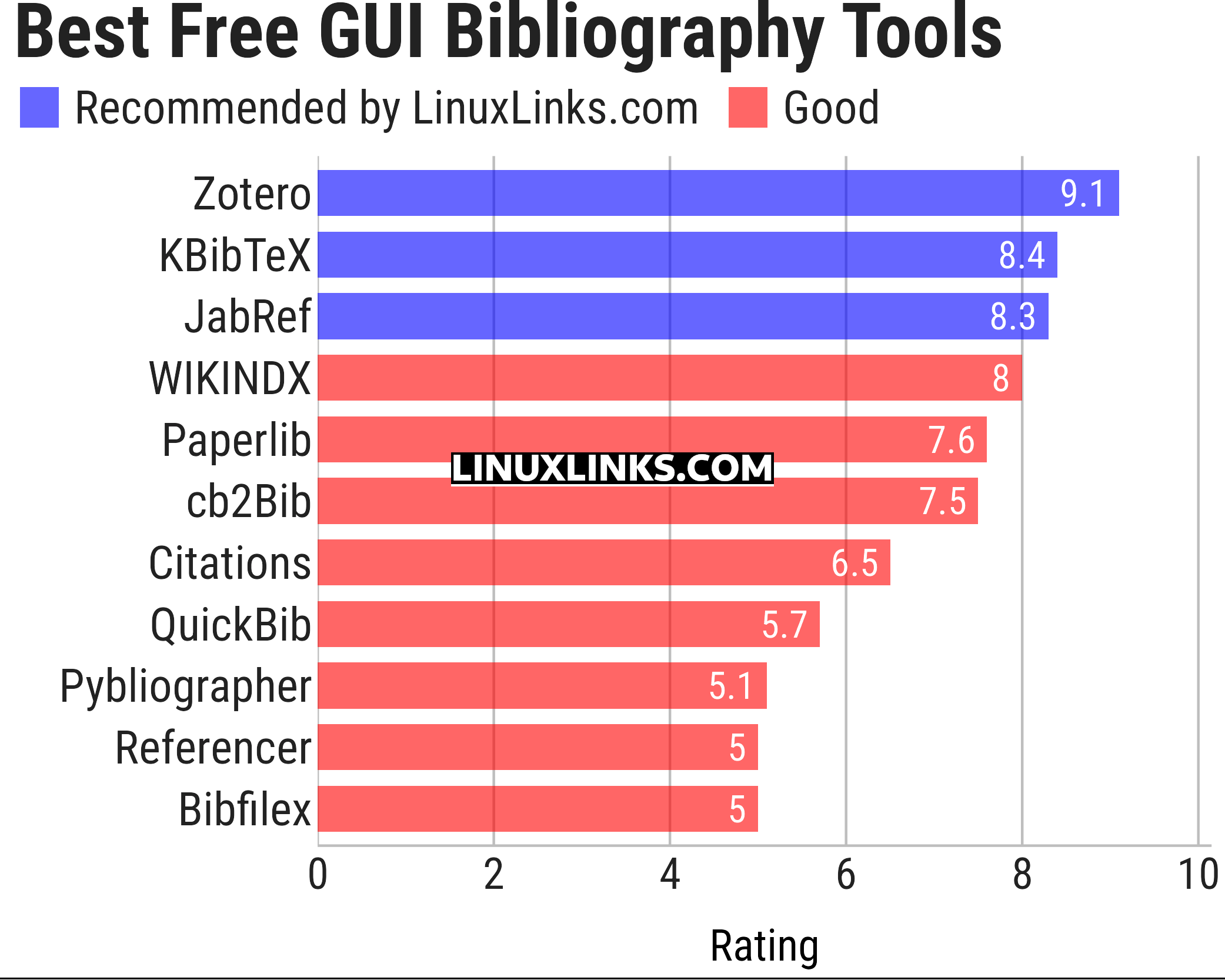
Let’s explore the 11 bibliography tools at hand. For each title we have compiled its own portal page, a full description with an in-depth analysis of its features, together with links to relevant resources.
| GUI Bibliography Tools | |
|---|---|
| Zotero | Powerful online/offline research tool |
| KBibTeX | Reference management software primarily for BibTeX |
| JabRef | Graphical frontend to manage BibTeX databases |
| WIKINDX | Provides a Virtual Research Environment |
| Paperlib | Academic paper management tool |
| cb2Bib | Extract bibliographic references from various sources |
| Citations | Manage your bibliographies using the BibTeX format |
| QuickBib | Fetch BibTeX for DOIs and arXiv identifiers |
| Pybliographer | Tool for manipulating bibliographic databases |
| Referencer | Document organiser and bibliography manager for Gnome |
| Bibfilex | LaTeX package implementing bibliographic functions with BibTeX |
This article has been updated to reflect the changes outlined in our recent announcement.
 Explore our comprehensive directory of recommended free and open source software. Our carefully curated collection spans every major software category. Explore our comprehensive directory of recommended free and open source software. Our carefully curated collection spans every major software category.This directory is part of our ongoing series of informative articles for Linux enthusiasts. It features hundreds of detailed reviews, along with open source alternatives to proprietary solutions from major corporations such as Google, Microsoft, Apple, Adobe, IBM, Cisco, Oracle, and Autodesk. You’ll also find interesting projects to try, hardware coverage, free programming books and tutorials, and much more. Know a useful open source Linux program that we haven’t covered yet? Let us know by completing this form. |
Please read our Comment Policy before commenting.
I split the roundup into terminal-based and GUI-based tools.
what about papis?
This article was published years before papis was even started. But please explain why it should be recommended?
it’s a command line based bibliioraphy manager
I dont think it os the most intuitive.
Zotero works very well but it lacks one feature: It’s not automatically populating all of the data. Often the author is missing. I was hoping that it would work a little more like Citationmaker but without all the annoying adverts. 😉
pubs is in an early stage of development, but it’s one I’m watching!